WebRTC
Audio over WebRTC is mono and narrow by default, and the only place that gets corrected is the SDP. This module brings the machinery for editing it — parsing, merging and fallback — plus the send-side cap, which is the other half of a pair people routinely mix up.
When do you need this?
If the call is voice only and the browser default is fine, you do not. Where it becomes necessary is shared-screen audio: music and video inherit the speech profile — mono, ~32 kbps, FEC on, DTX gating the quiet passages — which is exactly why system audio in a call sounds like a telephone. No high-level API lets you change it.
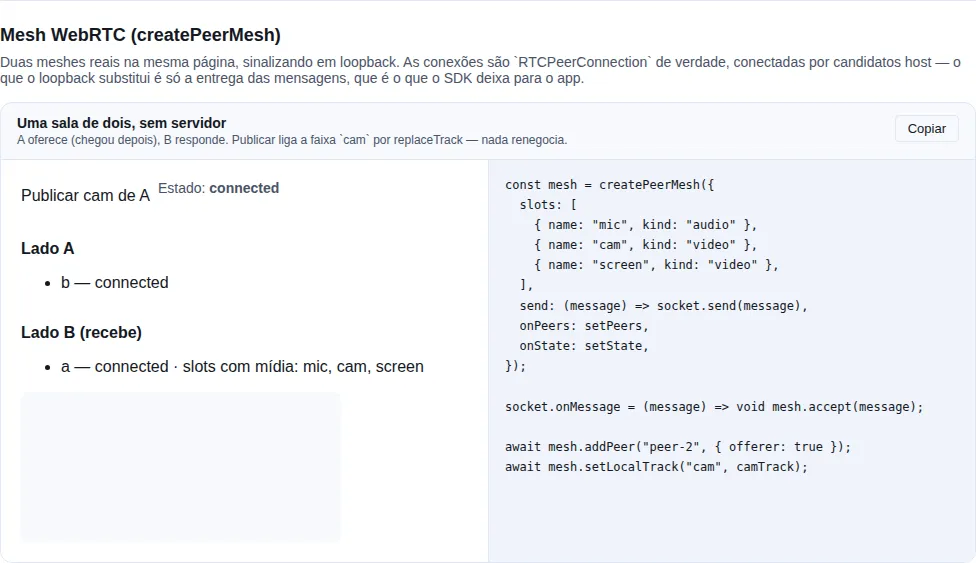
Section peer-mesh of the gallery — run it locally to interact.
The problem, in one line
RTCPeerConnection exposes no codec knob. The Opus profile lives in an a=fmtp: line of the SDP, and changing it means editing text — with a long tail of protocol traps (RFC 7587), not taste ones.
tuneOpus — a profile per audio m-line
import { tuneOpus } from "tempest-react-sdk";

const offer = await pc.createOffer();

const tuned = tuneOpus(offer.sdp!, {
  // by audio m-line index (0 is the first), or by mid
  0: { maxAverageBitrate: 48_000, stereo: false, fec: true, dtx: true },
  1: { maxAverageBitrate: 192_000, stereo: true, fec: false, dtx: false },
});

await pc.setLocalDescription({ ...offer, sdp: tuned });
One profile for every audio m-line is the short form:
const tuned = tuneOpus(offer.sdp!, { stereo: true, dtx: false });
| Field | Becomes | What for |
|---|---|---|
maxAverageBitrate |
maxaveragebitrate |
ceiling we ask the remote encoder for |
maxPlaybackRate |
maxplaybackrate |
highest rate worth decoding |
stereo |
stereo and sprop-stereo |
two channels in both directions |
fec |
useinbandfec |
rebuilds a lost packet — saves speech, smears music |
dtx |
usedtx |
stops sending during silence — wrong for music |
cbr |
cbr |
constant bitrate |
extra |
whatever you write | escape hatch for an unmodelled key |
No preset table, on purpose
Which values to use is your call: voice in a mesh does not want what system audio wants. A preset table is precisely the kind of thing that has no business inside a dependency — what lives here is the parsing, the merging and the fallback, which is where the long tail is.
The traps this handles
Getting any of them wrong degrades silently: nobody sees an exception, the audio is just worse.
stereo and sprop-stereo point in opposite directions
stereo=1 asks the remote to send two channels; sprop-stereo=1 announces that we will. Setting only one leaves the link asymmetric — the recurring reason for "I asked for stereo and got mono". The stereo field writes both.
The fmtp already exists and must not be overwritten
The browser emits a=fmtp:111 minptime=10;useinbandfec=1. Replacing the whole line drops the minptime — a packetization decision nobody meant to change. The merge is per key: whatever you do not name stays.
The payload type varies, and there may be more than one
The number comes from a=rtpmap:(\d+) opus/48000, never from a hard-coded 111. Every Opus payload in the block is tuned.
There may be no fmtp at all
Then the line is inserted right after the rtpmap. "The parameter is missing" and "the parameter is empty" are the same request from the caller's side.
Audio m-lines only
With several slots (mic plus system audio on separate transceivers) each wants a different profile — and the index counts audio blocks only, so a video m-line in between shifts nothing.
setTunedLocalDescription — the fallback that saves the call
import { setTunedLocalDescription } from "tempest-react-sdk";

const applied = await setTunedLocalDescription(pc, await pc.createOffer(), profiles);
if (applied === "original") logger.warn("the browser refused the Opus profile");
Chrome has been tightening what setLocalDescription accepts from edited SDP, and there is no way to know in advance. Without a fallback to the original SDP, the call dies instead of merely losing the profile — the wrong trade by a wide margin: worse audio beats no audio.
The return value says which one landed, because "original" means the profile silently did not apply — worth reporting.
setSenderBitrate — the other half of the pair
import { setSenderBitrate } from "tempest-react-sdk";

const sender = pc.getSenders().find((s) => s.track?.kind === "audio");
if (sender) await setSenderBitrate(sender, 48_000);
fmtp is what we want to receive; setParameters limits what we send
Both are needed, and in a mesh topology the second one matters more: the uplink carries one copy of the stream per participant, so that is what saturates first.
Two things make this a function instead of two lines in your code: setParameters only accepts the very object getParameters returned (a freshly built one is refused), and a sender that has not negotiated yet reports no encodings — writing to encodings[0] without checking throws on exactly the call that sets the cap before the first offer. null lifts the cap; the return is false when the browser refuses, and the call then runs uncapped rather than breaking.
Measuring the link: createLinkStatsSampler and useLinkStats
The badge every call shows — 1.2 Mbps · 42 ms · 1080p60 — comes ready-made from nowhere. getStats() returns dozens of entries holding cumulative counters, and turning that into three numbers is where every app rewrites the same two mistakes.
In React
import { useLinkStats } from "tempest-react-sdk";

function LinkBadge({ pc }: { pc: RTCPeerConnection | null }) {
  const stats = useLinkStats(pc);

  if (!stats) return <span>measuring…</span>;

  return (
    <span>
      {stats.kbps} kbps · {stats.rttMs ?? "—"} ms · {stats.width}×{stats.height}
      {stats.fps > 0 ? `@${stats.fps}` : ""}
    </span>
  );
}
Samples every 2 s, only while connectionState === "connected", and stops sampling when the tab goes to the background.
Outside React
import { createLinkStatsSampler } from "tempest-react-sdk";

const sampler = createLinkStatsSampler();

setInterval(async () => {
  const stats = await sampler.sample(pc);
  badge.textContent = `${stats.kbps} kbps`;
}, 2000);
One sampler per connection
The rate is a delta, so the sampler keeps the previous reading. Sharing one across peers subtracts one connection's counter from another's and reports nonsense. A five-person mesh has four samplers.
Already holding the report? sampler.read(report) runs the reduction without fetching again — useful when the same getStats() feeds more than one thing.
From badge to control signal
The three fields above describe what was sent. To decide quality rather than only display it, two more are needed, and they describe what the path can take — the only class of information that answers before the picture breaks:
| Field | What it answers |
|---|---|
availableKbps |
uplink the transport estimates, in kbps, or null |
limitedBy |
what the encoder says is holding the picture back, or null |
relayed |
whether the link travels through a TURN relay |
const stats = useLinkStats(pc);

if (stats?.limitedBy === "bandwidth" && stats.availableKbps !== null) {
  applyCap(Math.round(stats.availableKbps * 0.8));
}
kbps does not tell a cap being honoured from a cap drowning
A two-person call on a ~1 Mbps domestic uplink, handed the full 2500 kbps screen cap: kbps reports 2500 — the cap being obeyed while the queue behind it grows and the picture freezes. Nothing in kbps, width, height or fps separates "healthy at 2.5 Mbps" from "capped at 2.5 Mbps and drowning". availableKbps does.
null is not 0, and reading it as zero ruins every call
availableKbps is null while there is no estimate — which is most of the first seconds of every call, and permanent on an engine that publishes none. 0 is indistinguishable from a path that died. A consumer that reads absence as zero drops the quality at the start of every call.
Reacting to bandwidth on a CPU-bound machine buys a worse picture and no relief
limitedBy is the encoder's verdict, and it is what separates "bandwidth" from "cpu". When senders disagree, "bandwidth" wins, because it is the only reason a lower cap answers. The spec's "none" comes back as null: no consumer should have to know that one of the truthy strings means "nothing".
relayed is the hosting bill on a self-hosted mesh: a relayed stream goes up and down through the machine somebody pays for, and the person who picked 4K is not that somebody. It is resolved only from the pair the browser names, never from a merely succeeded one — guessing the route from a pair that carries nothing would report a cost nobody is paying.
All three are exported on their own too, in the same shape as readRoundTripMs:
import { readAvailableOutgoingKbps, readQualityLimitation, readRelayed } from "tempest-react-sdk";

const report = await pc.getStats();
const headroom = readAvailableOutgoingKbps(report);
const limit = readQualityLimitation(report);
const viaTurn = readRelayed(report);
One walk, not four
If you are going to read more than one, use the sampler: sampler.read(report) walks the report once and resolves the selected pair once. Calling the four standalone readers on the same report walks it four times, per link, on every tick — on a mesh of eight at one sample every two seconds that is the most expensive recurring work in the call, on the device least able to pay it.
The selected-pair chain
readRoundTripMs, availableKbps and relayed all depend on the same question: which pair is carrying the link? The answer has three steps, in this order:
transport.selectedCandidatePairId— what the spec defines;- the
candidate-pairflaggedselected: true— not in the spec, and it exists because an engine that fills neither of the two does not appear to exist, while one that fills only the flag does; - the first
succeededpair — a guess.
Step 3 is accepted for round trip and for headroom, because losing the reading is worse than an occasionally optimistic one. It is not accepted for relayed, for the reason above.
Step 2 was not measured in Firefox
The conclusion that Firefox marks the chosen pair with selected: true instead of filling transport.selectedCandidatePairId comes from reading third-party code, not from a measurement of ours. The chain is right by spec either way — step 1 is still tried first — but if you depend on that specific behaviour, measure it on your target before treating it as fact.
The two mistakes this avoids
1. Round trip read from the wrong pair. A connection keeps several candidate pairs alive at once — host, server-reflexive, relayed — and only one carries traffic. Taking the first candidate-pair with state: "succeeded" makes the number jump between paths nobody is travelling: 8 ms from an idle host pair alternating with 180 ms from the TURN pair doing the work.
The right one is the pair the transport names in selectedCandidatePairId. readRoundTripMs does that, and it is exported on its own because it is useful outside the sampler:
import { readRoundTripMs } from "tempest-react-sdk";

const rttMs = readRoundTripMs(await pc.getStats());
2. Throughput derived without a delta. bytesSent is cumulative since the connection opened. Dividing it by the session length gives the historical average — a number that only falls and never shows what is happening now. The rate is (bytes − previousBytes) × 8 ÷ 1000 ÷ seconds, and keeping the "previous" is exactly the part every copy rewrites.
What the sampler sums, and why
| Field | Comes from |
|---|---|
kbps |
the sum of every sender matching kind |
width / height / fps |
the stream with the largest area, not the last one reported |
rttMs |
the candidate pair the transport selected |
A peer publishing a camera and a screen at the same time occupies one uplink with both — and the uplink is what runs out. Hence the sum. Resolution comes from the largest because that is the stream dominating that bandwidth, and the one a viewer is looking at.
The default counts video only. kind: "all" folds audio in when the figure is meant to be the connection's real cost:
const sampler = createLinkStatsSampler({ kind: "all" });
Pausing, resuming and reset()
const stats = useLinkStats(pc, {
  intervalMs: 2000,       // getStats walks the whole report; 2 s is not laziness
  pauseWhenHidden: true,  // default
  kind: "video",          // default
});
Coming back from the background calls reset() before the next sample. Without it, the first sample after five minutes hidden divides five minutes of bytes by five minutes and reports the average of a period nobody asked about. Call sampler.reset() by hand for the same reason after an ICE restart or a reconnect.
reset() clears the baseline, not the screen: the next reading comes back at kbps: 0 and keeps the resolution and round trip already on show, so the badge does not blink.
The last reading survives the pause
useLinkStats keeps the previous value while paused instead of dropping back to null. A badge that blanks every time the tab loses focus reads as a dropped connection.
What this does not measure
Written down on purpose: each item is a question the report answers and this module does not, so you know where to look instead of finding out the number was lying.
- What you receive. There is only
outbound-rtphere. "Their video is stuttering" isinbound-rtp(bytesReceived,framesDecoded,packetsLost), and that reading has a different enough shape not to fit the same reduction — it answers about their encoder, not your uplink. - Why the rate dropped.
qualityLimitationReason("bandwidth","cpu","none") lives in the sameoutbound-rtpand tells "the network tightened" apart from "this machine cannot keep up" — which call for opposite actions. Read it straight off the report when you need it. - Loss and jitter.
packetsLostandjitterare there, but they are read against what was sent in the same interval; a raw lost-packet counter is a number without a denominator. - The cadence while the tab is hidden. With
pauseWhenHidden: falsethe timer keeps going, but browsers throttle background timers (Chrome drops to ≥ 1 min). No API works around that — sampling simply spaces out, and the delta stays correct because it is derived from measured time, not from the interval you asked for. - Real browser behaviour. This module's tests run in jsdom, which ships no WebRTC at all: they prove the reduction against synthetic reports, not the connection. The report's shape was checked separately, in Chromium, with two loopback
RTCPeerConnections carrying a 640×360@30 canvas — the same report carrieskindandmediaType,frameWidth/frameHeight/framesPerSecondcome filled in,transport.selectedCandidatePairIdis there, and the first sample lands at0kbps before settling around 350 kbps. Still, confirm on your own topology before trusting a production dashboard: TURN relaying, simulcast and mobile all change what shows up.
rttMs: 0 is not rttMs: null
Zero is a reading — it is what the local loopback measured. null means no pair has reported a timing yet, which is the normal state while the connection settles. A UI treating the two alike shows "0 ms" for a call that has not connected.
When the browser does not cooperate
The module already covers what varies between engines, and it is worth knowing that it varies:
| Situation | What happens |
|---|---|
Browser leaves selectedCandidatePairId empty |
falls back to the first succeeded pair with a timing |
Browser reports mediaType instead of kind (older Chrome) |
both are read |
framesPerSecond missing |
fps: 0, and the last good reading is kept |
| Counter restarts (ICE restart) | a negative delta becomes 0 and the baseline is rebuilt |
| Simulcast (several layers on one track) | the layers sum; resolution comes from the largest |
createPeerMesh — the whole room, N↔N
The pieces above handle one link. createPeerMesh handles the room: one RTCPeerConnection per participant, with the media lanes negotiated once.
import { createPeerMesh } from "tempest-react-sdk";

const mesh = createPeerMesh({
  slots: [
    { name: "mic", kind: "audio" },
    { name: "cam", kind: "video" },
    { name: "screen", kind: "video" },
  ],
  send: (message) => socket.send(message),
  onPeers: setPeers,
  onState: setState,
});

socket.onMessage = (message) => void mesh.accept(message);

await mesh.addPeer("peer-2", { offerer: true });
await mesh.setLocalTrack("mic", micTrack);
The signalling protocol stays yours. The SDK produces and accepts three shapes (offer, answer, ice) and knows nothing about rooms, identity or delivery — the server is yours to implement. What it brings is the part that is the same in every mesh and wrong in most of them.
The six traps, and why each one is mute
| Trap | Symptom |
|---|---|
| The answerer pre-allocating transceivers | The other person's camera lands in the screen tile, or the track vanishes |
Routing by position instead of mid |
The same, intermittently |
| An ICE candidate before the remote description | The connection sits in checking until it times out |
| Renegotiating on every toggle | With N peers, N−1 offer/answer rounds every time somebody unmutes |
| Glare | Both sides offer, and the negotiation cancels itself |
| Dividing the uplink without a floor | Everybody gets a blur that updates once a second |
None of them raises an error anywhere — which is why each one became a named test.
The answering side must not pre-allocate
Applying a remote offer creates one transceiver per m-line, in m-line order, and the browser does not reuse the ones the answerer made beforehand. Pre-allocating leaves dead transceivers in front of the live ones, and slot lookup starts pointing at the wrong media. So addPeer(id, { offerer: false }) allocates nothing: the slots appear when the offer does, and are adopted in mid order.
mid is the only slot identity valid on both sides
The track carries nothing that distinguishes a camera from a screen. The offerer allocates the m-lines in the order you declared in slots, so the mid is the ordinal and both ends read the same one. Position in getTransceivers() disagrees — the answering side appends the negotiated ones after whatever it already held — which is why it is only a fallback.
Who offers is decided by arrival order
// the server announces joins in a total order
socket.on("peer-joined", (peer) => mesh.addPeer(peer.id, { offerer: false }));
socket.on("welcome", ({ peers }) => {
  for (const peer of peers) void mesh.addPeer(peer.id, { offerer: true });
});
Whoever arrives later offers; whoever was already there answers. Exactly one side of each link offers, so there is no glare — without the rollback dance of perfect negotiation, and without depending on the browser implementing argument-less setLocalDescription().
Turning media on and off does not renegotiate
await mesh.setLocalTrack("mic", micTrack); // unmuted
await mesh.setLocalTrack("mic", null); // muted
The slots are negotiated before any track exists, so publishing is a replaceTrack on a transceiver that is already there: no m-line is added and nothing renegotiates. That property is what makes a mesh survive — with N peers, a renegotiation per toggle is N−1 simultaneous offer/answer rounds every time somebody unmutes.
Overlapping calls on the same slot are queued, and the last one wins: a setLocalTrack("mic", null) fired without awaiting the unmute before it ends with an empty sender, even if the unmute's replaceTrack was still in flight. Without the queue, the microphone would keep sending after the mute.
Hanging up is final
import { createPeerMesh } from "tempest-react-sdk";

declare const socket: {
  send: (message: unknown) => void;
  onMessage: (message: never) => void;
};

const mesh = createPeerMesh({
  slots: [{ name: "mic", kind: "audio" }],
  send: (message) => socket.send(message),
});
socket.onMessage = (message) => void mesh.accept(message);

mesh.stop(); // hung up
stop() closes every link, forgets the local tracks and reports closed — for good. The signalling socket usually outlives the call, so an offer still in flight from someone who left (or from anyone the server relays to this user) keeps reaching accept after the hang-up. A stopped mesh drops it: it opens no connection, answers nothing and publishes no track, so a call that shows closed never sends the microphone and camera again. The same goes for addPeer, removePeer, setLocalTrack and applyQuality, and for every negotiation that was already waiting on the browser when stop() ran. If the browser rejects that call with InvalidStateError, accept() resolves quietly instead of becoming an unhandled rejection under void mesh.accept(message); if the browser never settles it (Chromium was measured doing that), nothing else runs. After stop(), onPeers and onState no longer fire.
The tracks themselves are not stopped: they are yours, and may be in a preview or reused on the next call. To join again, create a new mesh.
Measuring the room: stats
The mesh knows how many links there are and when one goes away, which makes it the right place to sample from. stats arms a single timer it owns:
const mesh = createPeerMesh({
  slots,
  send: (message) => socket.send(message),
  stats: {
    intervalMs: 2000,
    onStats: (peerId, stats) => updateBadge(peerId, stats),
  },
});
The same value lands on MeshPeer.stats, so anything already reading the peer list needs no callback:
{mesh.peers.map((peer) => (
  <li key={peer.peerId}>
    {peer.peerId} — {peer.stats?.kbps ?? "—"} kbps · {peer.stats?.rttMs ?? "—"} ms
    {peer.stats?.relayed ? " · via TURN" : ""}
  </li>
))}
One sampler per connection — the rule a hand-rolled loop gets wrong
The rate is a delta, so the sampler keeps the previous reading. Sharing one across peers subtracts one connection's counter from another's and reports nonsense. The mesh keeps one sampler per link and drops it with the link, which is the part a hand-written loop forgets when somebody leaves the room.
Only connected links are sampled
A link still gathering candidates has no traffic to measure, and asking anyway spends a getStats() to learn that — per link, on every tick. An empty room runs no timer at all, which is where a call sits for as long as the first person is early.
Measuring makes onPeers fire on the interval
That is the point for a badge, and worth knowing for anything that does real work in that handler.
The connection the mesh does not model: getConnection
MeshPeer.connection is the state, which is what a view needs. getConnection(peerId) is the object, which is what a measurement needs:
const pc = mesh.getConnection("peer-1");
if (pc) {
  const channel = pc.createDataChannel("chat");
}
It is the escape hatch for everything the mesh does not model — getSenders(), an RTCDataChannel, an encoding tweak the quality shape has no field for. A mesh that kept the connection to itself would turn adopting the mesh into losing a feature.
For the common case, which is measuring, prefer stats above: it already handles the one-sampler-per-connection rule.
The Opus profile stays yours: setLocalDescription
The mesh is what creates every offer and every answer, so without a seam here there would be nowhere left for setTunedLocalDescription — and a call adopting the mesh would silently lose the bitrate and channel layout it had already negotiated. So applying the local description is a parameter:
import { createPeerMesh, setTunedLocalDescription } from "tempest-react-sdk";

const mesh = createPeerMesh({
  slots: [
    { name: "mic", kind: "audio" },
    { name: "cam", kind: "video" },
    { name: "screen", kind: "video" },
    { name: "screen-audio", kind: "audio" },
  ],
  send: (message) => socket.send(message),
  setLocalDescription: (connection, description) =>
    setTunedLocalDescription(connection, description, {
      0: { maxAverageBitrate: 48_000, stereo: false, fec: true, dtx: true },
      1: { maxAverageBitrate: 192_000, stereo: true, fec: false, dtx: false },
    }),
});
It covers the offer and the answer, because both halves of the handshake carry the audio lines.
Why keying profiles by m-line position is legitimate here
Same reason mid routing works: the slots list fixes the order, so the first audio slot is always the first audio m-line. Outside a mesh with a declared order, keying a profile by position is fragile — here the order is the protocol.
What is sent is what was applied
After the hook, the mesh reads the SDP back off connection.localDescription rather than sending what the browser created. So when setTunedLocalDescription falls back — the browser refused the edit — the peer receives the description that actually holds on the connection, not the version nobody applied.
Omitting the parameter uses connection.setLocalDescription(description), which is the untuned behaviour.
The room divides the uplink, and the division has a floor
await mesh.applyQuality({
  video: { cam: 1200, screen: 3000 },
  audio: { mic: 32000 },
  uplinkBudgetKbps: 6000,
  minVideoKbps: 300,
  degradationPreference: "maintain-framerate",
  fluidFloorKbps: 900,
});
Every peer sends one copy of everything per participant, so a cap that is comfortable one-to-one saturates a home uplink with four people. Three rules:
- Audio stays out of the division. It is an order of magnitude cheaper and it is the part of the call that has to survive.
minVideoKbpsis the floor. Dividing without one eventually allocates tens of kbps per stream — everybody loses the picture instead of the excess giving way.maintain-framerateis overridden belowfluidFloorKbps. Somebody who asked for fluidity asked for a good picture in motion, not for the number 60: with little bandwidth, holding the rate halves what each frame gets and the result is worse than the 30 fps it replaced.- A slot with no cap is the most generous case, not the absent one.
nullon a video slot means unbounded, which is exactly where fluidity should hold. An uncapped slot beside a modest camera keepsmaintain-framerate— reading thenullas "not reported" and then deciding from the camera is the answer backwards. degradationAnchornames the slot the choice was about. Without it the largest cap across the video slots decides, which is right when the slots are interchangeable and wrong when they are not: somebody who picked fluidity was thinking about the screen — code, a spreadsheet, a video at 60 fps — and on a call with only the camera on, that choice ends up being decided by a stream it was never about.
await mesh.applyQuality({
  video: { cam: 1200, screen: 3000 },
  degradationPreference: "maintain-framerate",
  degradationAnchor: "screen",   // the camera does not decide for the screen
  fluidFloorKbps: 900,
});
A slot the caps do not mention keeps the preference: nothing has been said about the thing being asked about, and a modest camera beside it is not an answer.
scaleForRoom(quality, peers) and resolveDegradation(asked, effective) are the two pure functions behind this, exported because the app needs the same division before it captures: choosing 4K for a room of four captures four times more pixels than there are bits to send them with, and the result is worse than the smaller size. Derive the capture size from the divided budget, not from what the person picked.
applyQuality keeps what was asked for, not what was applied, so a room that empties returns to the original quality on its own — including when a peer drops, because removePeer re-applies.
The aggregate state includes \"alone in the room\"
onState("connected", "alone") is the legitimate state of whoever arrived first. A badge that only asks "is any link connected?" reports a failure for as long as nobody else has joined.
Recap
tuneOpus(sdp, profiles)rewrites the audio m-lines: per-key merge, every Opus payload, inserts a missingfmtp, ignores video.stereowritesstereoandsprop-stereo— setting only one is the classic reason for "it came back mono".- Profiles keyed by audio m-line index or by
mid; a bare profile applies to all of them. - No built-in presets: the values are the consumer's decision.
setTunedLocalDescriptiontries the edited SDP and falls back to the original — losing the profile is far cheaper than losing the call.setSenderBitratecaps the send side, which is what saturates the uplink in a mesh.useLinkStats(pc)giveskbps, resolution, fps and round trip, pausing while the tab is hidden;createLinkStatsSampler()does the same outside React, one per connection.readRoundTripMs(report)reads the selected candidate pair, not the firstsucceededone — that is the difference between 42 ms and a number that jumps.- The rate is a delta: call
reset()after an ICE restart, a reconnect or a long pause.