Icons by slug
Every SDK component that takes an icon takes a ReactNode:
import { Button } from "tempest-react-sdk";
import { Save } from "lucide-react";

<Button leftIcon={<Save size={18} />}>Save</Button>;
That covers the case where you know the icon while writing the code. But
sometimes the icon name arrives ready-made: a menu the API returns, a CMS field, a
config table. There is nothing to import then — all you have is the string
"layout-dashboard".
That is what the tempest-react-sdk/icons subpath is for. 🚀
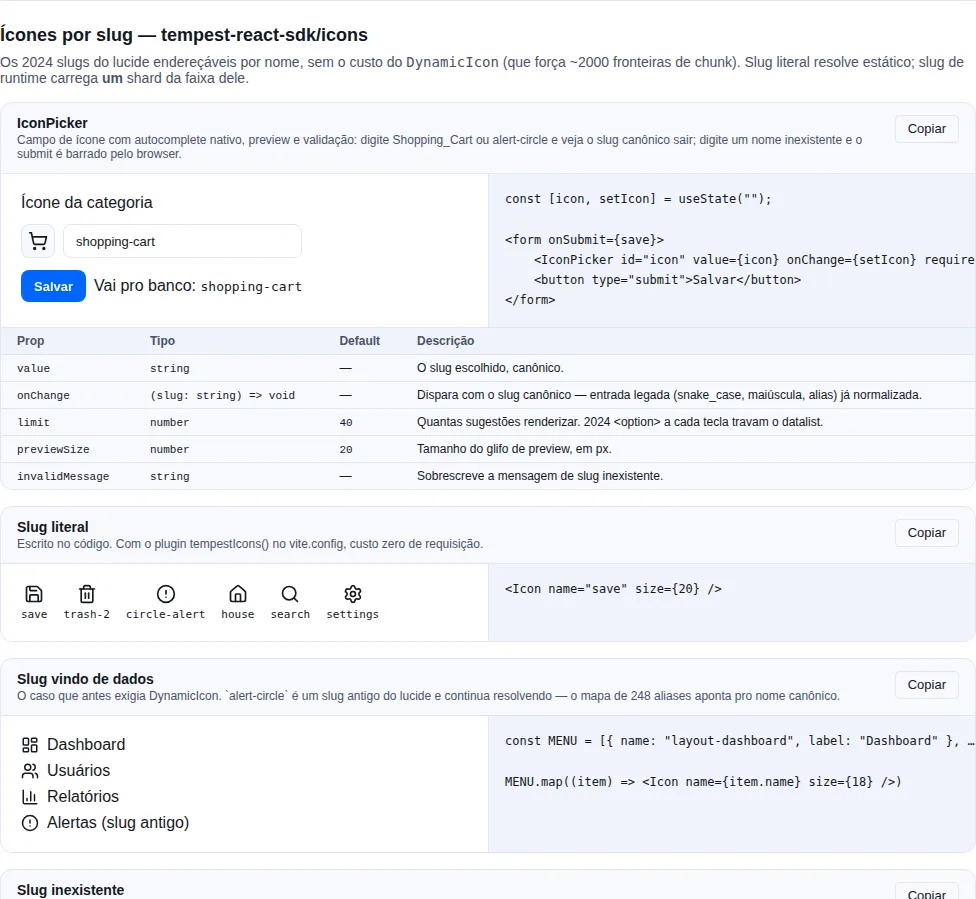
Section icons of the gallery — run it locally to interact.
The shortest path
import { Icon } from "tempest-react-sdk/icons";

export function Toolbar() {
    return (
        <div>
            <Icon name="save" size={18} />
            <Icon name="trash-2" size={18} />
        </div>
    );
}
That's it — no provider, no configuration. All 2065 lucide slugs work this way, including a name that only exists at runtime:
<Icon name={row.iconSlug} />
Slugs are kebab-case, not PascalCase
The name is lucide's, in kebab-case: "circle-alert", not "CircleAlert".
"trash-2", not "Trash2". In dev, a wrong name logs that hint to the console.
Do not install lucide-react yourself
lucide-react is a direct dependency of the SDK — installing it in your app is
what creates a problem, not what solves one.
npm uninstall lucide-react
Two copies of lucide = duplicated bytes and a broken slug table
If your package.json declares lucide-react on a different range than the
SDK's, the package manager installs two physical copies. Two effects, and
the second is the serious one:
- Duplicated bytes in the bundle — your app imports from its copy, the SDK from its own, and neither is tree-shaken against the other.
- Version skew: the
/iconsslug tables are generated against the version the SDK declares (^1.31.0). An older second copy may lack exports the tables reference, and the error then surfaces in your app's build asX is not exported by lucide-react— pointing inside the SDK, which makes the cause hard to find.
The rule: one copy only, the one the SDK brought.
If you import lucide components directly
Using only <Icon name="…" />, you never need to declare lucide anywhere.
If you also write import { Save } from "lucide-react" in your own code, what
happens depends on the package manager:
- npm / yarn — hoisting makes the SDK's copy visible at the root of your
node_modules, so the import resolves without you declaring anything. This is the recommended path. - pnpm (strict isolation) — an app cannot see a dependency it did not
declare, so you must declare it. In that case use the SDK's own range
(
"lucide-react": "^1.31.0") so there is still only one copy.
Confirm only one survived
npm ls lucide-react
node_modules/tempest-react-sdk/node_modules/) means two instances — run
npm dedupe, and if it persists, drop the declaration from your package.json.
Why not lucide's DynamicIcon
lucide-react ships a DynamicIcon that looks like it solves the same problem. It
carries a cost that makes it unusable:
DynamicIcon creates ~2000 chunk boundaries
The map it uses (dynamicIconImports) is a 116 KB module holding one
import() call for each of the 2065 icons. Any bundler that sees that
module must create a chunk per icon: in a production build that becomes ~2065
tiny files, and in development it becomes a flood of browser requests.
It also resolves the icon after render (in a useEffect), so the first frame
never has an icon and the layout shifts. And an unknown name throws, taking
down the React tree — precisely in the case where the name comes from outside.
The SDK's <Icon> trades that for one chunk per range of 40 icons. Rendering
130 different icons asks for a handful of requests, not 130:
GET .../icons/generated/shard-09.js   200
GET .../icons/generated/shard-21.js   200
GET .../icons/generated/shard-36.js   200
… one per range touched, 46 at most
The largest shard weighs 4.92 KB brotli, the median 4.31 KB and the
smallest 1.57 KB. The <Icon> runtime, before any shard, costs
~0.1 KB brotli.
Why ranges and not the initial letter
The first letter is the worst possible partitioning key, because lucide's names
are heavily skewed: c holds 284 slugs and q holds 4. Drawing one category
icon that happened to start with c fetched 284 icons — 19.10 KB brotli for a
half-KB glyph, a ~130x waste factor.
The ranges are contiguous and sorted, so the SDK finds the shard owning a slug
with a binary search over 46 bounds — instead of shipping the 2000-entry
slug→chunk map that makes lucide's own dynamicIconImports cost 120 KB in a main
chunk.
A closed catalog: registerIcons
An admin panel usually has twenty icons and not one more. That case needs neither a plugin nor a provider — register once from the entrypoint:
// src/main.tsx
import { createRoot } from "react-dom/client";
import { registerIcons } from "tempest-react-sdk/icons";
import { House, Save, Settings, Trash2, Users } from "lucide-react";
import { App } from "@/App";

registerIcons({
    house: House,
    save: Save,
    settings: Settings,
    "trash-2": Trash2,
    users: Users,
});

createRoot(document.getElementById("root")!).render(<App />);
That is it: every <Icon name="save" /> in the tree resolves on the first frame,
with no request. The imports are static, so the bundler keeps exactly those five
icons and drops the rest.
It also takes your own artwork
The key does not have to be a lucide slug. registerIcons({ "my-brand": Brand })
makes <Icon name="my-brand" /> work — same call site, same size default, no
if in the component.
A deprecated slug goes in under its canonical name
registerIcons({ "alert-circle": AlertCircle }) stores it as circle-alert, so
both spellings resolve. It is the same alias map <Icon> uses.
registerIcons is additive and idempotent: call it from as many modules as you
like, and registering the same pair twice costs no render. Registering after the
tree has already rendered works too — every mounted <Icon> sitting on its fallback
is notified and re-renders.
Already holding the component? Pass it
import { Icon } from "tempest-react-sdk/icons";
import { Wrench } from "lucide-react";

<Icon icon={Wrench} />
No lookup, no registry, no shard. It exists so a screen mixing literal icons with
data-driven ones can use one component for both — which is what makes
IconProvider's size/strokeWidth defaults apply to both. name and icon are
mutually exclusive: passing both is a type error.
When IconProvider still earns its place
After registerIcons, what is left for the provider is what is genuinely
tree-scoped:
size/strokeWidthdefaults for a subtree;- a registry that has to win over the global one right there (an alternate theme, an icon preview inside a modal).
Precedence is: provider registry → global registry (registerIcons plus shards
already fetched) → shard fetch.
Zero extra requests for the slugs you wrote
An <Icon name="save" /> written in your code needs no shard at all: the slug is
known at build time. The tempestIcons() plugin scans your source, finds those
names, and generates a registry of ordinary static imports.
1. Enable the plugin
If you use createViteConfig, it is already on — the plugin is included by
default:
// vite.config.ts
import { createViteConfig } from "tempest-react-sdk/vite";

export default createViteConfig();
Hand-rolled config? Add the plugin:
// vite.config.ts
import { defineConfig } from "vite";
import react from "@vitejs/plugin-react";
import { tempestIcons } from "tempest-react-sdk/vite";

export default defineConfig({
    plugins: [react(), tempestIcons()],
});
2. Pass the registry to the provider
// src/main.tsx
import { createRoot } from "react-dom/client";
import { IconProvider } from "tempest-react-sdk/icons";
import { staticIcons } from "tempest-react-sdk/icons/virtual";
import { App } from "@/App";

createRoot(document.getElementById("root")!).render(
    <IconProvider registry={staticIcons} size={18}>
        <App />
    </IconProvider>,
);
No type declaration needed
tempest-react-sdk/icons/virtual is a real module in the package: its types
come from exports, and it resolves without the plugin too — to an empty
registry. That is what lets the same file load under vitest without the plugin,
under tsx, in a Storybook with its own builder, or in any Node script that
imports the app's tree. Before it,
import { staticIcons } from "virtual:tempest-icons" outside a Vite build with
the plugin did not leave one icon missing: it took down the whole module.
The old spelling keeps working
import { staticIcons } from "virtual:tempest-icons" still resolves with the
plugin installed, and the
/// <reference types="tempest-react-sdk/icons/virtual" /> already sitting in
your vite-env.d.ts stays valid — you may delete it, you do not have to. Just do
not reach for that spelling in new code: it is the one that fails outside Vite.
With that in place, every literal slug in your code resolves on the first frame, with no extra request. A runtime slug still goes through the shard path — the behavior does not change, it just gets cheaper where it can.
The provider also holds the defaults
size and strokeWidth on IconProvider apply to the whole subtree, so you
stop repeating size={18} at every call site. An explicit prop on <Icon>
always wins over the default.
An icon_code from the database arrives dirty — and still renders
Every backend that stores an icon stores it dirty. snake_case left over from an
old form, a space and a capital from a hand-typed value, and slugs lucide has
deprecated since. <Icon> cleans the name before looking it up, so all three
render:
<Icon name="shopping_cart" />   {/* → shopping-cart */}
<Icon name="  Save " />         {/* → save */}
<Icon name="alert-circle" />    {/* → circle-alert (alias) */}
<Icon name=" Alert_Circle " />  {/* → circle-alert (all three at once) */}
The normalization is: trim → lower-case → _ becomes - → resolveIconAlias.
In that order, and it is the same function you can call yourself:
import { normalizeIconName } from "tempest-react-sdk/icons";

normalizeIconName(" Alert_Circle ");  // "circle-alert"
It is exported on its own because the form needs it before submitting, not only to render: you store the canonical slug in the database instead of keeping the mess and cleaning it on every read.
Normalizing is not validating
normalizeIconName returns the canonical spelling, not a guarantee that the
icon exists: normalizeIconName("Not_An_Icon") is "not-an-icon". What to do
with an unknown name is yours to decide — isIconName answers, and <Icon>
renders its fallback.
Strict lookup when you want to see the mistake
normalize={false} turns the cleanup off for that call site. Use it when an
unexpected spelling should surface as a missing icon rather than be quietly
repaired.
The dev warning names the code as written, not the normalized slug: the reader
is whoever typed it, and name="CircleAlert" is far more useful in the console
than the "circlealert" it normalizes to.
A name that does not exist
Never throws. Without fallback, it renders nothing:
<Icon name="does-not-exist" />
With fallback, it renders whatever you pass — including a same-sized placeholder,
so the layout does not shift while the shard is in flight:
<Icon
    name={row.iconSlug}
    size={20}
    fallback={<span style={{ width: 20, height: 20 }} />}
/>
In development a console.warn fires once per slug, and only when the name is
genuinely unknown — never while a valid icon is still loading.
Validate at the edge, not in the component
If the name comes from outside, decide the fallback once, where the data enters:
import { isIconName } from "tempest-react-sdk/icons";

const slug = isIconName(row.icon) ? row.icon : "circle-help";
isIconName imports the full slug list (~7 KB brotli). <Icon> does not
import that list — only pay for it where you need to validate or enumerate.
Old slugs keep working
Lucide renamed several icons (alert-circle → circle-alert, alert-triangle →
triangle-alert) and keeps the 258 old names as aliases. The SDK carries that map,
so a slug stored in a database two years ago still renders:
<Icon name="alert-circle" /> {/* renders circle-alert */}
The alias resolves to its canonical name before the shard is chosen, so
alert-circle pulls shard c, not a.
When a shard does not arrive
A runtime slug fetches a chunk, the chunk has a hash in its name, and the hash changes on every deploy. That sets up a routine scenario in a long-lived SPA tab:
- the user opens the app, and that range's shard has not been fetched yet;
- a deploy ships, and the old assets leave the CDN;
- the user navigates to a screen that needs that icon;
- the
import()rejects — 404.
The SDK handles it in three parts:
A short retry. Two extra attempts, at 100 ms and 400 ms, because the failure retrying fixes is the transient one: a flaky connection, a CDN edge that has not caught up. If one of them lands, the icon shows and nobody finds out.
A load failure is not a wrong name. iconStatus gained a fourth state:
iconStatus("save"); // "ready" | "loading" | "missing" | "error"
"missing" is only reported when that is actually knowable — the shard arrived
and the slug was not in it. A shard that failed answers "error", which is why
<Icon> stops warning "no such lucide icon" about a perfectly valid name. The
state is not permanent either: a later render tries again, behind a 10 s cooldown
so a genuinely dead chunk cannot turn into a request loop.
A signal for observability. Retrying does not fix a deploy 404; the app knowing does:
import { subscribeToIconErrors } from "tempest-react-sdk/icons";

subscribeToIconErrors(({ shard, slug, attempts, error }) => {
    Sentry.captureException(error, { tags: { iconShard: shard, slug, attempts } });
    promptReloadForStaleChunks();
});
Call it once from the entrypoint. The callback runs once per shard that gave up, with the shard, the slug that asked for it, how many attempts were made and the last rejection.
With nobody subscribed, dev warns on the console
Failing silently was the problem in the first place — so a development build
logs one console.warn per shard, saying the usual cause is a deploy that
rotated chunk names while the tab was open. Subscribed? The console stays
quiet, and the reporting is yours.
Warming the shards
Before opening a large menu or an icon picker, you can load the shards while the user's cursor is still on its way:
import { preloadIcons } from "tempest-react-sdk/icons";

<button onMouseEnter={() => void preloadIcons(MENU.map((i) => i.name))}>Menu</button>;
After that the icons appear on the first frame, never passing through fallback.
No Vite? Use the CLI
The plugin is the most comfortable route, not the only one. The CLI generates the same registry as a real file you commit:
npx tempest gen icons --out src/icons.generated.ts
→ scanning src

✓ 37 icon(s) from 42 file(s) → src/icons.generated.ts

Wire it up:
  import { IconProvider } from "tempest-react-sdk/icons";
  import { icons } from "@/icons.generated";
  <IconProvider registry={icons}>…</IconProvider>
Re-run it after adding new icons. A slug the scan cannot see (a name built by concatenation, say) still works through the shard path — it just does not get the static route.
The output file and its folder cannot be a symlink (dangling included) nor land
outside the project: gen icons refuses before writing, so a
src/icons.generated.ts that is a link in a cloned repository does not overwrite
the file it points to.
The icon picker, already built
Every panel that lets someone choose an icon was rewriting the same screen:
filter the list, cap it at N suggestions, build the <datalist>, and block submit
when the slug does not exist. That last step is the one that matters — without it
the invalid value reaches the database and only shows up as a missing icon on
every screen that renders the record.
import { useState } from "react";
import { IconPicker } from "tempest-react-sdk/icons";

export function CategoryForm({ onSave }: { onSave: (icon: string) => void }) {
    const [icon, setIcon] = useState("");

    return (
        <form
            onSubmit={(event) => {
                event.preventDefault();
                onSave(icon);
            }}
        >
            <label htmlFor="icon">Icon</label>
            <IconPicker id="icon" value={icon} onChange={setIcon} required />
            <button type="submit">Save</button>
        </form>
    );
}
What you get:
- native autocomplete over all 2065 slugs, through
<datalist>— keyboard, screen reader and mobile behaviour come from the platform; - a preview of the chosen icon next to the field;
- native form validation: the input carries
setCustomValidity, so a plain<form>refuses to submit and the browser points at the field; - legacy input accepted, canonical slug emitted — type
Shopping_CartandonChangereceivesshopping-cart; typealert-circleand it receivescircle-alert.
Suggestions are capped by default
limit is 40. Building 2065 <option> elements on every keystroke froze
the datalist — that is why the prop exists instead of a "show everything"
default.
Using react-hook-form or zod? The rule is exported
Do not duplicate the validation — that is how the two drift apart:
import { validateIconName } from "tempest-react-sdk/icons";

// react-hook-form
register("icon", { validate: (value) => validateIconName(value) ?? true });

// zod
z.string().refine((value) => !validateIconName(value), {
    message: "No such icon",
});
Empty passes validateIconName: "no icon chosen" is a required question,
not a spelling mistake — conflating them would make the field impossible to
clear.
It costs the whole list, and only here
IconPicker imports iconNames (~7 KB brotli), because a picker needs the
list. <Icon> does not — see What each import
costs. Styling comes from the SDK's styles.css, like
every component.
Prefer to build your own?
The list is public and sorted:
import { useMemo, useState } from "react";
import { Icon, iconNames } from "tempest-react-sdk/icons";

export function OwnPicker({ onPick }: { onPick: (slug: string) => void }) {
    const [query, setQuery] = useState("");
    const matches = useMemo(
        () => iconNames.filter((name) => name.includes(query.trim().toLowerCase())),
        [query],
    );

    return (
        <div>
            <input value={query} onChange={(e) => setQuery(e.target.value)} />
            <p>
                {matches.length} of {iconNames.length}
            </p>
            {matches.slice(0, 120).map((name) => (
                <button key={name} onClick={() => onPick(name)} title={name}>
                    <Icon name={name} size={20} />
                </button>
            ))}
        </div>
    );
}
See it running in the gallery, section Icons by slug.
The full list, for use outside the app
The backend that stores the slug — a category seed, an admin table, a Pydantic
validator — cannot import iconNames. For those cases the list is published
alongside this documentation, emitted by the same script that generates the
SDK's tables, so it never lags behind what <Icon> accepts:
| File | What's in it |
|---|---|
icon-slugs.txt |
The 1807 canonical slugs, one per line |
icon-slugs.csv |
All 2065 slugs with a status (canonical/deprecated) and the canonical name |
Use the .txt for anything that validates writes — it is the list of what
may be stored today. Use the .csv for anything that reads old data: the
canonical column says where each deprecated name resolves to, which is the
same resolution <Icon> performs at runtime.
Validating in a Python backend
from pathlib import Path

ICON_SLUGS: frozenset[str] = frozenset(
    Path("icon-slugs.txt").read_text().split()
)

if category.icon_code not in ICON_SLUGS:
    raise ValueError(f"{category.icon_code!r} is not a lucide icon slug")
The vocabulary is lucide, not Material Symbols
If your seed came from an Android/Flutter app, the codes are Material
Symbols in snake_case (format_paint, electrical_services) and none
of them is a lucide slug. Worse: a handful collide by accident (settings,
code, key, lock, shield, tv) and render correctly on ~10% of the
rows, which makes the problem look like "a few icons went missing". Convert
the vocabulary before storing it — or use the bridge in the next section, if
you cannot touch the seed.
Backends that store Material Symbols
The cleanest way out is for the backend to start storing lucide slugs directly: one vocabulary end to end, nothing to translate. When that is not possible — the seed is old, a Flutter app reads the same database, or you inherited the data — the SDK offers the bridge:
import { Icon, fromMaterialSymbol } from "tempest-react-sdk/icons";

export function CategoryTile({ category }: { category: Category }) {
    return (
        <li>
            <Icon name={fromMaterialSymbol(category.icon_code)} size={20} />
            <span>{category.name}</span>
        </li>
    );
}
fromMaterialSymbol never returns undefined. A code the table does not
know falls back to a neutral glyph (circle-question-mark), because a category
created in an admin with a new code still has to draw something rather than open
a hole in the grid. Pass the second argument when your domain has a better
default:
<Icon name={fromMaterialSymbol(category.icon_code, "folder")} size={20} />
The table is a seed, not the whole vocabulary
Material Symbols publishes ~6100 names and almost none of them will ever appear in
an icon_code of ours. materialToLucide holds 261 pairs today — the trades
lot it started as, plus the head of Google's own published popularity ranking
(fonts.google.com/metadata/icons), which is measured usage rather than a guess at
which names a seed will contain. And it grows on demand, one hand-written pair
at a time — a map generated by name heuristics gets it badly wrong, starting with
build, which is a wrench in Material Symbols and has nothing to do with
construction.
When two lots disagreed about the same code
Six keys appeared in both lots with different targets. The tie-break was to prefer whichever mapping keeps two distinct Material Symbols names distinct in lucide:
| Code | Kept | Because |
|---|---|---|
error |
circle-alert |
cancel already owns circle-x |
payments |
banknote |
account_balance_wallet already owns wallet |
receipt_long |
receipt-text |
receipt already owns receipt |
construction |
construction |
engineering already owns hard-hat |
today / event |
calendar / calendar-days |
splits the generic calendar names from the dated one |
The lucide side of every pair is checked by a test against the real slug list, so a pair pointing at a name lucide does not ship — or at one it has since deprecated — fails the suite instead of reaching your grid. What no test can check is whether the chosen icon is the right metaphor: that is why pairs go in by hand.
| Material Symbol | lucide | Note |
|---|---|---|
build, handyman, hardware |
wrench |
Approximation — three to one |
carpenter |
hammer |
|
format_paint |
paint-roller |
|
electrical_services |
plug-zap |
|
plumbing |
shower-head |
Approximation — lucide has no pipe |
roofing |
house |
Approximation — same glyph as home |
construction |
hard-hat |
|
cleaning_services |
spray-can |
Approximation — the activity, not the tool |
iron |
shirt |
Approximation — lucide has no iron |
local_laundry_service |
washing-machine |
|
dentistry |
face-slightly-smiling |
Approximation — lucide ships no tooth |
medical_services |
stethoscope |
|
vaccines |
syringe |
|
content_cut |
scissors |
Barbers, in a seed vocabulary |
spa |
flower-2 |
|
local_florist |
flower |
|
yard |
trees |
|
grass |
sprout |
|
pest_control |
bug |
|
pedal_bike, two_wheeler, delivery_dining |
bike |
Approximation — three to one |
car_repair, directions_car |
car |
Approximation — lucide has no car+wrench |
local_taxi |
car-taxi-front |
|
local_shipping |
truck |
|
local_gas_station |
fuel |
|
group, groups |
users |
Approximation — two to one |
store, storefront |
store |
Approximation — two to one |
home |
house |
|
person |
user |
|
payments |
banknote |
|
account_balance |
landmark |
|
savings |
piggy-bank |
|
receipt_long |
receipt |
|
dashboard |
layout-dashboard |
|
bar_chart, pie_chart |
chart-column, chart-pie |
|
description |
file-text |
|
event, today, schedule |
calendar, calendar-days, clock |
|
location_on |
map-pin |
|
chat, forum |
message-circle, messages-square |
|
campaign |
megaphone |
|
support_agent |
headset |
|
notifications |
bell |
|
favorite |
heart |
|
visibility |
eye |
|
edit, delete |
pencil, trash-2 |
|
help, info, warning, error |
circle-question-mark, info, triangle-alert, circle-x |
|
verified |
badge-check |
|
security |
shield-check |
|
history |
rotate-ccw-clock |
|
sync |
refresh-cw |
|
translate |
languages |
|
balance |
scale |
|
computer |
monitor |
|
photo_camera, videocam, music_note |
camera, video, music |
|
school, work |
graduation-cap, briefcase |
|
child_care, pets |
baby, paw-print |
|
restaurant, local_cafe, local_bar |
utensils, coffee, wine |
|
fitness_center |
dumbbell |
|
hotel, flight |
bed-double, plane |
|
soap |
soap-dispenser-droplet |
|
kitchen, chair, door_front |
refrigerator, armchair, door-open |
|
water_drop, bolt, ac_unit |
droplet, zap, snowflake |
|
settings, code, key, lock, shield, brush, tv, smartphone, mic, palette, router, gavel, warehouse, search, store, map, mail, phone, menu, check, star, folder, image, cloud, wifi, bluetooth, laptop, cake, info, upload, download |
(the same name) | Collide by accident |
Why the collisions are in the table
Those 31 already render today, because the name matches in both vocabularies. Leaving them out would send them to the fallback and make the bridge a regression for exactly the codes that used to work.
Pass the table to the plugin's include
A slug resolved at runtime pulls the shard of its range. A catalogue of ~130 categories spreads across dozens of ranges, so the DX win turns into dozens of requests unless you tell the build:
import { defineConfig } from "vite";
import { tempestIcons } from "tempest-react-sdk/vite";
import { materialToLucide } from "tempest-react-sdk/icons";

export default defineConfig({
    plugins: [tempestIcons({ include: Object.values(materialToLucide) })],
});
Missing a code?
Open an issue with the icon_code values your seed uses. Each pair goes in
hand-written, and a test pins the whole table against the real slug list, so
an entry pointing at a non-existent icon fails the suite instead of reaching
your grid.
Reference
| Export | What it does |
|---|---|
Icon |
Renders by slug (name) or by component (icon), + size, strokeWidth, fallback and SVG props |
registerIcons |
Registers slug → component globally, with no provider and no plugin |
staticIcons |
The registry the plugin generates, at tempest-react-sdk/icons/virtual |
IconProvider |
Static registry + size/strokeWidth defaults |
createIconRegistry |
Builds a registry from imported lucide components |
useIcon |
Resolves a slug to its component (what Icon uses internally) |
preloadIcons |
Warms the shards for a list of slugs |
iconStatus |
"ready" / "loading" / "missing" / "error" for a slug |
subscribeToIconErrors |
Subscribes to shard load failures (Sentry, stale-chunk reload) |
IconLoadError |
The failure payload: shard, slug, attempts, error |
peekIcon |
Reads the cache without triggering a load |
loadIcon |
Loads the shard owning a slug |
resolveIconAlias |
Deprecated slug → canonical slug |
isIconName |
Type guard against the real list (imports the list) |
normalizeIconName |
Dirty icon_code → canonical slug (trim, lower, _→-, alias) |
IconPicker |
Icon field: autocomplete + preview + native validation |
validateIconName |
The picker's validation rule, for react-hook-form/zod |
DEFAULT_ICON_PICKER_MESSAGE |
The default message for a slug that does not exist |
fromMaterialSymbol |
Material Symbols code → lucide slug, always returning one |
materialToLucide |
The pair table, to pass to the plugin's include |
MATERIAL_SYMBOL_FALLBACK |
The neutral glyph an unknown code uses |
iconNames |
The 2065 slugs, sorted (~7 KB brotli) |
iconAliases |
The 258 alias → canonical pairs |
IconName |
Type union of every slug (types only, zero cost) |
What each import costs
Measured with esbuild --bundle --minify plus brotli, react and lucide-react
external — that is, what the SDK adds to your bundle:
| You import | Brotli | Pulls the 2065-slug list? |
|---|---|---|
{ Icon } |
~2.5 KB | No |
{ resolveIconAlias } |
2.05 KB | No |
{ normalizeIconName } |
2.07 KB | No |
{ isIconName } |
7.33 KB | Yes (it is what it reads) |
{ iconNames } |
7.29 KB | Yes |
There is no /icons/catalog subpath — and none is needed
Runtime and catalogue are already separate, by tree-shaking: no module on
the <Icon> path imports the list, so a bundler simply leaves it out. A
separate subpath would move the same code somewhere else, break the import for
everyone using iconNames today, and save zero bytes.
What went in instead is a guard: postbuild
(scripts/check-dist-guards.mjs) walks the static import graph of dist from
Icon.js and fails the build if the list turns up there. With
preserveModules, a module's static imports are its real dependencies, so
that is an exact answer rather than an estimate. One convenience
import { iconNames } inside use-icon would cost ~6 KB to every app that
renders a single icon, and nothing in the source would look wrong.
What is eager on the <Icon> path is the 258-alias table (~2 KB): it has to
resolve before a shard is chosen, so deferring it would mean a second
network round trip for every old slug. 2 KB is the price of an icon_code
stored two years ago still rendering.
Measured costs
| What | Brotli |
|---|---|
<Icon> runtime, before any shard |
~0.1 KB |
| Smallest shard (7 icons), on demand | 1.57 KB |
| Median shard (40 icons), on demand | 4.31 KB |
| Largest shard (40 icons), on demand | 4.92 KB |
Largest shard before the rebalance (s) |
19.10 KB |
{ iconNames } — the list of 2065 slugs |
7.29 KB |
| Runtime plus all 46 shards (absolute ceiling) | 137.3 KB |
How this was measured
Shards and the slug list come from size-limit with lucide-react inside
the measurement — that is what the network actually transfers, since a
shard only re-exports the icons. Measuring the emitted file on its own would
report ~22 KB for all 25, which is a comfortable lie. The runtime figure is
the brotli size of the four modules that load before the first icon (Icon,
shard-cache, use-icon, icon-context), none of which pull lucide in.
Reproduce it with npm run build followed by npx size-limit; the icon
entries live in .size-limit.json.
Recap
<Icon name="save" />resolves any of lucide's 2065 slugs, with no setup.- A literal slug becomes a static import via
tempestIcons()(on by default increateViteConfig) → zero extra requests. - Closed catalog?
registerIcons({ save: Save })in the entrypoint gives you the same static path with no plugin and no provider. Already holding the component?<Icon icon={Save} />. tempest-react-sdk/icons/virtualis a real module: it resolves without the plugin (empty registry), so vitest,tsxand Storybook load the same file.- A runtime slug loads the shard of its range — ranges of 40 icons found by binary search, 4.92 KB brotli per request at most.
- An unknown name renders
fallback(nothing, by default) and never throws;console.warnin dev only. - A shard that does not arrive gets 2 short retries, answers
iconStatus"error"(not"missing") and is reported throughsubscribeToIconErrors— a deploy that rotates chunk names no longer ends in a silent, permanent fallback. - Lucide's 258 old aliases keep resolving.
- An
icon_codefrom the database renders dirty:shopping_cart," Save"and an old alias are normalized before the lookup.normalize={false}for a strict lookup, andnormalizeIconNameon its own to validate in a form. <IconPicker value onChange />is the field, already built: native autocomplete, a preview, andsetCustomValidityso the form refuses a non-existent slug.validateIconNamefor react-hook-form/zod.iconNamesstays outside what<Icon>costs — import it only to enumerate or validate.- Do not declare
lucide-reactin your app: it ships with the SDK, and a second copy duplicates bytes and may lack the exports the generated slug tables reference. - See also: Vite & alias · tempest CLI · Components