Passkeys (WebAuthn)
Passwordless sign-in, using the biometrics the user already unlocks their device with.
The SDK covers the client half: both ceremonies (navigator.credentials.create and .get), the base64url ↔ ArrayBuffer plumbing everybody re-implements badly, the capability probes, and error classification. The other half is your backend — and this page says exactly what it must send and receive, because a WebAuthn client that documents only its own half is useless.
Why a passkey instead of a password
The private key never leaves the device, so there is no password database to leak and no phishing that works: the browser only signs for the domain that registered the credential. For the user it is one touch on a sensor.
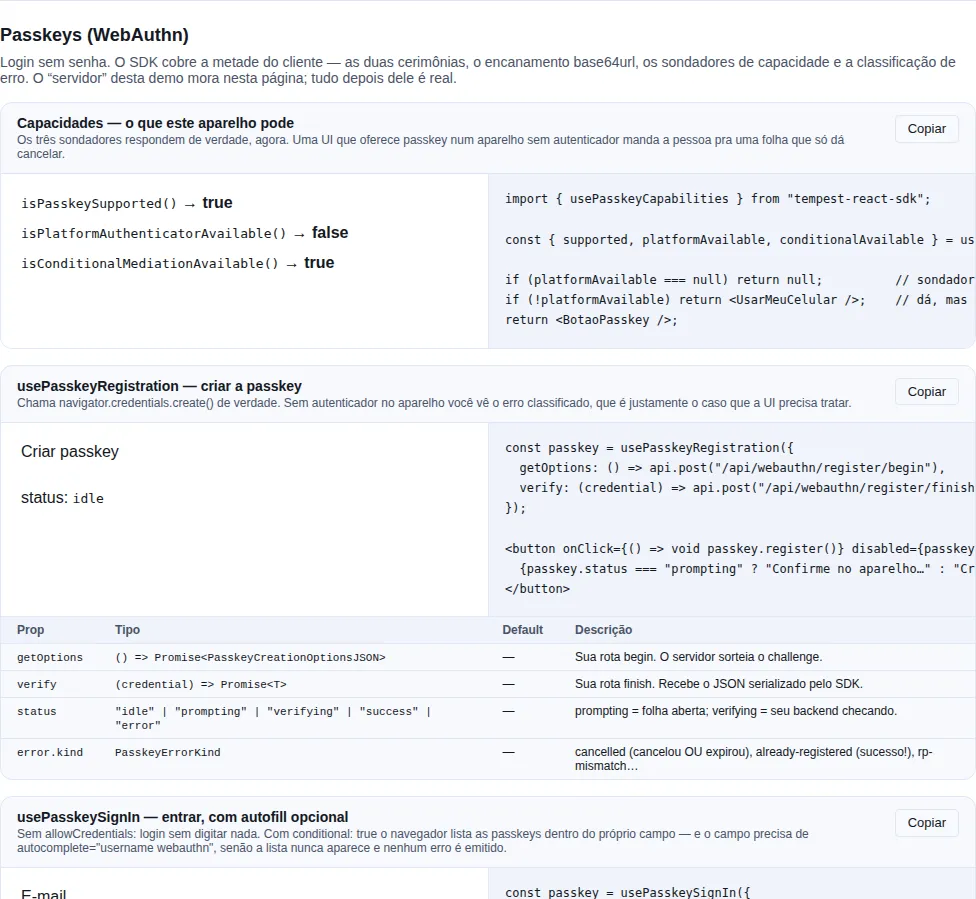
Section recipe-passkeys of the gallery — run it locally to interact.
The surface
| Symbol | What it is for |
|---|---|
createPasskeyClient |
Framework-free client: register + authenticate + probes |
usePasskeyRegistration |
Hook for the "create a passkey" flow |
usePasskeySignIn |
Hook for the "sign in with a passkey" flow, autofill optional |
usePasskeyCapabilities |
Just the three probes, when you decide the UI up front |
isPasskeySupported |
The browser has WebAuthn |
isPlatformAuthenticatorAvailable |
This device has Face ID / Hello / a fingerprint reader |
isConditionalMediationAvailable |
Passkey autofill is available |
classifyPasskeyError / PasskeyError |
An error with a kind your UI can switch on |
base64UrlToBytes / bytesToBase64Url |
The plumbing, exposed because you will need it |
Start with the hook
Two buttons, two hooks. This is enrolment, on the account screen:
import { usePasskeyRegistration } from "tempest-react-sdk";

import { api } from "../lib/api";

export function CreatePasskey() {
  const passkey = usePasskeyRegistration({
    getOptions: () => api.post("/api/webauthn/register/begin"),
    verify: (credential) =>
      api.post("/api/webauthn/register/finish", { body: credential }),
  });

  if (passkey.platformAvailable === null) return null;

  if (passkey.error?.kind === "already-registered") {
    return <p>This device already has a passkey for your account. 👍</p>;
  }

  return (
    <>
      <button
        type="button"
        onClick={() => void passkey.register()}
        disabled={passkey.status === "prompting" || passkey.status === "verifying"}
      >
        {passkey.status === "prompting" ? "Confirm on your device…" : "Create a passkey"}
      </button>
      {passkey.error && <p role="alert">{passkey.error.message}</p>}
      {passkey.status === "success" && <p>Passkey created. ✅</p>}
    </>
  );
}
Piece by piece:
getOptionsis yourbeginroute. The server mints the challenge and returns the options.verifyis yourfinishroute. It receives the JSON the SDK serialized.platformAvailable === nullmeans "I do not know yet" — the probe is async. Render nothing passkey-related in that state.register()resolves; it never rejects. Every failure is already state (status,error.kind) the UI has to draw; forcing atry/catchinside a button handler would only duplicate what the hook holds.
platformAvailable === false is not "no passkeys"
It means "no built-in authenticator here". The user can still use their phone over QR/hybrid. Offer it as "use my phone", not as one tap.
Sign-in, and the autofill that makes the difference
import { usePasskeySignIn } from "tempest-react-sdk";

import { api } from "../lib/api";
import { useAuthStore } from "../store/auth";

export function LoginForm() {
  const passkey = usePasskeySignIn<{ access_token: string }>({
    conditional: true,
    getOptions: () => api.post("/api/webauthn/signin/begin"),
    verify: (assertion) =>
      api.post<{ access_token: string }>("/api/webauthn/signin/finish", {
        body: assertion,
      }),
    onSuccess: ({ access_token }) => useAuthStore.getState().setToken(access_token),
  });

  return (
    <form>
      <label htmlFor="email">E-mail</label>
      <input id="email" name="email" autoComplete="username webauthn" />

      <button type="button" onClick={() => void passkey.signIn()}>
        Sign in with a passkey
      </button>
      {passkey.error && <p role="alert">{passkey.error.message}</p>}
    </form>
  );
}
conditional: true arms the autofill flow: no modal appears; the browser lists the user's passkeys inside the e-mail field. They tap one and they are in, without typing anything.
autocomplete="username webauthn" is not optional
Without that attribute on the input the list never appears — and there is no error, the request just hangs. The hook cannot do this part for you: only your screen knows which field identifies the user.
Two more rules of conditional mediation:
- One per page. A second concurrent conditional request kills the first.
- Aborting is not a failure. If the user types a password instead of picking the passkey, or the screen unmounts, the request is aborted and the hook does not set an error — nothing failed, they chose another door.
The errors, and what to do with each
error.kind is what the UI branches on. error.message is English text that is safe to show, but normally you write your own copy per kind:
kind |
Cause | What the UI does |
|---|---|---|
cancelled |
NotAllowedError |
Nothing red. Return to the initial state |
already-registered |
InvalidStateError |
Success in disguise: "already set up on this device" |
rp-mismatch |
SecurityError |
Your bug: rp.id does not match the origin |
not-supported |
NotSupportedError |
No authenticator accepts the requested algorithms |
invalid-options |
TypeError |
begin sent broken base64url |
insecure |
Page served over HTTP | Serve it over HTTPS |
unsupported |
Browser without WebAuthn | Hide the option |
aborted |
Your own signal fired |
Stay quiet |
unknown |
Everything else | Log it plus a generic message |
cancelled means "dismissed or timed out" — and there is no way to tell
NotAllowedError covers both by design: telling the site "this account has no credential here" would leak account existence. Treat it as one event and never claim "you cancelled".
rp-mismatch is integration bug #1
rp.id must be the page's domain or a registrable parent of it. app.acme.com may use acme.com; acme.com may not use app.acme.com. On localhost, leave rp.id out.
Without React: createPasskeyClient
The hooks are a shell. The client does the work, and it fits a plain form, a worker, or a test:
import { createPasskeyClient } from "tempest-react-sdk";

const passkeys = createPasskeyClient({ rpId: "acme.com", timeoutMs: 60_000 });

const options = await fetch("/api/webauthn/signin/begin", { method: "POST" }).then((r) =>
  r.json(),
);
const assertion = await passkeys.authenticate(options);
await fetch("/api/webauthn/signin/finish", {
  method: "POST",
  headers: { "Content-Type": "application/json" },
  body: JSON.stringify(assertion),
});
rpId and timeoutMs are only defaults: whatever the server sends always wins.
Injecting a fake credentials (tests)
createPasskeyClient({ credentials }) accepts any object with create and get — the CredentialsContainerLike interface. That is how the SDK tests the ceremonies itself, since jsdom has no navigator.credentials.
What your backend must implement
Four routes. The SDK never talks to any of them on its own: you pass getOptions and verify.
1. POST /webauthn/register/begin → options
Return a PasskeyCreationOptionsJSON. Every binary field is base64url:
{
  "challenge": "9WVvY2..._Q",
  "rp": { "name": "Acme", "id": "acme.com" },
  "user": { "id": "dXNlci0x", "name": "ada@acme.com", "displayName": "Ada Lovelace" },
  "pubKeyCredParams": [{ "type": "public-key", "alg": -7 }],
  "excludeCredentials": [{ "id": "AQID", "type": "public-key" }],
  "authenticatorSelection": { "residentKey": "required", "userVerification": "preferred" }
}
challenge: ≥16 random bytes, stored against the session, single use.user.id: an opaque, stable identifier. Never the e-mail — it changes, and it is burned into the authenticator.excludeCredentials: the credentials the user already has. This is what makes the authenticator answerInvalidStateError(→already-registered) instead of creating a duplicate.pubKeyCredParamsmay be omitted: the SDK offers-8(Ed25519),-7(ES256) and-257(RS256) — the exact list is exported asDEFAULT_PUB_KEY_CRED_PARAMS, so the backend can declare the same set without restating the numbers.residentKey: "required"is what makes the passkey discoverable — a prerequisite for signing in without typing anything.
2. POST /webauthn/register/finish ← credential
Receives a PasskeyRegistrationJSON. On the server:
- Decode
response.clientDataJSONand checktype === "webauthn.create", the storedchallenge, and theorigin. - Parse
response.attestationObject, extract the public key and the signature counter. - Store
id, the public key, the counter, andresponse.transports(it helps the later sign-in).
3. POST /webauthn/signin/begin → options
A PasskeyRequestOptionsJSON with a fresh challenge. Omit allowCredentials for usernameless sign-in and for autofill — that is what lets the browser offer any passkey for the domain.
4. POST /webauthn/signin/finish ← assertion
Receives a PasskeyAuthenticationJSON:
- Look the credential up by
id(or byresponse.userHandle, which is populated for a discoverable credential). - Check
clientDataJSONas in step 2, now withtype === "webauthn.get". - Verify
response.signatureoverauthenticatorData || sha256(clientDataJSON)with the stored public key. - Reject a counter that did not grow — it indicates a cloned credential.
- Only then issue the session token.
On the FastAPI side
A server library (py_webauthn, for instance) does steps 1–4. What it does not do is what this page is about: keeping the challenge in the session, choosing user.id, and building excludeCredentials.
Recap
createPasskeyClient— two ceremonies, base64url plumbing, one error type. No framework.usePasskeyRegistration/usePasskeySignIn— state (status,error,data) plus the action. They resolvenullon failure.isPlatformAuthenticatorAvailable()decides whether the button appears;platformAvailable === nullmeans "not known yet".conditional: true+autocomplete="username webauthn"is the one-tap sign-in. The attribute is mandatory.kind: "already-registered"is a success,"cancelled"is ambiguous by design,"rp-mismatch"is your bug.- The server implements 4 routes; the client invents none of them.
See also
- Auth — where to keep the token
finishreturned - HTTP — the
apiused in the examples - Access Control (RBAC) — what the session may do afterwards