Forms BR — masks, validators, ViaCEP
Everything Brazilian apps use daily: really validate CPF/CNPJ, mask input as the user types, and fill an address from the ZIP code (CEP). Pairs with zod + react-hook-form or a manual controlled form.
Why not just check the length?
"It has 11 digits" does not mean the CPF exists. Brazilian documents carry
check digits computed from the others — that is how the tax-authority
backend rejects mistyped numbers. Checking only the length lets
123.456.789-00 and any repeated sequence through. The functions below run the
full algorithm.
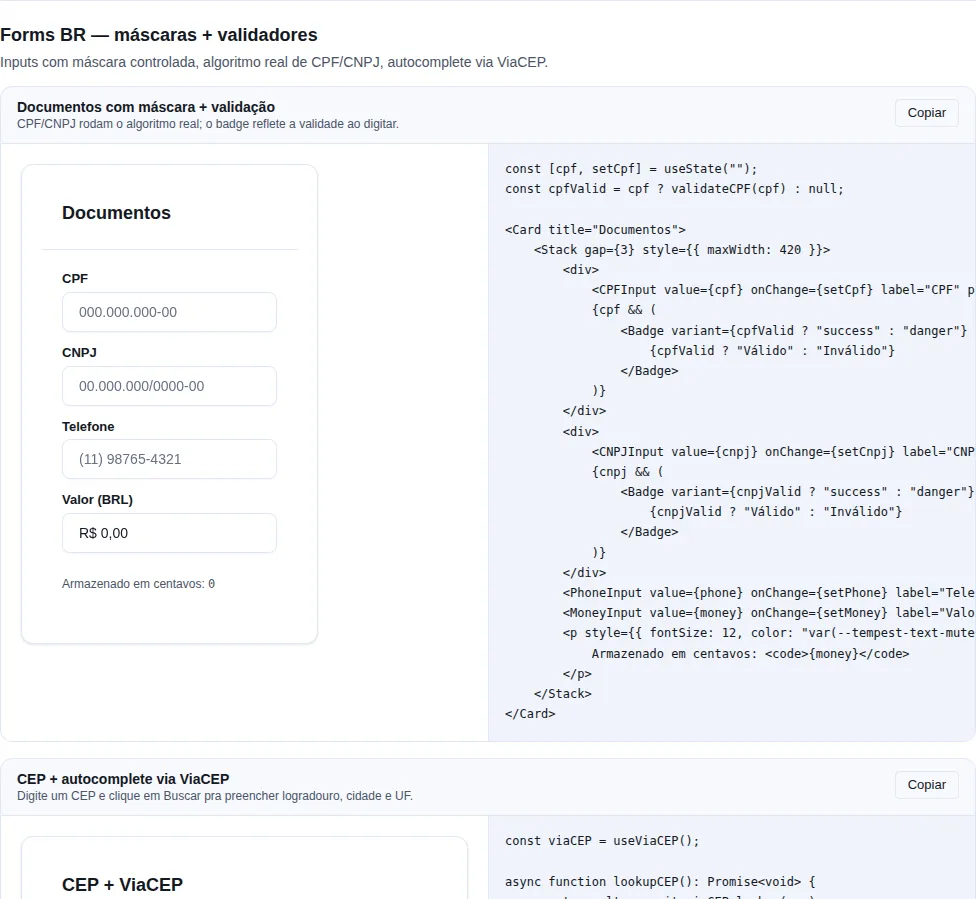
Section br-forms of the gallery — run it locally to interact.
Validators
import { validateCPF, validateCNPJ } from "tempest-react-sdk";

validateCPF("529.982.247-25"); // true
validateCPF("111.111.111-11"); // false (rejects all-equal)
validateCPF("12345678900"); // false (invalid check digit)
validateCNPJ("11.222.333/0001-81"); // true
Full algorithm (check digits), not just "11 digits". Accepts a string with or without a mask.
Why reject repeated digits
111.111.111-11, 000.000.000-00, etc. pass the check-digit math by
mathematical coincidence — the raw algorithm would accept them. Since none of
those is a real document, both validators have an explicit short-circuit
(/^(\d)\1+$/) that rejects any value with all-equal digits before computing.
They are pure — combine freely
validateCPF / validateCNPJ take a string and return a boolean, with no
state and no React. Use them directly in an onBlur, in a zod .refine() (see
the end of the page), or on the server — it is the same code on both sides.
Masked inputs
| Component | Mask | inputMode |
|---|---|---|
CPFInput |
000.000.000-00 |
numeric |
CNPJInput |
00.000.000/0000-00 |
numeric |
PhoneInput |
(00) 00000-0000 (or 10 digits) |
tel |
CEPInput |
00000-000 |
numeric |
MoneyInput |
R$ X.XXX,XX (cents) |
numeric |
Uniform API — they all take value: string (or number for MoneyInput) +
onChange:
import { useState } from "react";
import { CPFInput } from "tempest-react-sdk";

function CPFExample() {
  const [cpf, setCpf] = useState("");
  return <CPFInput value={cpf} onChange={setCpf} label="CPF" required />;
}
onChange gives a string, not an event
The masked inputs are controlled and call onChange(maskedValue) with the
already-formatted string — not with a ChangeEvent. Don't try
e.target.value. To keep only the digits, use unmask at
submit time.
MoneyInput works in cents (number) to avoid float errors:
import { useState } from "react";
import { MoneyInput } from "tempest-react-sdk";

function PriceExample() {
  const [cents, setCents] = useState(0);
  return <MoneyInput value={cents} onChange={setCents} label="Price" />;
  // cents=12990 → "R$ 129,90"
}
For other currencies: <MoneyInput currency="USD" locale="en-US" />.
MoneyInput is integer cents — never float
value and onChange deal in integer cents (12990), not currency units
(129.90). Persisting the value as an integer avoids the classic
0.1 + 0.2 !== 0.3. Divide by 100 only at the edge when displaying/computing.
unmask — digits only
import { unmask } from "tempest-react-sdk";

unmask("529.982.247-25"); // "52998224725"
Use it before sending to the backend, which usually expects raw digits.
formatCEP and formatCNPJ are also exported if you need to mask a string
outside a controlled input.
Mobile-only field — formatPhone({ mobile: true })
By default the grouping is decided by length, which is right for a field that takes both landlines and mobiles. In a mobile-only field it is wrong as you type: anything up to ten digits reads as a landline and the hyphen lands after the fourth subscriber digit.
import { formatPhone } from "tempest-react-sdk";

formatPhone("1191234");                      // "(11) 9123-4"     ← hyphen too early
formatPhone("1191234", { mobile: true });    // "(11) 91234"      ← separator in place
formatPhone("1112345678", { mobile: true }); // "(11) 91234-5678" ← inserts the 9
Both agree once all 11 digits are in; the difference shows while typing, where the default's hyphen jumps backwards as the eleventh digit lands. mobile also inserts the mandatory 9, so a ten-digit number is corrected rather than masked as a landline.
ViaCEP
useViaCEP queries the public ViaCEP service and returns the address fields — no
backend of your own.
import { useState } from "react";
import { CEPInput, Input, useViaCEP } from "tempest-react-sdk";

function AddressForm() {
  const [cep, setCep] = useState("");
  const [street, setStreet] = useState("");
  const [city, setCity] = useState("");
  const [uf, setUf] = useState("");
  const viacep = useViaCEP();

  async function handleLookup() {
    const result = await viacep.lookup(cep);
    if (result) {
      setStreet(result.logradouro);
      setCity(result.localidade);
      setUf(result.uf);
    }
  }

  return (
    <>
      <CEPInput value={cep} onChange={setCep} onBlur={handleLookup} label="ZIP" />
      {viacep.loading && <span>Searching…</span>}
      {viacep.error && <span role="alert">{viacep.error}</span>}
      <Input value={street} onChange={(e) => setStreet(e.target.value)} label="Street" />
      <Input value={city} onChange={(e) => setCity(e.target.value)} label="City" />
      <Input value={uf} onChange={(e) => setUf(e.target.value)} label="State" />
    </>
  );
}
No backend — uses https://viacep.com.br/ws/<cep>/json/.
Two kinds of failure
viacep.error is set both for an invalid format (≠ 8 digits, no network
call) and for a not-found CEP (the API replied { erro: true }). In both
cases lookup resolves with null — always check the return value before
using it.
Fire on onBlur, not on every keystroke
lookup makes an HTTP request. Call it when the field loses focus (onBlur)
or once the 8 digits are complete — not on every keystroke, to avoid hammering
the public service.
Combining with react-hook-form
Because the validators are pure functions, they drop straight into a zod
.refine(), and the masked input is wired with a <Controller> (or with the
SDK's <FormField>, which removes the boilerplate):
import { Controller, useForm } from "react-hook-form";
import { CPFInput, validateCPF, zodResolver } from "tempest-react-sdk";
import { z } from "zod";

const schema = z.object({
  cpf: z.string().refine(validateCPF, "Invalid CPF"),
});

function CPFField() {
  const form = useForm({ resolver: zodResolver(schema), defaultValues: { cpf: "" } });
  return (
    <Controller
      control={form.control}
      name="cpf"
      render={({ field, fieldState }) => (
        <CPFInput
          value={field.value ?? ""}
          onChange={field.onChange}
          onBlur={field.onBlur}
          error={fieldState.error?.message}
          label="CPF"
        />
      )}
    />
  );
}
Less boilerplate with FormField
The <Controller> above can collapse to one line with the SDK's <FormField>
inside a <FormProvider>: <FormField name="cpf" label="CPF"><CPFInput /></FormField>.
See the end-to-end example.
Recap
validateCPF/validateCNPJrun the full check-digit algorithm and reject repeated sequences — pure functions reusable on client and server.- The masked inputs are controlled and call
onChange(string)(not an event);MoneyInputworks in integer cents. unmaskstrips the mask before sending to the backend.useViaCEPresolvesnullon any failure (invalid format or non-existent CEP) — always check the return; fire ononBlur.- Plug the validators into zod via
.refine()and wire the inputs with<Controller>or<FormField>.
See also
- Forms (zod) —
useZodForm,FormField, layout, and the end-to-end example - HTTP —
parseResponsevalidates the API response - Hooks —
useDebounceto defer the CEP lookup while typing