Utility hooks
Every React app rewrites the same wrappers: "debounce this input", "close the menu
on Escape", "store the theme in localStorage", "re-render when the window resizes".
They are small, but each one has a trap — listener cleanup, running without window, the
dependency array. The SDK packages these patterns into granular, tested,
browser-guarded and independent hooks — import only what you need.
Each hook is a standalone piece
No hook depends on another or on a provider. import { useDebounce } from "tempest-react-sdk"
and you're done — the bundler tree-shakes the rest. They are grouped by purpose
in these docs, not by coupling.
Browser-guarded is not SSR support
Several hooks below guard on typeof window === "undefined" and return a
default instead of throwing. That exists for Node tests, the service-worker
context and build plugins — it is not a promise of server rendering. The
SDK is client-only by decision (see
Architecture).
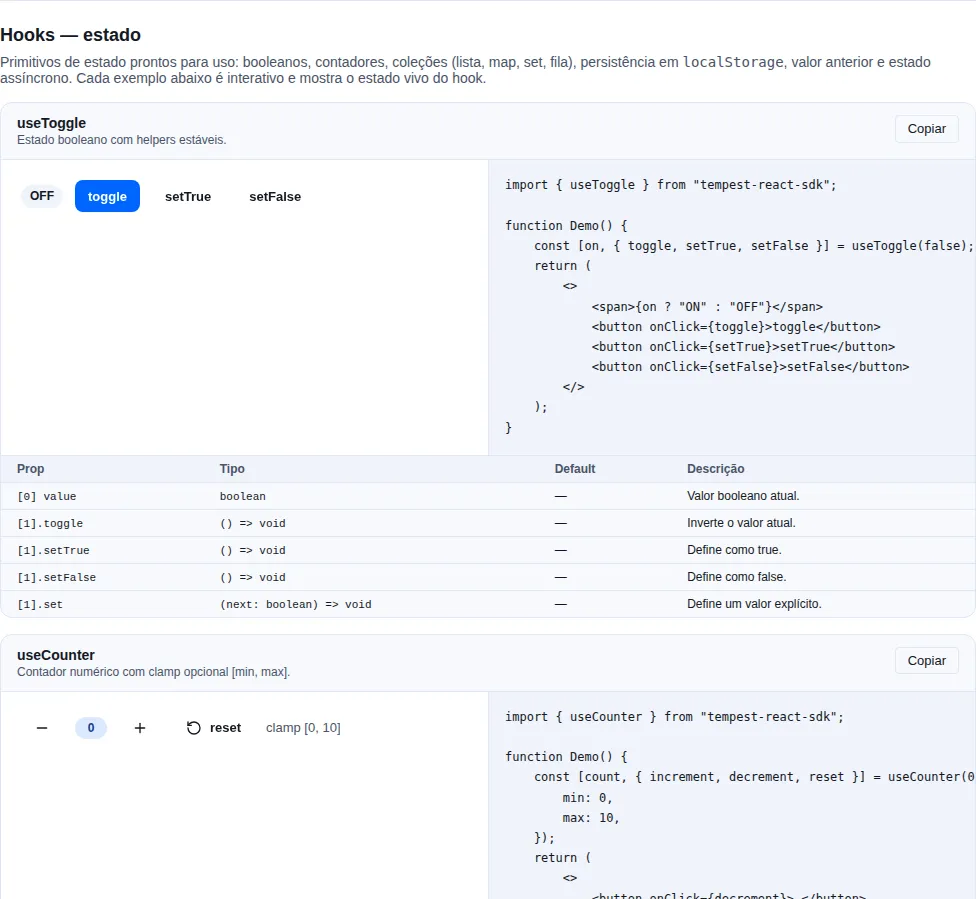
Section hooks-state of the gallery — run it locally to interact.
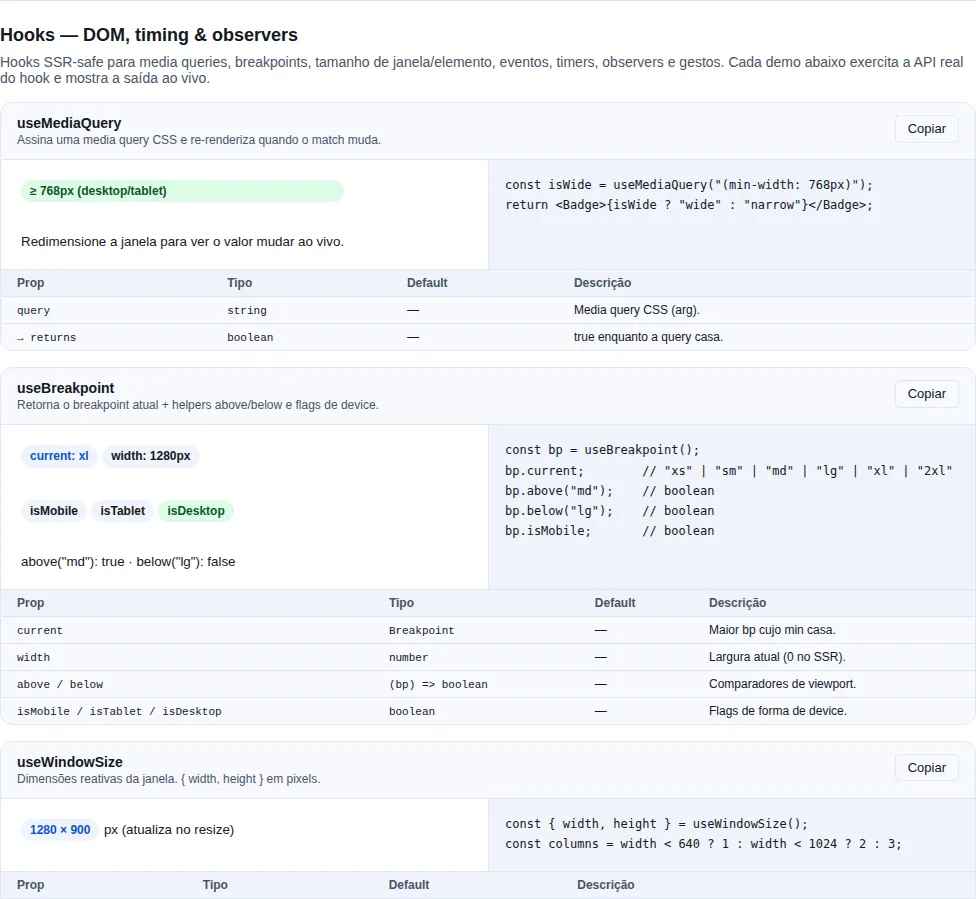
Section hooks-dom of the gallery — run it locally to interact.
Catalogue by purpose
DOM / viewport
| Hook | What it does |
|---|---|
useMediaQuery(query) |
Subscribes to matchMedia and re-renders on change. |
useBreakpoint() |
{ current, width, above, below, isMobile, isTablet, isDesktop } — reactive breakpoint (xs/sm/md/lg/xl/2xl). |
useWindowSize() |
{ width, height } of the window, reactive. |
useEventListener(name, handler, target?, opts?) |
Generic browser-guarded wrapper. target default = window. Accepts a ref or an EventTarget directly. |
useOnline(opts?) |
Reactive navigator.onLine; { pingUrl, intervalMs, timeoutMs } adds a real-reachability probe (catches captive portals / dead links). |
useDocumentVisibility() |
Reactive document.visibilityState. |
useIntersectionObserver(ref, opts?) |
IntersectionObserverEntry or null. |
useResizeObserver(ref) |
{ width, height } of the reference. |
useScrollOverflow(ref, axis?) |
true while the content overflows its box — use it to give a scroll container a tab stop only when there is something to scroll. |
useScrollLock(active) |
Locks body.overflow. |
useFocusTrap(ref, active) |
Confines Tab within the container. |
useHover(ref) / useLongPress(handler, opts?) |
Pointer gestures (reactive hover / long-press). |
useBeforeInstallPrompt() |
Deferred PWA install prompt (installable, installed, isStandalone, prompt()). |
useServiceWorkerUpdate({ url }) |
Registers the SW and exposes { updateAvailable, applyUpdate, registration } — consent-based update flow (pairs with <UpdatePrompt>). See PWA. |
useStorageEstimate({ pollMs? }) |
{ usage, quota, ratio, persisted, requestPersist, refresh } — Storage API quota + persist(). Pure pairs: estimateStorage, requestPersistentStorage. |
useIdle(timeout?) |
True when the user is idle for timeout ms. |
useFullscreen(ref?) |
{ isFullscreen, supported, enter, exit, toggle } — immersive mode whose state is driven by fullscreenchange, so Esc and the browser's own button update the UI. Pure pair: isFullscreenSupported. |
usePushToTalk({ code, onDown, onUp }) |
Hold to transmit. blur releases (alt-tab never delivers the keyup), auto-repeat is ignored, and a text field wins. Pairs: pushToTalkKeyLabel, PUSH_TO_TALK_KEYS. |
useGeolocation(opts?) |
Position + error + loading. |
useClickOutside(handler) |
Returns a ref; calls handler on a mousedown/touchstart outside the element. browser-guarded. |
useDocumentTitle(title) |
Sets document.title while mounted, restoring the previous one on unmount. browser-guarded. |
useFavicon(href) |
Swaps the favicon via <link rel="icon"> (creating the element if missing). browser-guarded. |
useAnnounce() |
Returns announce(message, politeness?) — speaks to screen readers through one shared live region. Pure pairs: announce, clearAnnouncer. |
Input / interaction
| Hook | What it does |
|---|---|
useDebounce(value, delay?) |
Returns the value stabilized after delay ms without changes. |
useThrottle(value, interval?) |
Limits updates to at most one per interval ms. |
useClipboard(opts?) |
{ copied, copy, reset } with a configurable TTL. |
useKeyboardShortcut(shortcut, handler, opts?) |
Global shortcut; accepts mod (Ctrl/Cmd). |
State
| Hook | What it does |
|---|---|
usePagination(initialPage?, initialSize?) |
{ page, size, setPage, setSize, reset }. |
useClientFilter(items, search, keysOrPredicate) |
Client-side filter by keys or predicate (memoized). Items are objects (T extends Record<string, unknown>). |
useDraftFilters(initial, { onApply?, isEqual? }) |
Draft vs applied state for a server-side filter: { draft, applied, isDirty, set, apply, clear }. Applying happens in the event, never in an effect — one click, one request. |
useLocalStorage<T>(key, default) |
State persisted to localStorage + synced cross-tab via the storage event. browser-guarded. |
useToggle(initial?) |
[value, { toggle, setTrue, setFalse, set }] — sugar for boolean state. |
useAsync<T>(fn, deps?, { immediate? }) |
Tracks idle/pending/success/error. { status, data, error, run, reset }. Distinct from React Query (no cache). |
usePrevious(value) |
The value from the previous render. |
useDisclosure(initial?) |
[opened, { open, close, toggle }] — stable handlers for modals/drawers/popovers. |
useCounter(initial?, { min, max }) |
[count, { increment, decrement, set, reset }] — numeric counter with an optional clamp. |
useListState<T>(initial?) |
[list, handlers] with append/prepend/insert/remove/reorder/setItem/setState/apply/clear. |
useMap<K, V>(initial?) |
{ map, set, delete, clear, get, has, size } — reactive Map (a fresh reference on each mutation). |
useSet<T>(initial?) |
{ set, add, delete, clear, has, toggle, size } — reactive Set (a fresh reference on each mutation). |
useQueue<T>({ initialValues, limit }) |
{ queue, add, update, cleanQueue, size } — FIFO queue with a limit and an overflow buffer. |
useIsFirstRender() |
true on the component's first render, false after. |
useObjectUrl(blob) |
Creates URL.createObjectURL(blob) and revokes it on unmount / when the blob changes; null for nullish input. |
Timers
| Hook | What it does |
|---|---|
useInterval(callback, delay) |
Declarative setInterval; delay = null pauses. |
useTimeout(callback, delay) |
Declarative setTimeout; delay = null cancels. |
useCountdown(durationMs, startedAt, { tickMs }) |
Time left on a window, recomputed from the clock each tick. Clamps at 0 and stops the interval. |
useTypewriter(text, speedMs) |
{ displayedText, isComplete, skip } — reveals text character by character. speedMs <= 0 renders it all at once. |
Performance
| Hook | What it does |
|---|---|
useStableCallback(fn) |
Stable ref that calls the current callback. |
useLatestRef(value) |
Stable ref whose current is always the newest value. |
useDeepMemo(value) |
Memoization with structural equality. |
browser-guarded by default
The hooks that touch browser APIs (useMediaQuery, useBreakpoint,
useWindowSize, useOnline, useDocumentVisibility, useLocalStorage,
useEventListener) check typeof window === "undefined" and return a safe
default on the server, hydrating the real value after mount. That is why the
first client render may briefly show the default (e.g. width: 0).
Examples
Offline-aware badge
import { useOnline, Badge } from "tempest-react-sdk";

function NetworkPill() {
  const online = useOnline();
  return <Badge variant={online ? "success" : "danger"}>{online ? "online" : "offline"}</Badge>;
}
Global shortcut — useKeyboardShortcut
import { useState } from "react";
import { useKeyboardShortcut } from "tempest-react-sdk";

function CommandPalette() {
  const [open, setOpen] = useState(false);
  useKeyboardShortcut({ key: "k", mod: true }, () => setOpen(true));
  return open ? <div role="dialog">Command palette…</div> : null;
}
mod: true accepts Ctrl or Cmd, simplifying cross-OS.
Doesn't fire inside inputs
By default (ignoreInput: true) the shortcut is ignored when focus is in an
<input>, <textarea>, <select> or [contenteditable] — so it doesn't steal
the "k" the user is typing. Pass { ignoreInput: false } if you want the
opposite.
Debounced search — useDebounce
import { useEffect, useState } from "react";
import { useDebounce } from "tempest-react-sdk";

function SearchBox() {
  const [text, setText] = useState("");
  const debounced = useDebounce(text, 400);

  useEffect(() => {
    if (debounced) fetch(`/api/search?q=${encodeURIComponent(debounced)}`);
  }, [debounced]);

  return <input value={text} onChange={(e) => setText(e.target.value)} placeholder="Search…" />;
}
useDebounce defers the value; the useEffect only fires once it stabilizes.
Lazy load via IntersectionObserver
import { useRef } from "react";
import { useIntersectionObserver } from "tempest-react-sdk";

function LazyChart() {
  const ref = useRef<HTMLDivElement>(null);
  const entry = useIntersectionObserver(ref, { once: true });
  return <div ref={ref}>{entry?.isIntersecting && <HeavyChart />}</div>;
}
Copy-to-clipboard with feedback — useClipboard
import { useClipboard, Button } from "tempest-react-sdk";

function CopyButton() {
  const { copied, copy } = useClipboard({ resetAfter: 2000 });
  return (
    <Button onClick={() => copy("npm install tempest-react-sdk")}>
      {copied ? "Copied!" : "Copy"}
    </Button>
  );
}
Responsive — useBreakpoint
import { useBreakpoint } from "tempest-react-sdk";

function Hero() {
  const bp = useBreakpoint();
  return <h1 style={{ fontSize: bp.isMobile ? 24 : 48 }}>Welcome</h1>;
}
bp.above("lg") / bp.below("md") cover arbitrary comparisons beyond the
isMobile / isTablet / isDesktop shortcuts.
The thresholds come from BREAKPOINTS, exported for when the same cut has to
exist outside React — in a media query built in JS, in a test, in a layout
calculation:
import { BREAKPOINTS } from "tempest-react-sdk";

BREAKPOINTS; // { xs: 480, sm: 640, md: 768, lg: 1024, xl: 1280, "2xl": 1536 }
window.matchMedia(`(min-width: ${BREAKPOINTS.lg}px)`);
Persisted state — useLocalStorage
import { useLocalStorage } from "tempest-react-sdk";

function ThemeToggle() {
  const [theme, setTheme] = useLocalStorage<"light" | "dark">("theme", "light");
  return <button onClick={() => setTheme(theme === "light" ? "dark" : "light")}>{theme}</button>;
}
Multi-tab: other tabs receive the update through an internal
window.addEventListener("storage", ...).
The key must be stable and unique
useLocalStorage uses the key as an internal dependency. Don't build it inline
with changing values (`user-${id}` changes every time id changes and
swaps the storage slot). And since the key is global per domain, pick a prefixed
name so it doesn't collide with another feature.
Async — useAsync
import { useAsync, Spinner, ErrorState } from "tempest-react-sdk";

interface User {
  id: string;
  name: string;
}

function UserPanel({ id }: { id: string }) {
  const { status, data, error, run } = useAsync<User>(
    () => fetch(`/api/users/${id}`).then((r) => r.json()),
    [id],
    { immediate: true },
  );

  if (status === "pending") return <Spinner />;
  if (status === "error") return <ErrorState description={String(error)} onRetry={run} />;
  return <p>{data?.name}</p>;
}
useAsync vs React Query
useAsync is the one-shot primitive — no cache, no extra dependencies — ideal
for point actions (submit, "load more"). For server data with caching, dedup and
revalidation, use React Query. useAsync discards results from
stale runs, so changing id quickly never causes a race.
Global listener — useEventListener
import { useState } from "react";
import { useEventListener } from "tempest-react-sdk";

function ScrollWatcher() {
  const [scrolled, setScrolled] = useState(false);
  useEventListener("scroll", () => setScrolled(window.scrollY > 100), undefined, {
    passive: true,
  });
  return <header data-scrolled={scrolled}>…</header>;
}
Focus trap in a custom Modal
import { useRef } from "react";
import { useFocusTrap, useScrollLock } from "tempest-react-sdk";

function CustomModal({ open }: { open: boolean }) {
  const ref = useRef<HTMLDivElement>(null);
  useFocusTrap(ref, open);
  useScrollLock(open);
  return open ? (
    <div ref={ref} role="dialog" aria-modal="true">
      …
    </div>
  ) : null;
}
The hook owns focus end to end: when it arms it moves focus to the first
focusable (or to the container itself when there is none — give it
tabIndex={-1}), keeps Tab/Shift+Tab inside, and when it disarms returns
focus to whoever held it when the trap armed — even if an autoFocus child took
focus first. Portalled panels opened from inside (Popover, HoverCard,
NavigationMenu, Menubar) count as part of the container, and traps stack:
only the most recent one moves focus.
Focus-trap accessibility
useFocusTrap handles focus, not the rest of the dialog contract: set
role="dialog" + aria-modal="true", give it an accessible name and handle
Escape. The SDK's Modal, Drawer and BottomSheet already do all of this —
only reach for this hook in hand-rolled overlays.
Speaking to a screen reader — useAnnounce
Something happened that a sighted user can see and a screen reader user cannot: a
filter narrowed a list, a row saved, a copy succeeded. useAnnounce returns a stable
function that says so.
import { useAnnounce, useClientFilter } from "tempest-react-sdk";
import { useEffect, useState } from "react";

interface Product extends Record<string, unknown> {
  id: string;
  name: string;
}

export function FilteredList({ items }: { items: Product[] }) {
  const [term, setTerm] = useState("");
  const visible = useClientFilter(items, term, ["name"]);
  const announce = useAnnounce();

  useEffect(() => {
    announce(`${visible.length} results`);
  }, [visible.length, announce]);

  return (
    <>
      <input value={term} onChange={(e) => setTerm(e.target.value)} aria-label="Search" />
      <ul>
        {visible.map((item) => (
          <li key={item.id}>{item.name}</li>
        ))}
      </ul>
    </>
  );
}
announce(message) is polite by default; announce(message, "assertive") interrupts
whatever is being read — keep it for an error that demands action.
Two regions, one polite and one assertive — on purpose
Politeness is a property of the region, read when the assistive technology
registers it. Flipping aria-live later is honoured by some screen readers,
ignored by others, and sometimes drops the announcement. Two regions that never
change are the only version that behaves the same everywhere. And they are
shared: several live regions mutating at once is how announcements get lost or
doubled.
The same string twice usually announces nothing
A screen reader announces when the content changes — writing the same text again is not a change, so "Item removed" twice in a row is read once. Instead of mutating text, every call replaces the region's child element: the mutation is real even for an identical string, and the reader hears exactly your message with no padding character bolted on.
Never wrap streaming text in a live region
A live region over text that grows token by token makes the reader start the whole
answer again on every token. Announce the edges — "generating response",
"response complete" — and leave the transcript in a plain role="log" the user
reads at their own pace. That is what AIChat does.
And what not to send to the announcer: content already on screen inside a region
with a role — a SyncStatusBadge (role="status"), a toast, a field error tied to its
input. Announcing those again reads them twice.
Outside React, announce(message, politeness?) is the same function and creates the
region on first use. clearAnnouncer() removes the regions — useful for test teardown
and for a micro-frontend leaving a page it does not own.
Toggle — useToggle
import { useToggle } from "tempest-react-sdk";

function Disclosure() {
  const [open, { toggle, setTrue }] = useToggle(false);
  return (
    <>
      <button onClick={toggle}>{open ? "Close" : "Open"}</button>
      <button onClick={setTrue}>Force open</button>
      {open && <p>Content</p>}
    </>
  );
}
The second element is an object, not loose functions
useToggle returns [value, { toggle, setTrue, setFalse, set }]. Destructure the
object (const [on, { toggle }] = useToggle()) — not const [on, toggle] = ...,
which would put the whole object in toggle.
Performance — useStableCallback
import { useEffect } from "react";
import { useStableCallback } from "tempest-react-sdk";

function Tracker({ onSelect }: { onSelect: (id: string) => void }) {
  const stable = useStableCallback(onSelect);
  // `stable` has a constant ref; the effect doesn't re-fire when onSelect changes.
  useEffect(() => bindSomething(stable), [stable]);
  return null;
}
Mind the dependency array
Pass useStableCallback to effects/listeners you don't want to re-run when
the callback's identity changes. Derived values (useDebounce, useAsync with
deps) should still go into the deps normally — omitting them causes stale-value
bugs. Rule of thumb: trust eslint-plugin-react-hooks.
A fresh value inside a run-once effect — useLatestRef
An effect mounted once — an interval, a subscription, a listener — is stuck with the render that created its closure. Listing the value in the dependencies tears the effect down and back up on every change; omitting it freezes the value. useLatestRef is the third way out:
import { useEffect } from "react";
import { useLatestRef } from "tempest-react-sdk";

function Poller({ options }: { options: PollOptions }) {
  const optionsRef = useLatestRef(options);

  useEffect(() => {
    const id = setInterval(() => poll(optionsRef.current), 5_000);
    return () => clearInterval(id);
  }, [optionsRef]); // the interval survives every options change — and still reads the latest

  return null;
}
useLatestRef or useStableCallback?
When the value is a function you want to call, use useStableCallback: it hands back something callable with a stable identity, instead of making every call site reach through .current. useLatestRef covers everything else — config objects, state, props.
Cooldown — useCountdown
import { useCountdown } from "tempest-react-sdk";

function ResendButton({ lastSentAt }: { lastSentAt: number }) {
  const remaining = useCountdown(60_000, lastSentAt);

  return (
    <button disabled={remaining > 0}>
      {remaining > 0 ? `Resend in ${Math.ceil(remaining / 1000)}s` : "Resend code"}
    </button>
  );
}
The hook is built around a timestamp, not a counter that decrements. The remaining time is recomputed from Date.now() on every tick, so a throttled background tab, a slow frame or a drifting setInterval cannot make the countdown disagree with the clock — and remounting the component resumes at the right value instead of restarting. The interval stops at zero rather than running on behind a clamp.
Pass { tickMs: 50 } when the value drives a progress bar; the 1000 default suits a "try again in Ns" label.
Text revealed character by character — useTypewriter
import { useMediaQuery, useTypewriter } from "tempest-react-sdk";

function Dialogue({ line }: { line: string }) {
  const reduced = useMediaQuery("(prefers-reduced-motion: reduce)");
  const { displayedText, isComplete, skip } = useTypewriter(line, reduced ? 0 : 30);

  return <p onClick={skip}>{displayedText}{isComplete ? "" : "▌"}</p>;
}
Changing text restarts the reveal. The reset happens during render, not in an effect, so the new string never flashes in full for one frame before the animation takes over.
Always give the reader a way out
An animation that cannot be skipped is a tax on anyone re-reading or moving fast. Wire skip to a click or a key — and handle prefers-reduced-motion by passing speedMs = 0, which renders everything at once with no conditional branch in the component.
Disclosure — useDisclosure
import { useDisclosure, Modal, Button } from "tempest-react-sdk";

function EditPanel() {
  const [opened, { open, close }] = useDisclosure(false);
  return (
    <>
      <Button onClick={open}>Edit</Button>
      <Modal open={opened} onClose={close} title="Edit profile">
        …
      </Modal>
    </>
  );
}
The handlers (open/close/toggle) are referentially stable across renders — unlike useToggle, it's the right sugar for overlays.
Clamped counter — useCounter
import { useCounter, Button } from "tempest-react-sdk";

function Quantity() {
  const [count, { increment, decrement, reset }] = useCounter(1, { min: 1, max: 10 });
  return (
    <>
      <Button onClick={decrement}>−</Button>
      <span>{count}</span>
      <Button onClick={increment}>+</Button>
      <Button onClick={reset}>Reset</Button>
    </>
  );
}
useCounter(initial, { min, max }) clamps the value — increment/decrement/set respect the bounds.
Draft vs applied — useDraftFilters
A server-side filter cannot react to every keystroke: each typed character would be a request. The pattern is always the same — a draft the bar edits freely, and an applied value that only changes on click (or Enter).
import { Button, Input, useDraftFilters, usePaginatedQuery, type OffsetPage } from "tempest-react-sdk";

interface AppError {
  id: number;
  code: string;
}

async function listErrors(params: Record<string, unknown>): Promise<OffsetPage<AppError>> {
  const response = await fetch(`/api/errors?${new URLSearchParams(params as Record<string, string>)}`);
  return (await response.json()) as OffsetPage<AppError>;
}

export function Logs() {
  const filters = useDraftFilters({ code: "" });
  const errors = usePaginatedQuery<AppError>({
    queryKey: ["errors", filters.applied],
    queryFn: (params) => listErrors({ ...params, ...filters.applied }),
  });

  return (
    <>
      <Input
        label="Code"
        value={filters.draft.code}
        onChange={(e) => filters.set({ code: e.target.value })}
      />
      <Button disabled={!filters.isDirty} onClick={() => filters.apply()}>
        Apply
      </Button>
      <Button variant="ghost" onClick={filters.clear}>
        Clear
      </Button>
      <ul>
        {errors.items.map((error) => (
          <li key={error.id}>
            <Button variant="link" onClick={() => filters.apply({ code: error.code })}>
              {error.code}
            </Button>
          </li>
        ))}
      </ul>
    </>
  );
}
set(partial)edits only the draft.apply()publishes the draft;apply(partial)writes and publishes in the same gesture — the "filter by this code" of a table row, which with twosetStates would read the stale draft.clear()returns the draft and the applied value to the initial one, together: resetting only one leaves a filtered list under an empty bar, or the opposite.isDirtyisfalseright afterapply()andclear()— it is what enables the button.appliedkeeps the same reference while nobody applies something different, so it can be aqueryKeywithout a phantom refetch.
The page goes back to 1 on its own
Filtering while on page 7 asked for page 7 of a result that now has two, and the screen came back empty. Measured (test in src/query/use-paginated-query.test.tsx): before 0.68.0 the requests were [":page=1", ":page=7", "AUTH:page=7"]; now they are [":page=1", ":page=7", "AUTH:page=1"]. The fix lives in usePaginatedQuery, not here: any structural change of the queryKey resets the page, in the same render — with or without this hook.
Keeping the page yourself? Use onApply
If the page lives in your own useState (or in the URL), useDraftFilters(EMPTY, { onApply: () => setPage(1) }) — it runs on every apply() and clear().
No effect in there
Applying happens in the event that asked for it, never in a useEffect watching the draft. That is what guarantees one request per click.
List as state — useListState
import { useListState, Button } from "tempest-react-sdk";

function TodoList() {
  const [items, handlers] = useListState<string>(["Buy bread"]);
  return (
    <>
      <Button onClick={() => handlers.append("New item")}>Add</Button>
      <ul>
        {items.map((item, i) => (
          <li key={i} onClick={() => handlers.remove(i)}>
            {item}
          </li>
        ))}
      </ul>
    </>
  );
}
Immutable handlers: append/prepend/insert/remove/reorder/setItem/setState/apply/clear. Use handlers.reorder({ from, to }) for drag-and-drop.
Reactive Map and Set — useMap / useSet
import { useMap, useSet } from "tempest-react-sdk";

function SelectionTracker() {
  const selected = useSet<string>();
  const meta = useMap<string, number>();

  return (
    <button
      onClick={() => {
        selected.toggle("a");
        meta.set("clicks", (meta.get("clicks") ?? 0) + 1);
      }}
    >
      {selected.size} selected · {meta.get("clicks") ?? 0} clicks
    </button>
  );
}
useMap returns { map, set, delete, clear, get, has, size } and useSet returns { set, add, delete, clear, has, toggle, size } — each mutation yields a fresh reference and re-renders.
FIFO queue — useQueue
import { useQueue, Button } from "tempest-react-sdk";

function Notifications() {
  const { queue, add, cleanQueue, size } = useQueue<string>({ limit: 3 });
  return (
    <>
      <Button onClick={() => add(`msg ${Date.now()}`)}>Enqueue</Button>
      <Button onClick={cleanQueue}>Clear visible ({size})</Button>
      <ul>
        {queue.map((msg, i) => (
          <li key={i}>{msg}</li>
        ))}
      </ul>
    </>
  );
}
useQueue({ initialValues, limit }) keeps up to limit items visible in queue; the surplus sits in a buffer and surfaces as cleanQueue frees space.
Close on outside click — useClickOutside
import { useState } from "react";
import { useClickOutside } from "tempest-react-sdk";

function Menu() {
  const [open, setOpen] = useState(false);
  const ref = useClickOutside<HTMLDivElement>(() => setOpen(false));
  return open ? (
    <div ref={ref} role="menu">
      …
    </div>
  ) : null;
}
useClickOutside(handler) returns a ref; the handler fires on a mousedown/touchstart outside the element.
Title and favicon — useDocumentTitle / useFavicon
import { useDocumentTitle, useFavicon } from "tempest-react-sdk";

function InboxPage({ unread }: { unread: number }) {
  useDocumentTitle(unread > 0 ? `(${unread}) Inbox` : "Inbox");
  useFavicon(unread > 0 ? "/favicon-alert.ico" : "/favicon.ico");
  return <main>…</main>;
}
Both are browser-guarded; useDocumentTitle restores the previous title on unmount.
First render — useIsFirstRender
import { useEffect } from "react";
import { useIsFirstRender } from "tempest-react-sdk";

function Analytics({ query }: { query: string }) {
  const first = useIsFirstRender();
  useEffect(() => {
    if (!first) track("search-refined", { query });
  }, [query, first]);
  return null;
}
Returns true only on the first render — handy to skip mount-time effects.
Immersive mode — useFullscreen
Fullscreen is the case where keeping the state in your own function always lies. Esc, the browser's own exit button and F11 pressed during an API session all leave fullscreen without going through your exit() — and the useState you flipped on the click keeps saying "Leave fullscreen" over a page that is already back to normal.
useFullscreen reads the fullscreenchange event (plus the webkitfullscreenchange variant, which Safari is still the only engine to fire). The state comes from there, never from the return of the call:
import { useRef, useState } from "react";
import { Alert, Button, useFullscreen } from "tempest-react-sdk";

export function ImmersiveStage() {
  const stage = useRef<HTMLDivElement>(null);
  const { isFullscreen, supported, toggle } = useFullscreen(stage);
  const [refused, setRefused] = useState(false);

  return (
    <div ref={stage} style={{ background: "black" }}>
      <video src="/lesson.mp4" controls />

      {refused ? <Alert variant="warning">The browser refused fullscreen.</Alert> : null}

      {supported ? (
        <Button
          onClick={() => {
            setRefused(false);
            toggle().catch(() => setRefused(true));
          }}
        >
          {isFullscreen ? "Leave fullscreen" : "Fullscreen"}
        </Button>
      ) : null}
    </div>
  );
}
Three things are going on there:
isFullscreenis identity between your element and the one the browser is presenting. Leaving withEscdrops the flag without you doing anything; a<video>inside your stage going fullscreen on its own does not count, because the element being painted is not yours.supportedcomes fromisFullscreenSupported()— the same function exported standalone, for checking outside a component. It isfalsein two situations that only the flag tells apart: the API does not exist (older WebKit, iOS outside<video>) and the API exists but is switched off, which is what an<iframe>withoutallowfullscreenreports. Hiding the button beats rendering one that does nothing.toggle()is async and can reject. The rejection is propagated on purpose, so handle it — without the.catch()it becomes an unhandled rejection in the console.
With no ref, the target is the whole page (document.documentElement); enter() and exit() exist separately for when the button is not a toggle.
Only inside a user gesture
requestFullscreen is only accepted from a click, tap or key press. Calling enter() in a mount useEffect rejects with a TypeError in every modern browser — and that is why the rejection reaches you instead of being swallowed: a button that did nothing has to say why.
F11 is a different thing
The browser's own fullscreen (F11) does not go through the Fullscreen API: document.fullscreenElement stays null and no event fires, so isFullscreen stays false for an F11 session. The other direction does hold: F11 pressed during an API fullscreen leaves it and fires the event, which is exactly the case the hook covers.
Overlays in fullscreen already work on their own
You do not need this hook for <Modal>, <Drawer> or toasts: the SDK's <Portal> follows the fullscreen element by itself — including moving an already-open dialog when fullscreen starts. See Fullscreen.
Push-to-talk — usePushToTalk
Holding a key to transmit looks like keydown/keyup and is not. Three things go wrong, and all three only show up in real use:
import { usePushToTalk, pushToTalkKeyLabel, PUSH_TO_TALK_KEYS } from "tempest-react-sdk";

export function VoiceBar({ track }: { track: MediaStreamTrack }) {
  const [key, setKey] = useState("Space");

  usePushToTalk({
    code: key,
    onDown: () => (track.enabled = true),
    onUp: () => (track.enabled = false),
  });

  return (
    <p>
      Hold <kbd>{pushToTalkKeyLabel(key)}</kbd> to talk.
    </p>
  );
}
blurreleases, and it is not an edge case: alt-tabbing with the key held means the browser never sees thekeyup, and the microphone stays open for as long as the person is looking at another window — exactly what push-to-talk exists to prevent. Unmounting releases for the same reason.- Auto-repeat is ignored (
event.repeat), otherwise a held key firesonDownat the keyboard's repeat rate. - A text field wins — on the way down. With the focus in an
<input>,<textarea>,<select>or acontenteditable, the key passes straight through: without that, Space as PTT means you cannot type a space in the chat, because the handler calledpreventDefault. On the way up the guard is a different one: it releases if a hold was in progress, and only then swallows the key.keyupgoes to whatever is focused when the key rises, not to what was focused when it fell — so holding Space over the page and clicking into an<input>before letting go delivers thekeyupinto the field, and a field guard there would swallow the release and leave the microphone open.
PUSH_TO_TALK_KEYS is the list for a settings picker, DEFAULT_PUSH_TO_TALK_KEY ("Space") the value to seed the preference with before anyone chooses, and pushToTalkKeyLabel(code) the label — a raw KeyboardEvent.code is not something to show a person.
code, not key
The binding uses KeyboardEvent.code, which is the physical key: on an ABNT2 keyboard the key reported for the backquote position is not what a US layout reports, while Backquote is the same key on both.
enabled: false to switch it off without unmounting
Toggling between an open microphone and push-to-talk is enabled. Turning it off releases first, so flipping the switch with the key held does not leave onUp unfired.
PWA & pointer gestures
Install prompt with fallback — useInstallPrompt
useBeforeInstallPrompt (above) only captures the Chromium beforeinstallprompt event. But half of your users are on iOS Safari (which never fires it) or on an Android Chromium fork that stripped the API. useInstallPrompt resolves which strategy to offer, in a single method:
import { useInstallPrompt } from "tempest-react-sdk";

function InstallButton() {
  const { method, install, openInChromeIntent } = useInstallPrompt();

  if (method === "native")
    return <button onClick={install}>Install app</button>;
  if (method === "ios")
    return <p>Tap Share → Add to Home Screen</p>;
  if (method === "manual")
    return openInChromeIntent ? (
      <a href={openInChromeIntent}>Open in Chrome to install</a>
    ) : (
      <p>Use the browser menu → Install app</p>
    );
  return null; // "none" — already installed or unsupported runtime
}
method resolves like this:
"native"→ thebeforeinstallpromptevent arrived; callinstall()to trigger the native prompt."ios"→ iOS/iPadOS Safari; show the "Add to Home Screen" instructions."manual"→ a Chromium fork without the API, or no event arrived withinmanualFallbackDelayMs(3s by default); show generic browser-menu instructions."none"→ already running as an installed PWA (standalone display mode) or the decline cooldown is active.
When the user declines, the hook stores a timestamp in localStorage and hides the CTA for declineCooldownMs (7 days by default). It's all pluggable and browser-guarded:
| Option | Default | What it does |
|---|---|---|
declineStorageKey |
"tempest:install-declined-at" |
localStorage key for the decline timestamp. |
declineCooldownMs |
604800000 (7 days) |
How long the CTA stays hidden after a decline. |
manualFallbackDelayMs |
3000 |
How long to wait for beforeinstallprompt before falling back to "manual". |
Environment helpers exported separately
The pure functions behind the hook are exported too — useful on their own: isIOS(), isAndroid(), isAndroidWithoutPromptApi() (Mi/UC/Opera Mini/Huawei/KaiOS), isStandalone(), and buildOpenInChromeIntent() (builds an intent:// URL that reopens the page in Android Chrome, with a Play Store fallback). The BeforeInstallPromptEvent type ships from the SDK as well.
Long-press that returns handlers — useLongPressHandlers
useLongPress(ref, fn) (in the DOM / viewport table above) attaches pointer listeners to a ref. When you'd rather spread handlers onto an element and also suppress the click that follows a long-press, use useLongPressHandlers:
import { useLongPressHandlers } from "tempest-react-sdk";

function AnimalCard({ id }: { id: string }) {
  const longPress = useLongPressHandlers(() => enterSelectionMode(id), {
    delayMs: 500,
  });

  return (
    <button
      {...longPress}
      onClick={() => {
        if (longPress.wasLongPress()) return; // guard the post-hold click
        openDetails(id);
      }}
    >
      Animal {id}
    </button>
  );
}

declare function enterSelectionMode(id: string): void;
declare function openDetails(id: string): void;
It fires onLongPress once after delayMs (mouse or touch), cancels on release/move, and wires contextmenu so a desktop right-click opens selection mode just like an Android long-press. wasLongPress() reports whether the last interaction was a long-press — use it in onClick to avoid navigating twice. Pass { disabled: true } to make the handlers inert.
Drag to reorder — useSortable
Drag-to-reorder, with a keyboard path of equal standing. The hook owns interaction only: it never touches your data. onReorder fires once per committed move and you apply it, typically with moveItem.
import { moveItem, useSortable } from "tempest-react-sdk";
import { useState } from "react";

export function BacklogPriority() {
  const [items, setItems] = useState(["Fix login", "CSV export", "Dark mode"]);

  const sortable = useSortable({
    itemCount: items.length,
    roleDescription: "Sortable item",
    onReorder: ({ from, to }) => setItems((current) => moveItem(current, from, to)),
  });

  return (
    <ul {...sortable.getListProps()} aria-label="Priority" ref={sortable.setContainer}>
      {items.map((item, index) => (
        <li
          key={item}
          {...sortable.getItemProps(index)}
          className={index === sortable.overIndex ? "highlight" : undefined}
        >
          {item}
        </li>
      ))}
    </ul>
  );
}
| Field | Type | What it is |
|---|---|---|
activeIndex |
number \| null |
Index being dragged, or null when idle |
overIndex |
number \| null |
Where it would land if dropped now — use it to draw the indicator |
getItemProps(index) |
props | Spread on each item (pointer, keyboard, role="option", tabIndex) |
getListProps() |
props | Spread on the container (role="listbox") |
setContainer |
callback ref | Point it at the container: that is where hit-testing looks for items |
cancel() |
() => void |
Aborts the drag without reordering |
Keyboard: Space picks the item up · arrows move it · Space/Enter drop it · Escape cancels.
A reorder that only works by dragging excludes keyboard users
That is where most drag-and-drop implementations fail. Here the keyboard path is not an extra: same state (activeIndex/overIndex), same commit, same onReorder. role="listbox" + role="option" + aria-roledescription are what make a screen reader announce the list as sortable.
One onReorder per move, not per frame
The hook does not call onReorder mid-drag. If it did, a controlled list would re-render on every pointermove — and the indices would shift underneath the drag itself. You draw the preview from overIndex; the mutation happens once, on release.
Rows of different heights work
Hit-testing reads the live rects of the [data-sortable-index] children instead of assuming a fixed row height. Changing itemCount mid-drag cancels it: the list no longer has the indices the drag was based on, and committing would move the wrong row.
Recap
- Granular, independent, tree-shakeable hooks — import only what you use.
- The browser-facing ones are browser-guarded: they return a default on the server and hydrate after mount.
useTogglereturns[value, { toggle, setTrue, setFalse, set }]— the second item is an object.useDisclosure/useCounter/useListStatereturn a[state, handlers]tuple;useMap/useSet/useQueuereturn a single object.useAsyncis the cache-less primitive; for server data with caching use React Query.- Watch the dependency arrays:
useStableCallbackto avoid re-runs, explicit deps everywhere else.
See also
- Components —
<Show>/<Hide>useuseBreakpointunder the hood - Theme —
useMediaQueryfor programmatic responsiveness - Query — React Query when you need server cache
- Forms —
useDebounceon search fields,useAsyncon submit