Device capture
Four browser APIs that cost no dependency at all: the camera reading codes
(BarcodeScanner, useBarcodeScanner), recorded video (useVideoRecorder), the
shared screen (useScreenCapture) and speech turned into text
(useSpeechRecognition).
The whole slice measures 5.40 KB brotli — and every one of those four things is an API the browser already has, not a library the SDK bundled.
If you only want to read a barcode, jump to Reading codes
The rest of the page is video, screen and speech, plus the lower layer of each.
Audio capture lives on another page
Microphone, voice recording, level meter and WAV are in Audio. The two pages share the same recording engine and the same error taxonomy — what changes is the device.
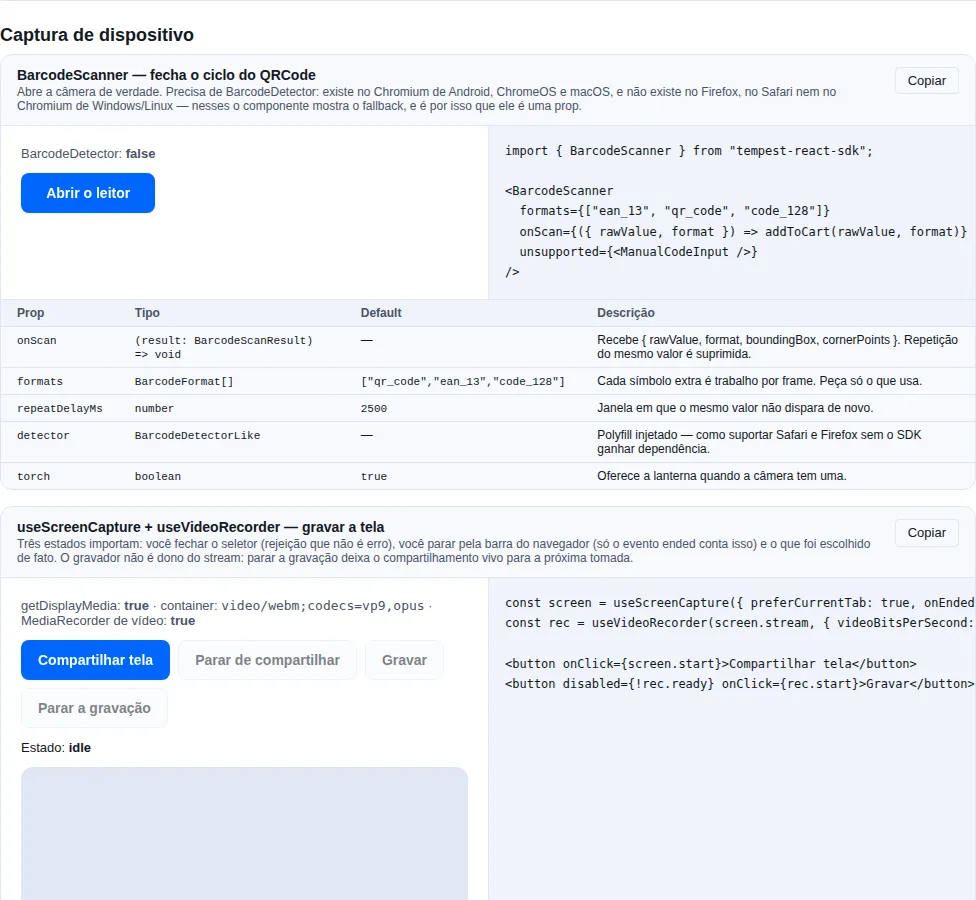
Section device-capture of the gallery — run it locally to interact.
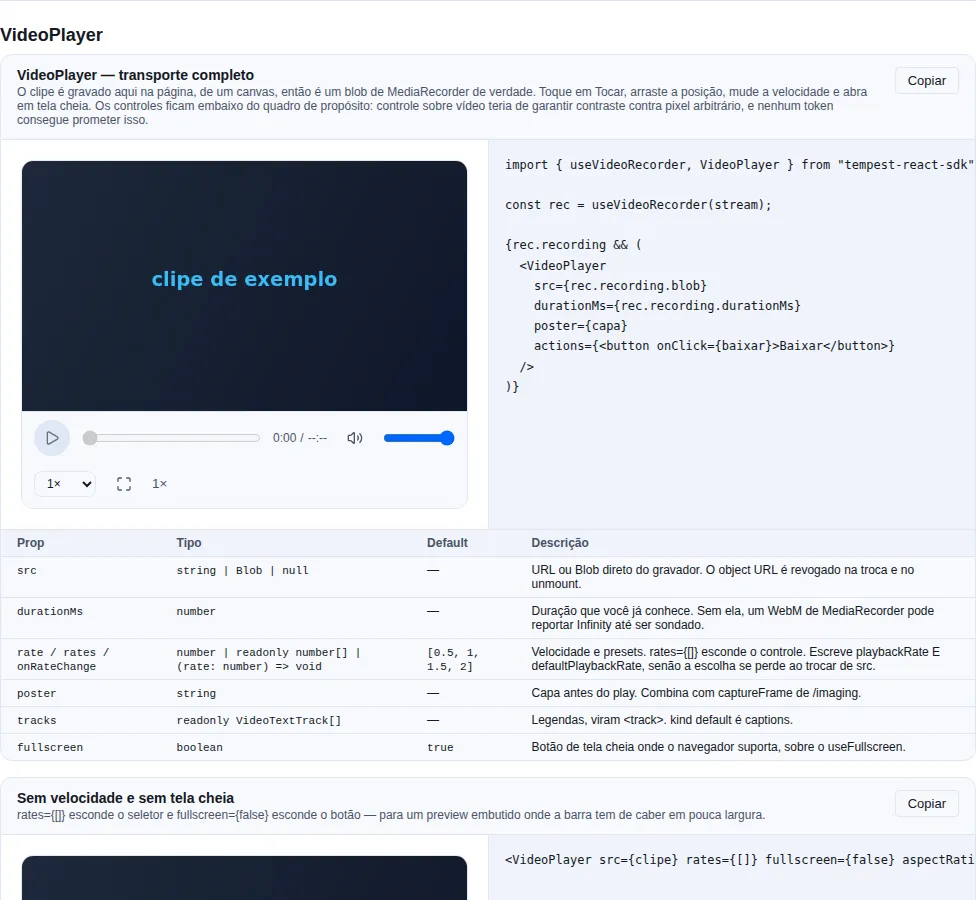
Section video-player of the gallery — run it locally to interact.
Reading codes: start with the component
The SDK already had QRCode, which only encodes.
BarcodeScanner closes the loop:
import { BarcodeScanner } from "tempest-react-sdk";

export function ProductScanner({ onProduct }: { onProduct: (gtin: string) => void }) {
  return (
    <BarcodeScanner
      formats={["ean_13", "qr_code", "code_128"]}
      onScan={({ rawValue, format }) => {
        if (format === "ean_13") onProduct(rawValue);
      }}
      footer={<small>Point the camera at the barcode on the package.</small>}
      unsupported={<TypeCodeField onSubmit={onProduct} />}
    />
  );
}
What you get without writing anything:
| You did | The component does |
|---|---|
| nothing | Fixed-ratio viewport, corner brackets and a scanning indicator |
| nothing | A detect loop that never overlaps — it never queues a read on top of the last one |
| nothing | Suppresses the same code repeating; a different value fires immediately |
| nothing | The torch, when the camera has one |
| nothing | A classified camera error, with a retry button |
unsupported |
Where there is no decoder, shows your fallback instead of a black rectangle |
Mounting the scanner opens the camera — mount it when the user asks
useCameraStream acquires on mount, so rendering the scanner is firing the prompt.
A prompt the user did not provoke is the most reliable way to earn a permanent
block — after which getUserMedia rejects without ever asking again, which also
burns the next feature that needs the camera. The pattern is a button that reveals
it:
const [scanning, setScanning] = useState(false);

return scanning ? (
  <BarcodeScanner onScan={accept} />
) : (
  <Button onClick={() => setScanning(true)}>Scan a code</Button>
);
BarcodeDetector does not exist in half the browsers
This is the part that decides the design of your screen, so it is here and not in a footnote:
| Engine | Has BarcodeDetector? |
|---|---|
| Chromium on Android and ChromeOS | yes |
| Chromium on macOS | usually yes |
| Chromium on Windows and Linux | no |
| Firefox (any OS) | no |
| Any browser on iOS (all are WebKit underneath, Chrome included) | no |
The SDK bundles no decoder at all, and that is a choice rather than a gap: a QR reader is Reed–Solomon error correction plus perspective correction plus a finder-pattern search, and the honest options were a WASM build every consumer of this SDK would pay for, or nothing. So what exists is the seam:
import { BarcodeDetector } from "barcode-detector/pure"; // or your zxing-wasm wrapper
import { BarcodeScanner } from "tempest-react-sdk";

<BarcodeScanner
  detector={new BarcodeDetector({ formats: ["qr_code", "ean_13"] })}
  onScan={accept}
/>;
Anything with a detect(source) resolving to { rawValue } will do — that is all the
BarcodeDetectorLike interface asks, and it is what the SDK's own tests exercise with a
real decoder.
You need no decoder at all for the most common case
On operations screens (load checking, POS, inventory) the target is an Android phone,
where the API exists. unsupported covers the office desktop with a text field — which
tends to be what a keyboard-driven operator prefers anyway.
Props
| Prop | Type | Default | What it does |
|---|---|---|---|
onScan |
(result: BarcodeScanResult) => void |
— | Every accepted read. |
formats |
BarcodeFormat[] |
DEFAULT_BARCODE_FORMATS = ["qr_code","ean_13","code_128"] |
Every extra symbology is work per frame. ALL_BARCODE_FORMATS carries the whole domain, for building a picker. |
paused |
boolean |
false |
Stops looking without releasing the camera. |
detector |
BarcodeDetectorLike |
— | Injected polyfill. |
intervalMs |
number |
200 |
How often a frame is examined. |
repeatDelayMs |
number |
2500 |
Window in which the same value does not fire again. |
torch |
boolean |
true |
Offers the torch when the camera has one. |
aspectRatio |
number |
4 / 3 |
Viewport ratio. |
locale |
"pt-BR" \| "en" |
"pt-BR" |
Labels. |
footer · unsupported |
ReactNode |
— | Instruction and fallback. |
onError |
(error: unknown) => void |
— | A frame the engine refused (routine). |
BarcodeScanResult = { rawValue, format, boundingBox, cornerPoints } — boundingBox is
null and cornerPoints is [] when the engine reports no geometry.
The formats that matter here
Three carry the weight in Brazil: ean_13 is the barcode on every packaged product,
qr_code is what a Pix "copia e cola" payload travels in, and code_128 is the
label on a shipment. The default is exactly those three.
Asking for a format the engine does not have makes the constructor throw
NotSupportedError, which reads like a bug in your code. The format list belongs to the
platform decoder, not to the browser, so two Chromium builds on two operating
systems answer differently. The hook handles that by asking for the intersection — and
you can look first:
import { getSupportedBarcodeFormats } from "tempest-react-sdk";

const formats = await getSupportedBarcodeFormats(); // [] where there is no decoder
Repeat suppression is not a detail
A symbol stays in frame for as long as the user holds the camera there. Without
suppression, the same code fires five times a second — and wired to "add to cart" that is a
bug the customer pays for. repeatDelayMs (2.5 s by default) is the window in which the
same value is ignored; a different value never is.
If your screen opens a confirmation after a read, set paused while it is open — it stops
looking without releasing the camera, so closing the confirmation costs no second
permission round-trip.
Torch
import { useTorch } from "tempest-react-sdk";

const torch = useTorch(stream);
{torch.supported && <button onClick={() => void torch.toggle()}>Torch</button>}
The torch is not a device — it is a constraint on a live track
There is nothing to control before a camera stream exists, and it disappears when that
stream is released. That is why supported can only be answered afterwards: the same
code is true on an Android rear camera and false on the front one of the same
phone. Where neither getCapabilities() nor getSettings() mentions torch, the hook
reports false instead of offering a button that silently does nothing.
Building it yourself: useBarcodeScanner
import { useBarcodeScanner } from "tempest-react-sdk";

export function OwnScanner() {
  const scanner = useBarcodeScanner({
    formats: ["ean_13"],
    onScan: ({ rawValue }) => console.log(rawValue),
  });

  if (!scanner.supported) return <p>This browser cannot decode codes.</p>;

  return (
    <>
      <video ref={scanner.videoRef} muted playsInline style={{ width: "100%" }} />
      <p>{scanner.scanning ? "Looking…" : scanner.status}</p>
      {scanner.error && <p role="alert">{scanner.error.message}</p>}
    </>
  );
}
The loop re-arms itself after each detect() settles rather than on a setInterval:
decoding sometimes takes longer than the interval, and an interval would queue calls faster
than the engine drains them until the tab is unusable.
Recording video
useVideoRecorder is useAudioRecorder with a video track and videoBitsPerSecond — the
clock that subtracts paused time, the stop() that resolves with every chunk in hand
and the container negotiation are the same, because it is the same engine.
import { useScreenCapture, useVideoRecorder } from "tempest-react-sdk";

export function ScreenRecorder() {
  const screen = useScreenCapture({ preferCurrentTab: true });
  const rec = useVideoRecorder(screen.stream, {
    maxDurationMs: 120_000,
    videoBitsPerSecond: 2_500_000,
    onRecorded: ({ blob, durationMs }) => send(blob, durationMs),
  });

  return (
    <>
      <button onClick={screen.start}>Share screen</button>
      <button disabled={!rec.ready} onClick={rec.start}>Record</button>
      <button disabled={rec.status !== "recording"} onClick={() => void rec.stop()}>
        Stop
      </button>
      <span>{(rec.durationMs / 1000).toFixed(1)} s</span>
    </>
  );
}
ready stays false until there is a stream, so the whole UI can render disabled while
the user has not picked a screen yet.
The container that comes out is not the one you asked for
VideoRecording.mimeType is what the browser reported, not what was negotiated: we
hand over video/webm;codecs=vp9,opus and Chromium answers video/webm;codecs=vp9
when there is no audio. Use the value that came back to name the file and to set the
upload's Content-Type. The preference order is VP9 → VP8 → WebM → MP4/H.264 (the last
one exists for Safari, which produces nothing else).
Video fills memory an order of magnitude faster than audio
A minute of 1080p at 2.5 Mbps is roughly 19 MB sitting in memory until stop(). On
any capture that could run past a few minutes, use timesliceMs and send the pieces
away:
useVideoRecorder(stream, {
  timesliceMs: 5_000,
  onChunk: (chunk) => void upload(chunk),
});
Chunks are not independently playable: only the set forms a valid file.
There is no level meter here, and that is deliberate
Metering a screen share means opening an AudioContext over a stream that usually has
no audio track at all, and browsers cap live contexts (Chrome allows about 6). If you
record a camera and want a level, run
createLevelMeter on the same stream.
The recorder does not own the stream: stopping the recording leaves the share alive, because a support flow usually records, stops, lets the person look and records again.
Playing back what was recorded: VideoPlayer
AudioPlayer's counterpart for video. It takes the Blob directly, with no
upload in between:
import { useScreenCapture, useVideoRecorder, VideoPlayer } from "tempest-react-sdk";

export function RecordAndReview() {
  const screen = useScreenCapture();
  const rec = useVideoRecorder(screen.stream);

  return (
    <>
      <button onClick={screen.start}>Share screen</button>
      <button disabled={!rec.ready} onClick={rec.start}>Record</button>
      <button onClick={() => void rec.stop()}>Stop</button>

      {rec.recording && (
        <VideoPlayer src={rec.recording.blob} durationMs={rec.recording.durationMs} />
      )}
    </>
  );
}
The full transport: play/pause, a seek bar, times, mute and volume, speed
and fullscreen. playsInline is on by default.
| Prop | What it does |
|---|---|
src |
URL or Blob/File. The object URL is revoked on change and unmount |
durationMs |
A length you already know — pass it whenever you have it |
rate / rates / onRateChange |
Speed and its presets. rates={[]} hides the control |
shiftPitch |
Let the pitch rise with the speed. Default false |
poster |
Cover still. Pairs with captureFrame |
tracks |
Captions, rendered as <track> |
aspectRatio |
Frame shape before the video reports its own. Default 16 / 9 |
fullscreen |
Fullscreen button where the browser supports it. Default true |
muted / autoPlay / loop |
As on the element |
actions |
Slot at the end of the bar — download, delete |
The default presets are exported as DEFAULT_PLAYBACK_RATES ([0.5, 1, 1.5, 2]), so a settings screen can show the list instead of restating it.
The speed resets on a src change if you only write playbackRate
The element's load algorithm copies defaultPlaybackRate over
playbackRate. A player that keeps "2×" in state and writes only the second
loses the viewer's choice on every new clip — no error, no log.
VideoPlayer writes both.
If you build your own instead, that is the line that cannot be missing. And do not expect a jsdom test to catch it: there the two values are independent and there is no load algorithm, so the regression is invisible.
Outside a useful range the browser may drop the audio
The spec lets a browser mute when playbackRate leaves a reasonable range,
and the limit varies. The default presets (0.5× to 2×) sit inside every
one we measured; if you offer 4× or 0.1×, test with audio in the target
browser before promising it to the viewer.
The controls sit below the frame, not over it
A control drawn over video has to guarantee contrast against arbitrary
pixels, and no --tempest-* token promises that: every text token here is
resolved against a known surface, and the two contrast defects this SDK
shipped were both a text token used over a surface it was never checked
against. A bar with its own surface inherits the theme and is legible by
construction.
If you want the cinema look, position your own chrome over the frame — what ships is the one that is right in both themes.
Sharing the screen
import { useScreenCapture } from "tempest-react-sdk";

export function ShareButton() {
  const screen = useScreenCapture({
    preferCurrentTab: true,
    audio: true,
    onCancelled: () => setHint("You closed the picker — nothing was shared."),
    onEnded: () => saveAndClose(),
  });

  return (
    <>
      <button onClick={screen.start} disabled={screen.status === "sharing"}>
        Share screen
      </button>
      {screen.status === "sharing" && (
        <p>
          Sharing {screen.surface} · audio: {screen.hasAudio ? "yes" : "no"}
        </p>
      )}
      {screen.error && <p role="alert">{screen.error.message}</p>}
    </>
  );
}
Three states decide whether this feels right, and two of them are easy to miss:
| State | What happened | What the hook does |
|---|---|---|
| Picker dismissed | the user changed their mind | back to idle, error stays null, calls onCancelled |
| Stopped from the browser bar | nothing in your UI was clicked | clears the stream, back to idle, calls onEnded |
| Sharing | they picked something | surface says what, hasAudio says whether audio came along |
The ended event is the only signal that the user stopped sharing
Chrome shows its own bar with "Stop sharing". When that is used, no promise rejects
and nothing in your UI was clicked — the only notice is the video track's ended
event. Without that listener the app keeps showing "recording" over a stream that is
already dead. The hook listens and clears; you only need onEnded if you have
something to save.
A dismissed picker is not an error — and there is no separate exception for it
Closing the picker produces the same NotAllowedError as a policy block, and some
builds report AbortError. The hook treats both as a cancellation, because a
display-capture prompt is always user-initiated — nothing can open it behind their
back — so the overwhelmingly likely cause is "I changed my mind", and a red toast for
that punishes them for using the picker. The raw rejection goes to onCancelled if you
need to tell a system-level block apart (macOS screen-recording permission).
Picker hints
| Option | Effect |
|---|---|
displaySurface |
"monitor", "window" or "browser" (a tab) first in the list |
preferCurrentTab |
puts this tab on top — right for "record what you are seeing" |
selfBrowserSurface: "exclude" |
avoids the hall-of-mirrors capture |
surfaceSwitching: "include" |
lets the user switch surface mid-share, without a new prompt |
systemAudio |
system audio when a whole screen is shared |
audio: true |
asks for the tab's audio |
Every one of those is a hint, never a guarantee
The user can pick something else, Firefox ignores the hints, and display audio only
exists for a tab in Chromium (Safari has none at all). That is why the hook returns
surface and hasAudio: read what happened, not what you asked for.
Speech → text
import { useSpeechRecognition } from "tempest-react-sdk";

export function DictationField({ onText }: { onText: (text: string) => void }) {
  const speech = useSpeechRecognition({
    lang: "pt-BR",
    continuous: true,
    onFinal: (text) => onText(text),
  });

  if (!speech.supported) return null;

  return (
    <>
      <button onClick={speech.listening ? speech.stop : speech.start}>
        {speech.listening ? "Stop" : "Dictate"}
      </button>
      <p>
        {speech.transcript}
        <em>{speech.interim}</em>
      </p>
      {speech.error && <p role="alert">{speech.error.message}</p>}
    </>
  );
}
Recognition is not local: Chromium sends the audio to a Google server
Nothing about the API says so, there is no setting that changes it, and it happens on
every start(). Anything the user says while a session is open leaves the device.
Do not put this on a field taking clinical notes, credentials or a client's financial
detail without telling them first — and if the data cannot leave your infrastructure,
this API is the wrong tool and a self-hosted model is the right one. Putting the notice
in the interface, next to the button, is the minimum.
Interim and final
transcript accumulates the phrases the engine has settled on; interim is the guess
it is still revising and is replaced wholesale on every event. Rendering
transcript + interim gives the live-caption effect; rendering transcript alone gives
the committed text.
| Option | Default | What it does |
|---|---|---|
lang |
"pt-BR" |
BCP-47 tag. |
continuous |
false |
Keeps going after the first phrase settles. |
interimResults |
true |
Publishes the running guess. |
maxAlternatives |
1 |
How many readings per phrase to ask for. |
onResult · onFinal · onError · onEnd |
— | Every update, only settled text, classified failure, end of session. |
factory |
— | Build the recogniser yourself — another engine, or a stub in a test. |
Classified errors
kind |
Cause | What the UI should do |
|---|---|---|
unsupported |
Firefox and every non-Chromium engine | hide the button |
not-allowed |
microphone denied (includes service-not-allowed) |
point at site settings |
no-speech |
nobody spoke | routine — not a failure to report |
audio-capture |
no microphone on the device | say so |
network |
the recognition service did not answer | offer typing |
aborted |
cancelled | routine |
language-not-supported |
the service does not speak that language | fall back to pt-BR or en-US |
There is no auto-restart, deliberately
Even with continuous: true the engine ends the session by itself after a stretch of
silence — that is a server timeout, not a bug. A restart loop is how an app ends up
holding the microphone forever and, in Chromium, streaming audio to a third party
forever. Show that listening stopped and let the person press again.
Dictating into AIChat
AIChat does not know about speech recognition, and it will not: that would make every
consumer of the component pay for an API that streams audio to a third party. What exists
is composerRef — the button you put inside the composer writes into the field:
import { useRef } from "react";
import {
  AIChat,
  Button,
  useSpeechRecognition,
  type AIChatComposerHandle,
} from "tempest-react-sdk";

export function ChatWithDictation({ messages, onSend }: ChatProps) {
  const composer = useRef<AIChatComposerHandle>(null);
  const speech = useSpeechRecognition({
    continuous: true,
    onFinal: (text) =>
      composer.current?.setValue(`${composer.current.getValue()} ${text}`.trim()),
  });

  return (
    <AIChat
      messages={messages}
      onSend={onSend}
      composerRef={composer}
      composerActions={
        <Button
          size="sm"
          variant={speech.listening ? "primary" : "soft"}
          disabled={!speech.supported}
          onClick={speech.listening ? speech.stop : speech.start}
        >
          {speech.listening ? "Listening…" : "Dictate"}
        </Button>
      }
      composerFooter={<small>Dictated audio leaves the device.</small>}
    />
  );
}
getValue() is what makes anything additive possible
The composer is uncontrolled on purpose (one keystroke per render of the whole transcript would be expensive), so without reading the draft the only way to append — a dictated phrase, a picked slash-command, a pasted citation — would be to shadow the whole value in app state and hope the two never drift.
Recap
BarcodeScanner— the complete reader: viewport, brackets, torch, repeat suppression, classified error. Mounting opens the camera, so mount it when the user asks.BarcodeDetectoris Chromium-only. The SDK bundles no decoder;unsupportedcovers who has none, anddetectortakes a polyfill.useBarcodeScanner— the decoding half, overuseCameraStream; a non-overlapping loop,formatsresolved by intersecting with the engine.useTorch— the torch is a live-track constraint, not a device;supportedonly means anything after the stream.useVideoRecorder— the same engine as audio: a clock that subtracts paused time, astop()with every chunk, a negotiated container. UsetimesliceMsfor a long capture.useScreenCapture— a dismissed picker is a cancellation (not an error);endedis the only signal that the user stopped;surface/hasAudiosay what actually happened.useSpeechRecognition— interim vs final, classified errors, no auto-restart. The audio leaves the device in Chromium.AIChat+composerRef— dictation without the component knowing the speech API.
See also
- Audio — microphone, voice recording, WAV, output routing
- Utility components —
QRCode, which encodes - Vision (ONNX) — the
useCameraStreamthis module reuses