Advanced: chat
Chat for a thread between people and AIChat for a conversation with a model. Different components, not variants — which is why they get their own page.
Chat
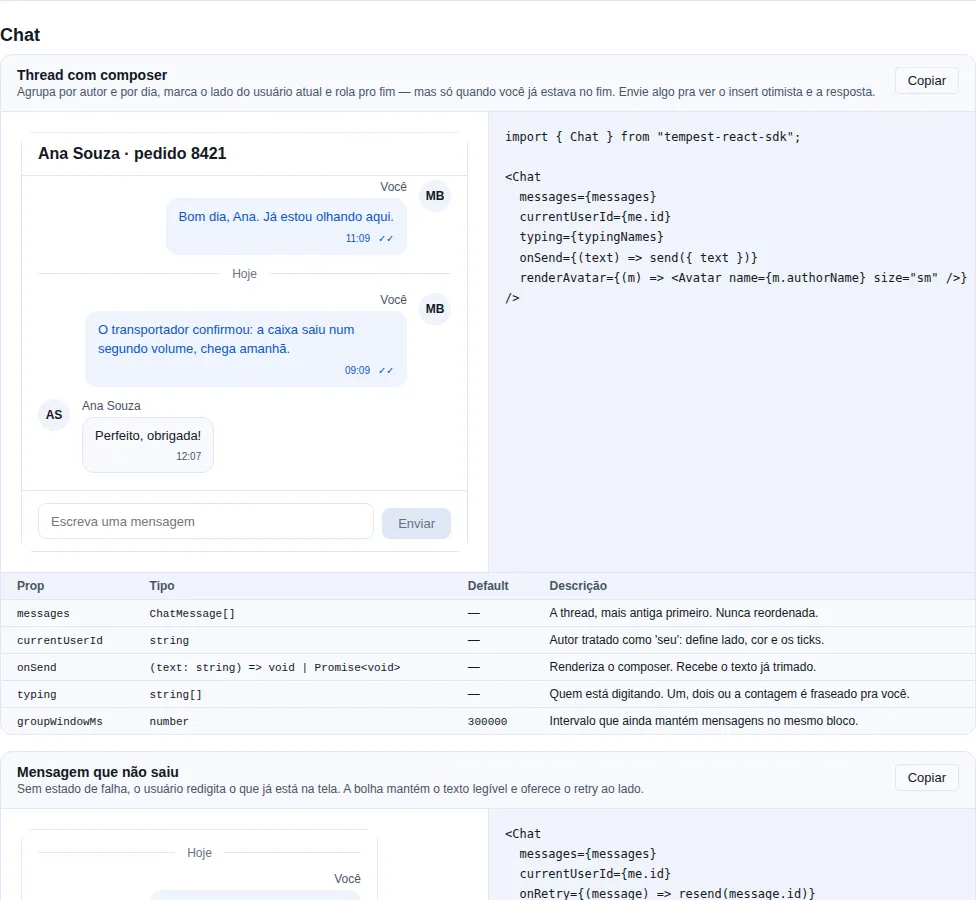
Section chat of the gallery — run it locally to interact.
When to use: a message thread — support, internal chat, document comments, a service history.
Groups by author and by day, marks the current user's side, shows delivery state and who is typing, and brings the composer along when you pass onSend.
import { Chat, Avatar, type ChatMessage } from "tempest-react-sdk";
import { useState } from "react";

export function Support({ me }: { me: { id: string } }) {
  const [messages, setMessages] = useState<ChatMessage[]>([]);

  /** Optimistic insert: the message shows up before the server confirms. */
  const send = async (text: string) => {
    const id = crypto.randomUUID();
    setMessages((current) => [
      ...current,
      { id, body: text, authorId: me.id, sentAt: Date.now(), status: "sending" },
    ]);
    await api.post("/messages", { body: { id, text } });
    setMessages((current) =>
      current.map((m) => (m.id === id ? { ...m, status: "sent" } : m)),
    );
  };

  return (
    <Chat
      messages={messages}
      currentUserId={me.id}
      onSend={send}
      onRetry={(m) => resend(m.id)}
      renderAvatar={(m) => <Avatar name={m.authorName ?? m.authorId} size="sm" />}
    />
  );
}
| Prop | Type | Default | What it does |
|---|---|---|---|
messages |
ChatMessage[] |
— | The thread, oldest first. Never reordered. |
currentUserId |
string |
— | Author treated as "own": side, colour, delivery ticks. |
onSend |
(text: string) => void \| Promise<void> |
— | Renders the composer. Receives the trimmed text. |
onRetry |
(message: ChatMessage) => void |
— | Enables the retry control on a "failed" message. |
onSendError |
(error: unknown) => void |
— | Called when onSend rejects. The draft stays in the field. |
typing |
string[] |
[] |
Who is typing. One, two or a count is phrased for you. |
renderAvatar |
(message) => ReactNode |
— | Avatar for the first message of each run. |
header |
ReactNode |
— | Bar above the thread, inside the panel. |
groupWindowMs |
number |
300000 |
Gap that still keeps messages in one run. |
locale |
"pt-BR" \| "en" |
"pt-BR" |
Labels ("Today", "You", "Sending"…). |
emptyState |
ReactNode |
<EmptyState/> |
Empty thread. |
composerDisabled |
boolean |
false |
No permission, archived thread, offline. |
onReact |
(message, emoji: string) => void |
— | Enables the reaction chips. Receives the emoji pressed. |
messageActions |
(message) => ContextMenuItem[] |
— | Per-message actions: right click, long press, ⋮ button. |
onQuoteClick |
(message) => void |
— | Click on the reply stub — scroll to the quoted message. |
ChatMessage = { id, body, authorId, authorName?, sentAt, status?, receipt?, attachments?, quote?, reactions?, deleted?, edited?, data? } · status ∈ "sending" | "sent" | "read" | "failed".
Messenger: what a bubble carries besides text
<Chat> started as a text thread, and that is what it solves for support and for document comments. For a messenger between people it stopped at the first bubble that was not plain text — building tempest-zap is where that became concrete: the app wrote its own MessageBubble, MessageThread and MessageComposer, not out of preference, but because none of this had anywhere to go.
import { Chat, type ChatMessage } from "tempest-react-sdk";

const messages: ChatMessage[] = [
  {
    id: "m1",
    authorId: "ana",
    authorName: "Ana",
    sentAt: Date.now() - 60_000,
    body: "look at the place",
    attachments: [{ kind: "image", url: "/photos/room.jpg", alt: "empty room" }],
    reactions: [{ emoji: "🔥", count: 2, reacted: true }],
  },
  {
    id: "m2",
    authorId: "me",
    sentAt: Date.now() - 30_000,
    body: "booking it for Friday",
    quote: { messageId: "m1", senderName: "Ana", excerpt: "look at the place", kind: "image" },
    receipt: { deliveredTo: 9, readBy: 4, totalRecipients: 9 },
  },
  { id: "m3", authorId: "bruno", sentAt: Date.now(), deleted: true },
];

<Chat
  messages={messages}
  currentUserId="me"
  onReact={(message, emoji) => toggleReaction(message.id, emoji)}
  onQuoteClick={(message) => scrollToMessage(message.quote!.messageId)}
  messageActions={(message) => [
    { label: "Reply", onSelect: () => reply(message) },
    { label: "Forward", onSelect: () => forward(message) },
    { separator: true },
    { label: "Delete", danger: true, onSelect: () => remove(message) },
  ]}
/>;
| Field | Type | What it solves |
|---|---|---|
attachments |
ChatAttachment[] |
Image (opens the Lightbox), video and audio (the SDK's players), a voice note with its waveform, a document as a download row |
quote |
ChatQuote |
The stub of the replied-to message, with revoked for when it is deleted |
reactions |
ChatReaction[] |
Emoji with a tally, marking yours |
receipt |
ChatReceipt |
deliveredTo / readBy / totalRecipients — a group's ticks |
deleted |
boolean |
The tombstone, as a state, not a body swapped for a string |
edited |
boolean |
Marks "edited" without touching the body |
Deleting a message has to delete the quote of it
ChatQuote.revoked is not decoration. Without it, the text of a deleted message stays visible inside the reply that quoted it — the easiest leak to miss, because the original disappears from the screen and the copy does not. With revoked: true the stub swaps the excerpt for "Message deleted" and none of the content survives.
The attachment URL goes through an allowlist before it becomes a link
The download row is the one place the sender's URL becomes an href. It goes through safeAttachmentUrl: http, https, blob (the upload still in flight) and relative URLs become a link; anything else — javascript: included — becomes the same row without a link, with name and size. It does not depend on React: on 18 the javascript: href was written verbatim and ran on click, with or without download.
Group ticks need three states, not two
status: "read" is a boolean for the sender: it cannot separate "delivered to everyone" from "read by everyone", and only the second turns the ticks. With receipt, resolveReceiptState returns "sent" | "delivered" | "read" — and the thresholds are deliberately all: reporting "read" because one person out of nine opened it is what makes the indicator lose credibility. When totalRecipients is 0 (a thread whose membership the app does not track), status decides again.
Actions live in a menu, not painted on the bubble
Buttons on every bubble turn a conversation into a toolbar. messageActions wires up the SDK's <ContextMenu>: right click on the desktop, long press on a phone, and a ⋮ button — which is also the keyboard path. A deleted message gets no actions.
Media and the menu arrive through lazy() — a text thread does not pay
Measured on dist, bundled with code splitting: the thread itself is 3.67 kB brotli, the media path (Lightbox + VideoPlayer + AudioPlayer) is 4.91 kB in a chunk requested only when an attachment appears, and the actions menu is 1.42 kB, requested only when you pass messageActions. A support chat or a comment thread keep costing what they cost.
The component is presentational and controlled, like the rest of the SDK: it takes a list and emits intent. Where messages come from (REST, the SDK's createWebSocket, an SSE stream) and how the optimistic insert is done stay with the app, because those differ per backend.
It only jumps to the bottom if you were already at the bottom
A thread that always scrolls to the newest message yanks whoever is reading history, every time anyone types. So the jump happens only when the reader was already down there (with 48px of slack for a partially visible last row) — the rule every chat app converges on. Verified in the browser: reading history at the top, three messages arrived and the position did not move.
A run breaks on author, on day and on a gap
Repeating the avatar and the name on every line of a five-message burst turns a conversation into a list of receipts. But a reply an hour later is a new beat even when nobody else spoke — joining it to the earlier burst would put one timestamp on messages an hour apart. groupWindowMs is that limit.
Failure state is not decoration
Without "failed" + onRetry, the user re-types what is already on screen. The failed bubble keeps its text readable (border and meta in red, not the whole background) precisely because re-reading the message is what somebody does before deciding to resend.
The thread is role=\"log\" with aria-live=\"polite\", and keyboard-reachable
A new message is announced without stealing focus. The container has tabIndex={0} because a scroll area with nothing focusable inside is unreachable by keyboard — the same problem the scroll fix solved for Table. Delivery state is text (VisuallyHidden), not just a glyph: "✓✓" is not read out.
It doubles as a comment thread
Same component without currentUserId and without typing: everyone on one side, a name per run. That is why "who am I" is a prop rather than an own field on every message — in a document comment thread nobody wants to annotate 200 messages.
ChatBubble
Exported separately for the same reason ChatComposer is: an app that builds its own thread (a virtualised list, a two-column layout) reuses the whole bubble — quote, attachments, reactions, ticks, actions menu and tombstone — instead of rebuilding it. It takes message, own, locale and the same handlers <Chat> does.
For ticks outside a bubble, the two pure functions it uses are exported as well: resolveReceiptState(message) returns "sending" | "sent" | "delivered" | "read" | "failed", and receiptLabel(receipt, strings) returns the sentence ("Read by 4 of 9") that goes in the title and to the screen reader.
ChatComposer
Exported separately for a custom layout (a composer pinned to the footer of a route, say). A textarea that grows with its content, Enter sends, Shift+Enter breaks the line.
| Prop | Type | Default | What it does |
|---|---|---|---|
onSend |
(text: string) => void \| Promise<void> |
— | Receives the trimmed text. Clears the field only if it does not reject. |
onError |
(error: unknown) => void |
— | Error from onSend. The draft is preserved either way. |
actions |
ReactNode |
— | Before the send button — attach, emoji. |
maxRows |
number |
6 |
Largest height, in lines. |
sendLabel |
string |
locale | Button label. |
It is uncontrolled, on purpose
A chat draft changes on every keystroke, and lifting that into app state re-renders the whole thread per character — the one place where "controlled by default" costs something visible. Apps that need the draft (a persisted composer, a slash-command menu) read it from onChange or drive it through the ref (focus(), setValue()).
IME: Enter while composing does not send
While composing Japanese or Korean, Enter confirms the candidate word. Sending there posts half a word and eats the confirmation — hence the isComposing check.
AIChat
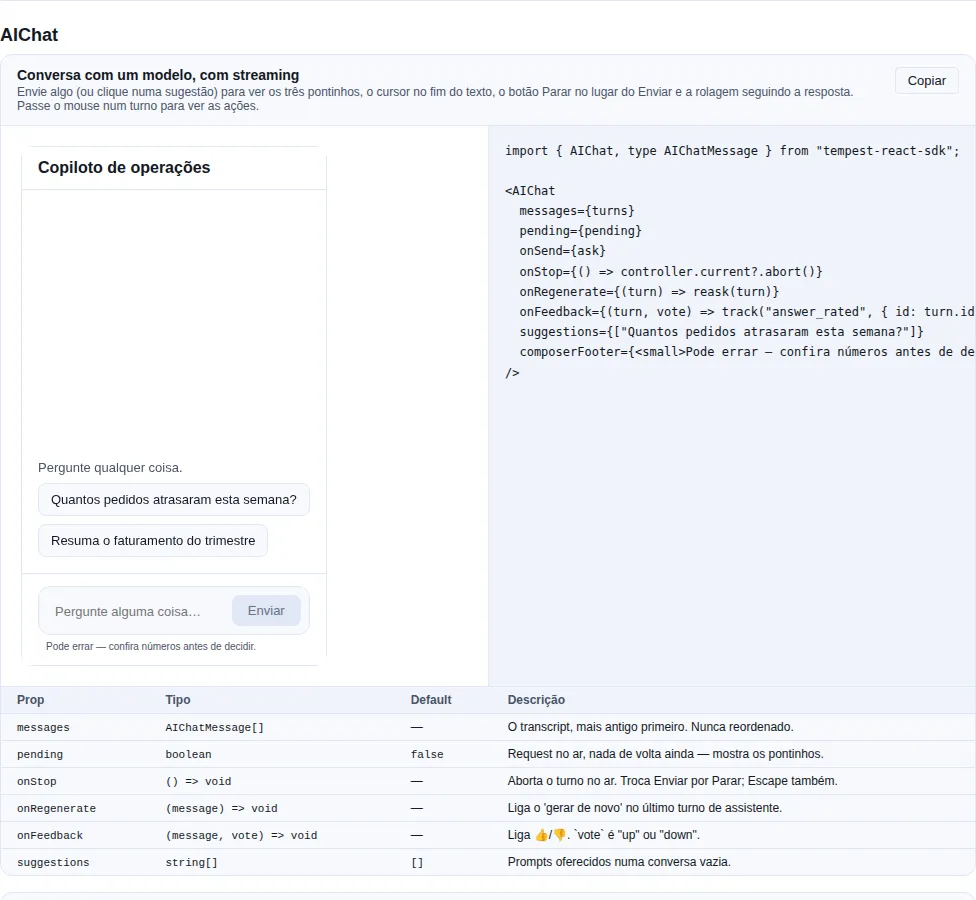
Section aichat of the gallery — run it locally to interact.
When to use it: a conversation with a model — a copilot inside your app, a support assistant, conversational search. This is the shape ChatGPT, Claude and DeepSeek converged on.
Role-based turns (user / assistant / system), Markdown answers with code blocks, reasoning in its own block, a streaming caret, per-turn actions (copy, regenerate, edit, 👍/👎) and a composer that turns into a stop button while the answer is arriving.
AIChat and Chat are different components, not variants
A human thread is addressed by author and cares about delivery state. A model transcript is addressed by role, has no delivery state at all, and needs three things a human thread never does: partial output, reasoning separate from the answer, and re-asking. Folding both into one variant would mix two data models into the same props and leave authorId/delivery ticks dead on the LLM path.
Start with the minimum — a list and an onSend:
import { AIChat, type AIChatMessage } from "tempest-react-sdk";
import { useState } from "react";

export function Copilot() {
  const [turns, setTurns] = useState<AIChatMessage[]>([]);

  const ask = async (text: string) => {
    setTurns((current) => [
      ...current,
      { id: crypto.randomUUID(), role: "user", content: text },
    ]);
    const answer = await fetch("/api/ask", {
      method: "POST",
      body: JSON.stringify({ prompt: text }),
    }).then((r) => r.json());
    setTurns((current) => [
      ...current,
      { id: crypto.randomUUID(), role: "assistant", content: answer.text },
    ]);
  };

  return <AIChat messages={turns} onSend={ask} />;
}
That already gives you the transcript, the Markdown, the composer, Enter/Shift+Enter, the scroll that follows the answer, and the copy action. What is missing is streaming — and that is where the component starts to look like a product.
Streaming, from scratch
The SDK does not make the call for you: "how do I stream from my backend" has a different answer per provider. What it does is render the state. The contract is simple — keep rewriting the content of the last turn, and keep streaming: true on it until you are done:
import { AIChat, type AIChatMessage } from "tempest-react-sdk";
import { useRef, useState } from "react";

export function StreamingCopilot() {
  const [turns, setTurns] = useState<AIChatMessage[]>([]);
  const [pending, setPending] = useState(false);
  const abort = useRef<AbortController | null>(null);

  /** Rewrites the last turn on every chunk — the component follows the text itself. */
  const write = (id: string, text: string) =>
    setTurns((current) =>
      current.map((t) => (t.id === id ? { ...t, content: text } : t)),
    );

  const ask = async (prompt: string) => {
    const answerId = crypto.randomUUID();
    setTurns((current) => [
      ...current,
      { id: crypto.randomUUID(), role: "user", content: prompt },
    ]);
    setPending(true);

    abort.current = new AbortController();
    const response = await fetch("/api/stream", {
      method: "POST",
      body: JSON.stringify({ prompt }),
      signal: abort.current.signal,
    });

    setPending(false);
    setTurns((current) => [
      ...current,
      { id: answerId, role: "assistant", content: "", streaming: true },
    ]);

    const reader = response.body!.pipeThrough(new TextDecoderStream()).getReader();
    let buffer = "";
    try {
      while (true) {
        const { value, done } = await reader.read();
        if (done) break;
        buffer += value;
        write(answerId, buffer);
      }
    } catch (error) {
      if ((error as Error).name !== "AbortError") throw error;
    } finally {
      setTurns((current) =>
        current.map((t) => (t.id === answerId ? { ...t, streaming: false } : t)),
      );
    }
  };

  return (
    <AIChat
      messages={turns}
      pending={pending}
      onSend={ask}
      onStop={() => abort.current?.abort()}
      composerFooter={<small>May be wrong — check numbers before deciding.</small>}
    />
  );
}
What you get for free in that snippet:
| You did | The component does |
|---|---|
pending while the request is out |
Shows the three dots and already swaps Send for Stop |
streaming: true on the last turn |
Draws the ▍ caret at the end of the text and hides that turn's actions |
Rewrites content per chunk |
Scrolls to follow — only if the reader was already at the bottom |
onStop |
Stop button in the send slot, and Escape in the field aborts too |
streaming: false at the end |
Caret goes away, actions come back, and a screen reader hears "Response complete" |
If your backend speaks SSE, use the SDK's createEventStream
The loop above is fetch + ReadableStream because that is the common path for LLM APIs. For a real text/event-stream endpoint, the SDK's sse already handles reconnection and Last-Event-ID — the write() loop is the same.
Reasoning (extended thinking / R1)
A turn with reasoning gets a collapsible block above the answer:
import { type AIChatMessage } from "tempest-react-sdk";

const turno: AIChatMessage = {
    id: "a1",
    role: "assistant",
    content: "There are 12 orders.",
    reasoning: "Filtered by overdue delivery date and status != delivered…",
};
While only the reasoning has arrived, the block opens itself
If the turn has streaming: true and content is still empty, the reasoning block mounts open — it is the only content there is, and hiding it would leave the screen frozen behind a blinking caret. Once the answer lands the block stays open (collapse it if you want); defaultReasoningOpen opens all of them, which is what an audit screen wants.
Per-turn actions
| Action | Appears on | Prop that enables it |
|---|---|---|
| Copy | every turn | always (copies the raw Markdown, not the HTML) |
| Regenerate | only the newest assistant turn | onRegenerate |
| 👍 / 👎 | assistant turns | onFeedback |
| Edit | user turns | onEditSubmit |
| Retry | a turn carrying error |
onRetry |
import {
    AIChat,
    type AIChatMessage,
    type AIChatVote,
} from "tempest-react-sdk";

export function Conversa({
    turnos,
    votosSalvos,
    reperguntar,
    perguntar,
    truncarAPartirDe,
    track,
}: {
    turnos: AIChatMessage[];
    votosSalvos: Record<string, AIChatVote>;
    reperguntar: (turno: AIChatMessage) => void;
    perguntar: (texto: string) => Promise<void>;
    truncarAPartirDe: (id: string) => void;
    track: (event: string, payload: Record<string, unknown>) => void;
}) {
    return (
        <AIChat
            messages={turnos}
            onRegenerate={reperguntar}
            onFeedback={(turno, voto) => track("answer_rated", { id: turno.id, voto })}
            onEditSubmit={(turno, texto) => {
                truncarAPartirDe(turno.id);
                return perguntar(texto);
            }}
            votes={votosSalvos}
        />
    );
}
Regenerate shows up on the newest assistant turn only — on purpose
Re-asking a turn in the middle throws away every turn after it. That is a different operation ("branch here") and needs its own confirmation; offering the same button for both invites losing half a conversation in one click.
Editing does not decide what to delete
onEditSubmit hands you the turn and the new text. Truncating the transcript is the app's call, because "drop everything after" and "create a branch" are different products and the SDK should not pick for you.
Suggested prompts and the empty state
import { AIChat } from "tempest-react-sdk";

export function Vazio({ perguntar }: { perguntar: (texto: string) => void }) {
    return (
        <AIChat
            messages={[]}
            onSend={perguntar}
            suggestions={["Summarise the latest report", "Which orders are late?"]}
        />
    );
}
On an empty conversation the suggestions sit at the bottom of the transcript area; clicking one sends it straight away. They disappear on the first turn. Without onSend they are not rendered (there would be nowhere to send them) and the EmptyState shows instead — or your emptyState.
Props
| Prop | Type | Default | What it does |
|---|---|---|---|
messages |
AIChatMessage[] |
— | The transcript, oldest first. Never reordered. |
onSend |
(text: string) => void \| Promise<void> |
— | Renders the composer. Receives the trimmed prompt. |
onStop |
() => void |
— | Aborts the turn in flight. Swaps send for stop; Escape aborts too. |
pending |
boolean |
false |
Request is out, nothing back yet. |
onRegenerate |
(message) => void |
— | Enables "regenerate" on the newest assistant turn. |
onEditSubmit |
(message, text) => void \| Promise<void> |
— | Enables "edit" on user turns. |
onFeedback |
(message, vote) => void |
— | Enables 👍/👎. vote ∈ "up" \| "down". |
onRetry |
(message) => void |
— | Enables retry on a turn carrying error. |
onSendError |
(error: unknown) => void |
— | Error from onSend or onEditSubmit. Draft preserved. |
votes |
Record<string, AIChatVote> |
— | Votes the app owns. Without it the pressed state is local. |
suggestions |
string[] |
[] |
Prompts offered on an empty conversation. |
renderAvatar |
(message) => ReactNode |
— | Avatar per turn. |
renderContent |
(message) => ReactNode |
— | Replaces the body — a tool-call card, a chart, a citation list. |
showSystem |
boolean |
false |
Show "system" turns. |
defaultReasoningOpen |
boolean |
false |
Open every reasoning block. |
showLineNumbers |
boolean |
false |
Line numbers in fenced code. |
header |
ReactNode |
— | Bar above the transcript, inside the panel. |
composerActions |
ReactNode |
— | Before the send button — attach, model picker. |
composerFooter |
ReactNode |
— | Under the field — token count, disclaimer. |
composerDisabled |
boolean |
false |
No credits, conversation archived, offline. |
maxRows |
number |
8 |
Largest composer height, in lines. |
locale |
"pt-BR" \| "en" |
"pt-BR" |
Labels ("Stop", "Reasoning", "You"…). |
emptyState |
ReactNode |
<EmptyState/> |
Empty conversation. |
AIChatMessage = { id, role, content, reasoning?, streaming?, error?, createdAt?, model?, attachments?, data? } · role ∈ "user" \| "assistant" \| "system".
AIChatAttachment = { id, name, size?, url?, mimeType? } — with url it renders a thumbnail, without it a chip with name and size.
Decisions worth knowing
The answer is Markdown, the prompt is plain text
A model emits Markdown by contract. A person who typed compute 2 * 3 * 4 did not mean to open an emphasis span — and seeing your own prompt rewritten is unsettling. So a user turn is white-space: pre-wrap and an assistant turn goes through Markdown (which already uses CodeBlock for fenced blocks). Want Markdown in the prompt too? renderContent.
The answer is the document, not a bubble
An assistant turn takes the full width with no bubble; a user turn is a narrow bubble pushed to the end of the row. Wrapping the answer in a bubble would cap its width, fight the tables and code blocks inside it, and make a long answer look like a shouted message. The prompt is short and needs to be told apart at a glance, which a bubble does better than anything else.
The transcript is not aria-live — and that is accessibility, not an oversight
A live region over streaming text makes a screen reader read the answer again on every token: unusable. So the role="log" carries no aria-live, and the two moments that matter ("Generating a response", "Response complete") are announced by a separate role="status". The turn in flight carries aria-busy, and the finished answer is read from the log at the reader's own pace. jsdom's axe cannot catch this class of mistake — it was a design decision, verified in a real browser.
Scrolling follows the answer only if you were already at the bottom
Same rule as Chat, and it weighs more here: a transcript that always jumps to the newest text would yank the reader dozens of times per second while streaming. When you are not at the bottom, a round button appears to take you back — the jump never happens unasked.
The scroll effect's dependency is not the list
Streaming appends to the last turn. An app that mutated that object in place — or that re-rendered from a store holding the same array — would keep the same dependency while the text grows, and the view would stop following the answer. Hence tailSignature() (exported): array length + tail identity + tail text length cover both shapes.
Only the growing turn re-parses
Markdown parses in its own render, and React skips re-rendering a child whose element is referentially identical. Holding that element across renders is what keeps a fifty-turn transcript from re-parsing every finished answer on every token of the newest one.
Stop takes the send slot, not a button next to it
The one button under your thumb is always the one you want next: send while idle, abort while the answer is coming. Two buttons side by side would mean aiming at the right one mid-stream.
An action hidden behind :hover does not exist on touch
The action row appears on hover and on keyboard focus, and is always visible where there is no hover at all (@media (hover: none)). Without that, on a phone the first tap would land on whatever is underneath. Verified with an emulated touch device: hover: none and pointer: coarse both true, row at opacity: 1.
The buttons measure 28×28 — above the 24×24 floor of WCAG 2.5.8, below the 44×44 of 2.5.5, and there are four of them side by side. Under pointer: coarse an ::after hit-slop takes the real target to 44×44 without moving a pixel of what you see, the same trick Button uses for its icon-only sizes. Growing the padding instead would space the row out on desktop, where the pointer is precise and the row should stay quiet.
Responsive: from a phone to a TV
Measured in a browser at 360×640, 390×844, 740×360 (phone in landscape), 768×1024, 1440×900, 1920×1080 and 3840×2160. At every width: zero horizontal overflow on the page and in the transcript, composer always visible, tables and code blocks scrolling inside their own box.
What changes with width:
| Range | What happens |
|---|---|
| up to 480px | transcript gap and padding tighten, the user bubble and the editor go to max-width: 100% |
| 480px – 768px | the reading column follows the available width |
| 768px and up | the column caps at 48rem and centres; the rest becomes margin |
The column width is a knob: --tempest-ai-chat-width
A capped column is the right answer from a phone up to a 1920 desktop — prose past roughly 90 characters per line is measurably harder to track back to the start of the next line, and letting an answer run the full width of a wide monitor makes it worse, not more useful.
From 2560 up the trade flips: 768px in the middle of a living-room screen is mostly empty room, and only the app knows how far away its user is sitting. Hence a knob rather than a constant:
:root {
  --tempest-ai-chat-width: 72rem; /* default 48rem */
}
One value moves the turns, the thinking row, the suggestions and the composer together.
Type size is not solved here
The font is the same at 360px and at 4K. Scaling type for a TV is a decision for typography.css and density.css — a component-local font ramp would fight the tokens every app themes through. If you target TVs, raise --tempest-text-* at the root (or use [data-tempest-density="spacious"]) alongside --tempest-ai-chat-width.
AIChatComposer and AIChatTurn
Exported separately for apps that build their own layout — a composer pinned to the footer of a route, a side-by-side diff of two answers. Same relevant props as the panel, and AIChatComposer is uncontrolled for the same reason as ChatComposer: a draft changes on every keystroke, and lifting that into app state re-renders the whole transcript per character — with a streaming answer above, that is visible.
| Exported helper | What it is for |
|---|---|
visibleTurns({ messages, showSystem }) |
The list the panel actually renders. |
isGenerating(messages) |
Whether any turn is streaming. |
lastAssistantId(messages) |
Which turn gets "regenerate". |
tailSignature(messages) |
An effect dependency that changes when the tail grows. |
aiChatStrings(locale) · roleLabel(role, strings) · turnTime(ts, locale) |
Labels, to reuse in your own layout. |
ChatComposer — the input box on its own
When to use it: when the message list is yours (your own virtualisation, a
layout Chat does not cover) but you want the composer ready-made: a textarea
that grows up to maxRows, Enter to send, Shift+Enter for a newline, and
focus() / setValue() exposed through a ref.
import { useRef } from "react";
import { ChatComposer, type ChatComposerHandle } from "tempest-react-sdk";

export function Footer({ send }: { send: (text: string) => Promise<void> }) {
    const composer = useRef<ChatComposerHandle>(null);

    return (
        <>
            <button onClick={() => composer.current?.setValue("Good morning!")}>
                Use template
            </button>
            <ChatComposer ref={composer} onSend={send} maxRows={6} sendLabel="Send" />
        </>
    );
}
An onSend that rejects does not lose the text
If the promise rejects, the composer calls onError and puts the text
back instead of clearing the box. A box that empties on a network failure
makes the user retype — and they do not know they have to.
AIChatComposer and AIChatTurn — the parts of AIChat
When to use them: to build a layout AIChat does not give you.
AIChatTurn renders one turn (assistant markdown, user plain text, a
collapsible reasoning block, copy/regenerate/vote actions); AIChatComposer is
the box with generating state and a stop button.
import { AIChatComposer, AIChatTurn, type AIChatMessage } from "tempest-react-sdk";

export function CustomThread({
    turns,
    generating,
    ask,
    stop,
}: {
    turns: AIChatMessage[];
    generating: boolean;
    ask: (text: string) => Promise<void>;
    stop: () => void;
}) {
    const last = turns.at(-1);

    return (
        <>
            {turns.map((turn) => (
                <AIChatTurn
                    key={turn.id}
                    message={turn}
                    canRegenerate={turn.id === last?.id && turn.role === "assistant"}
                />
            ))}
            <AIChatComposer onSend={ask} onStop={stop} generating={generating} />
        </>
    );
}
canRegenerate only on the newest assistant turn
Regenerating an older turn throws away everything after it — a different
operation, and AIChat reserves the control for the newest turn. Building
the list yourself makes that decision yours.
Recap
- Conversation:
Chatfor a thread between people (author, delivery, typing) andAIChatfor a conversation with a model (role, streaming, reasoning, re-asking). They are different components, not variants. - All share the same controlled/uncontrolled patterns, expose keyboard A11y, and import from
tempest-react-sdk.