Web Push + Service Worker
Browser push notifications have two halves that talk to each other: the main thread (your UI asks for permission and creates the subscription) and the worker thread (the service worker receives the push and draws the notification, even with the tab closed). The push module of tempest-react-sdk covers both halves — the browser side (permission, pushManager.subscribe, notificationclick) belongs to the SDK; the persistence endpoints and the push delivery belong to your app, through callbacks.
Editable diagram: push-flow.drawio (open it in draw.io).
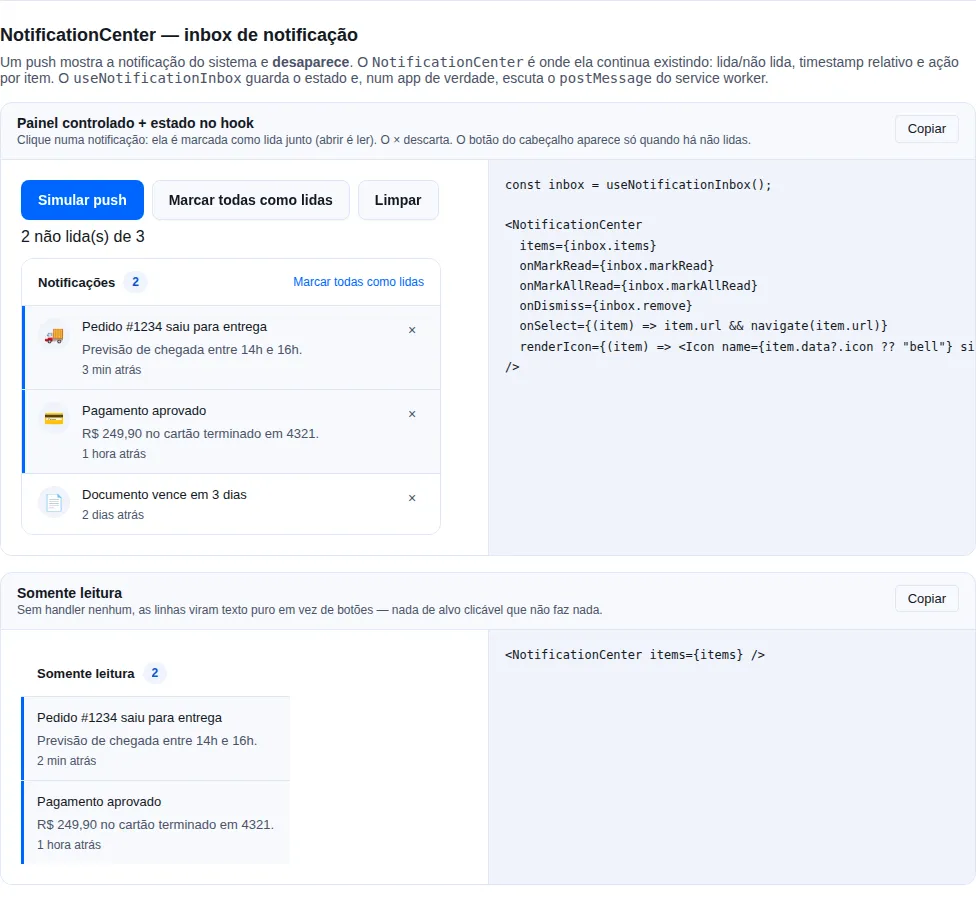
Section notification-center of the gallery — run it locally to interact.
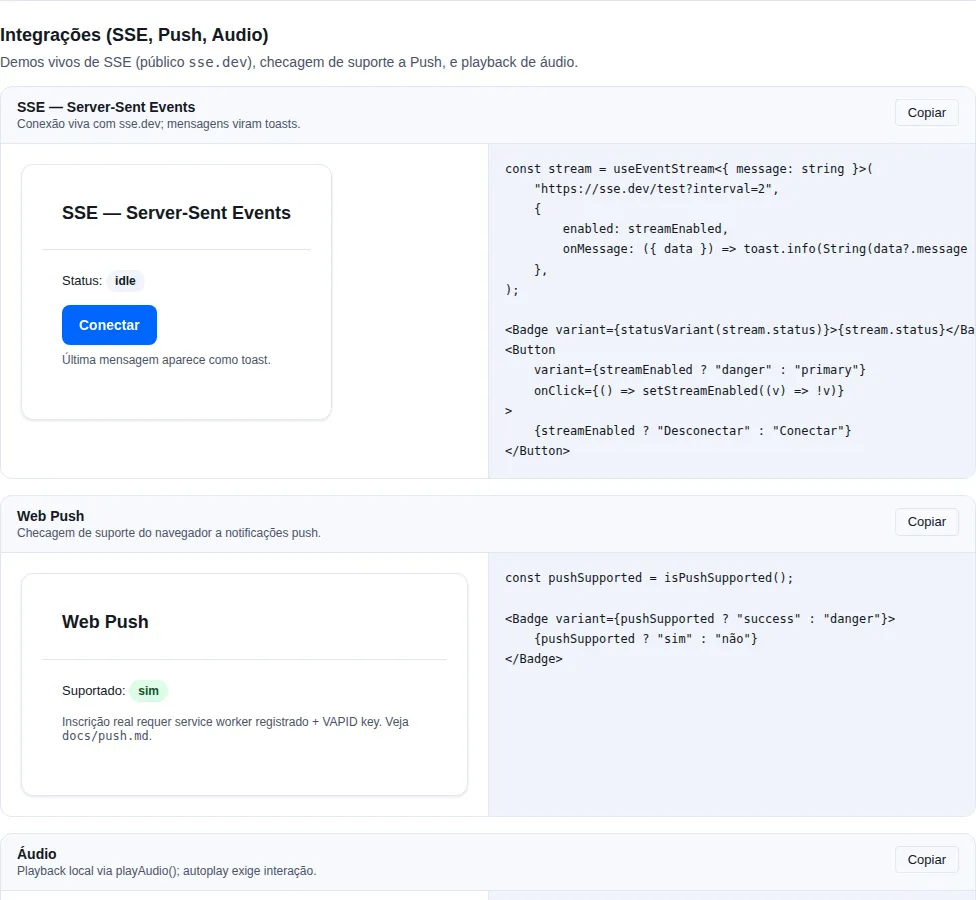
Section integrations of the gallery — run it locally to interact.
How Web Push works (the 30-second view)
- The app asks the user for permission (
Notification.requestPermission()). - Once granted, the browser creates a
PushSubscriptionsigned with your VAPID public key. - The app sends the subscription JSON to your backend, which stores it.
- Later, the backend uses the VAPID private key to send a push to the subscription's endpoint.
- The service worker wakes up on the
pushevent, reads the payload, and callsshowNotification.
The SDK gives you steps 1–3 (and the step-5 handlers); steps 3 (storage) and 4 (delivery) are the backend's responsibility.
What VAPID is, in one sentence
VAPID (Voluntary Application Server Identification) is a key pair (public +
private) that identifies your server to the browser's push service. The
public one goes in the front end (VITE_VAPID_PUBLIC_KEY); the
private one stays on the backend and is never exposed. Generate the pair
once with npx web-push generate-vapid-keys.
Prerequisites
- A backend that stores
PushSubscriptionJSONand sends notifications via web-push (VAPID). - A registered service worker (
vite-plugin-pwa,registerServiceWorker, ornavigator.serviceWorker.register). - A
VITE_VAPID_PUBLIC_KEYvariable in the front end (the URL-safe base64 VAPID public key). - HTTPS, or
localhost. Service workers and the Push API do not exist on an insecure origin — including the LAN IP (http://192.168.0.10:5173) you test the phone against. Use an HTTPS tunnel (cloudflared,ngrok) for that.
The hook does NOT register the service worker
usePushSubscription assumes the SW is already registered and uses
navigator.serviceWorker.ready by default. Register the SW yourself (step
below) — or pass getRegistration to reuse your own registration. Without a
registered SW, subscribe() never resolves.
Adopting it in an app that already exists
This section is for the common case: the app is already live and you are
switching push on now. Nothing here asks you to adopt the scaffold,
createViteConfig, or become a PWA.
The checklist, in order:
- Generate the VAPID pair and put the public half in the front end.
- Have a service worker served from the root (three scenarios below).
- Install the push handlers inside that SW.
- Agree the contract for two endpoints with your backend.
- Wire
usePushSubscriptionto a button. - Tie
subscribe/unsubscribeto login and logout — the step almost everybody forgets.
1. VAPID keys
npx web-push generate-vapid-keys
# .env — only the public half reaches the front end
VITE_VAPID_PUBLIC_KEY=BOxx…
The private half stays on the backend. Changing this pair later invalidates every existing subscription — see key rotation.
2. The service worker: three scenarios
The SW file has to be served from the root of its scope
A service worker only controls pages under its own path: an
/assets/sw-abc123.js controls /assets/… and nothing else — so
navigator.serviceWorker.ready never resolves on your home page and
subscribe() hangs forever, with nothing in the console.
It is the most common way switching push on fails in a bundled app: the SW
cannot go through the hashed asset pipeline. It has to land at /sw.js (or
be served with a Service-Worker-Allowed: / header). Check it in
DevTools → Application → Service workers: Scope must read /.
Create src/sw.ts and bundle it separately from the app, because the
app's entry goes through the asset pipeline and the SW must not:
/// <reference lib="webworker" />
import {
  installNotificationClickHandler,
  installPushHandler,
  installSkipWaitingListener,
} from "tempest-react-sdk/sw";

declare const self: ServiceWorkerGlobalScope;

installSkipWaitingListener();
installPushHandler({ defaultTitle: "My App", defaultIcon: "/icons/logo.png" });
installNotificationClickHandler();
// vite.sw.config.ts — builds the worker alone, to dist/sw.js
import { resolve } from "node:path";
import { defineConfig } from "vite";

export default defineConfig({
  build: {
    emptyOutDir: false, // keeps the app's dist/ intact
    lib: {
      entry: resolve(__dirname, "src/sw.ts"),
      formats: ["iife"], // classic worker, no import/export
      name: "sw",
      fileName: () => "sw.js",
    },
    rollupOptions: { output: { entryFileNames: "sw.js", inlineDynamicImports: true } },
  },
});
{
  "scripts": {
    "build": "vite build && npm run build:sw",
    "build:sw": "vite build --config vite.sw.config.ts"
  }
}
Register it from the app entry:
// src/main.tsx
import { registerServiceWorker } from "tempest-react-sdk";

registerServiceWorker({ url: "/sw.js" });
No build step, if you prefer
A hand-written public/sw.js works too — files in public/ are copied
verbatim to the root of dist/. The cost is that you cannot import the
SDK helpers in there: you write the push and notificationclick
listeners yourself. Fine for the simple case; past that, bundle it.
Only injectManifest mode lets you write the SW. If yours is on
generateSW (the default), switch:
// vite.config.ts
VitePWA({
  strategies: "injectManifest",
  srcDir: "src",
  filename: "sw.ts",
  injectRegister: "auto",
});
Then in src/sw.ts, put the SDK handlers next to your Workbox ones — they do
not compete, they are different events (push/notificationclick on one
side, fetch on the other):
/// <reference lib="webworker" />
import { precacheAndRoute } from "workbox-precaching";
import { installNotificationClickHandler, installPushHandler } from "tempest-react-sdk/sw";

declare const self: ServiceWorkerGlobalScope & { __WB_MANIFEST: unknown[] };

precacheAndRoute(self.__WB_MANIFEST); // what the plugin already did
installPushHandler({ defaultTitle: "My App" });
installNotificationClickHandler();
Keep the plugin's registration (virtual:pwa-register) — do not call
registerServiceWorker as well: two registrations of the same file fight
over the update cycle.
Two lines inside what you already have, and none of your code changes:
import { installNotificationClickHandler, installPushHandler } from "tempest-react-sdk/sw";

installPushHandler({ defaultTitle: "My App" });
installNotificationClickHandler();
Already have your own addEventListener("push", …)? Pick one of the two:
both handlers running show two notifications for the same push, because
each one calls showNotification.
If you register the SW yourself and want to reuse that registration instead
of navigator.serviceWorker.ready, pass getRegistration:
const registration = await navigator.serviceWorker.register("/sw.js");

usePushSubscription({
  vapidPublicKey: import.meta.env.VITE_VAPID_PUBLIC_KEY,
  getRegistration: async () => registration,
  onSubscribe: (sub) => api.post("/webpush/subscribe", { body: sub }),
});
3. The contract with your backend
The SDK picks no route, verb or format — it hands you the
PushSubscriptionJSON and you decide. This is exactly what reaches
onSubscribe:
{
  "endpoint": "https://fcm.googleapis.com/fcm/send/dQw4w9Wg...",
  "expirationTime": null,
  "keys": {
    "p256dh": "BNcRdreALRFXTkOOUHK1EtK2wtaz5Ry4YfYCA_0QTpQtUbVlUls0VJXg7A8u-Ts1XbjhazAkj7I99e8QcYP7DkM=",
    "auth": "tBHItJI5svbpez7KI4CCXg=="
  }
}
Two routes close the cycle — and the natural key is the endpoint, not the
user:
| Route | When | Body |
|---|---|---|
POST /webpush/subscribe |
subscribed (or re-synced) | the JSON above + the logged-in user, from the token |
DELETE /webpush/subscribe |
unsubscribed | { "endpoint": "…" } |
One user has N subscriptions, one per browser
Phone, work laptop, Chrome and Firefox on the same machine: each is a
subscription with its own endpoint. If the backend stores one
subscription per user (UPDATE … WHERE user_id = ?), every new device
silently switches the previous one off — the user installs on their phone and
stops receiving on the desktop, with nothing explaining why.
Store one row per endpoint, with UNIQUE(endpoint) and an indexed
user_id. The POST is an upsert by endpoint: the same browser
re-sending the same subscription (which happens on every subscribe() — see
re-syncing) must not
create a duplicate row.
Main-thread
Register the SW
import { registerServiceWorker, skipWaiting } from "tempest-react-sdk";

registerServiceWorker({
  url: "/sw.js",
  onUpdate: (waiting) => {
    if (confirm("New version available. Reload?")) {
      skipWaiting(waiting);
      window.location.reload();
    }
  },
});
Auto-update (no vite-plugin-pwa)
If you'd rather have every deploy reach the user on its own — no "reload?" prompt — turn on autoUpdate. The helper then calls registration.update() on an interval (updateIntervalMs, default 1h) and reloads the page as soon as a new worker takes control (controllerchange), guarded against reload loops. It's the vite-plugin-pwa auto-update behaviour, implemented directly on navigator.serviceWorker with no dependency on it:
import { registerServiceWorker } from "tempest-react-sdk";

registerServiceWorker({
  url: "/sw.js",
  autoUpdate: true, // poll + reload on controllerchange
  updateIntervalMs: 60 * 60 * 1000, // 1h (default)
  reloadOnActivate: true, // default; set `false` to only poll
});
Set reloadOnActivate: false when you want to keep polling but control the reload yourself (e.g. show a toast first).
Subscribe the user (with the hook)
import { usePushSubscription, Button } from "tempest-react-sdk";

const push = usePushSubscription({
  vapidPublicKey: import.meta.env.VITE_VAPID_PUBLIC_KEY,
  onSubscribe: (sub) => api.post("/webpush/subscribe", { body: sub }),
  onUnsubscribe: (sub) => api.delete("/webpush/subscribe", { body: { endpoint: sub.endpoint } }),
});

<Button loading={push.loading} onClick={() => push.subscribe()}>
  {push.subscribed ? "Unsubscribe" : "Receive notifications"}
</Button>;
The hook exposes supported, permission, subscribed, loading, error, subscribe(), unsubscribe(), and refresh(). Imperative version: WebPushClient. Typed errors: WebPushUnsupportedError, WebPushPermissionDeniedError.
What subscribe() does, step by step
Notification.requestPermission()— the browser prompt. A refusal throwsWebPushPermissionDeniedError.- Gets the registration (
navigator.serviceWorker.ready, or yourgetRegistration). - If a subscription already exists in this browser, it reuses it and calls
onSubscribeagain. - If none exists, it creates one with
pushManager.subscribe({ userVisibleOnly: true, applicationServerKey })and callsonSubscribe.
What happens when a subscription already exists
Step 3 is deliberate, and it is what makes the button double as a re-sync:
calling subscribe() in a browser that is already subscribed creates nothing new
— it re-sends the same subscription to your backend. That recovers the case where
the database lost the row (a restore, a migration, an environment swap) while the
browser stayed subscribed: without the re-send, that device would be subscribed in
the browser and unknown on the server — mute forever.
The price is on the backend: the POST must be an upsert by endpoint. A
blind insert turns one device into two rows, and the user gets every notification
twice.
subscribed always starts out false
Knowing whether a subscription exists takes await pushManager.getSubscription(),
so the first render cannot know the answer: the hook returns false and
corrects itself right after. A button that reads only subscribed flashes
"Receive notifications" before turning into "Unsubscribe".
Let the state settle before deciding the label — loading is false during
that window, so use your own "already checked" flag:
const push = usePushSubscription({ /* … */ });
const [checked, setChecked] = useState(false);

useEffect(() => {
    void push.refresh().finally(() => setChecked(true));
}, [push.refresh]);

if (!checked) return <Skeleton height={40} />;
refresh() is for state that changes outside your app
The user grants or blocks notifications in browser settings, or drops the
subscription from chrome://settings/content/notifications, and your React
never hears about it — there is no event for that. Call refresh() when the
tab becomes visible again:
useEffect(() => {
    const onVisible = () => {
        if (document.visibilityState === "visible") void push.refresh();
    };
    document.addEventListener("visibilitychange", onVisible);
    return () => document.removeEventListener("visibilitychange", onVisible);
}, [push.refresh]);
Permission and subscription flow (complete example)
This component shows the full lifecycle state — unsupported, permission denied, subscribed, toggle — and handles the permission-denied error:
import { usePushSubscription, WebPushPermissionDeniedError, Button } from "tempest-react-sdk";
import { api } from "./api";

export function PushToggle() {
  const push = usePushSubscription({
    vapidPublicKey: import.meta.env.VITE_VAPID_PUBLIC_KEY,
    onSubscribe: (sub) => api.post("/webpush/subscribe", { body: sub }),
    onUnsubscribe: (sub) =>
      api.delete("/webpush/subscribe", { body: { endpoint: sub.endpoint } }),
  });

  // 1. Browser without support (iOS Safari outside a PWA, old browsers)
  if (!push.supported) {
    return <p>Notifications are not supported in this browser.</p>;
  }

  // 2. User blocked it in the browser settings
  if (push.permission === "denied") {
    return <p>Notification permission blocked. Allow it in the browser settings.</p>;
  }

  async function handleSubscribe() {
    try {
      await push.subscribe();
    } catch (err) {
      if (err instanceof WebPushPermissionDeniedError) {
        alert("You need to allow notifications to receive them.");
      }
    }
  }

  // 3. Toggle the subscription
  return (
    <Button
      loading={push.loading}
      onClick={() => (push.subscribed ? push.unsubscribe() : handleSubscribe())}
    >
      {push.subscribed ? "Unsubscribe" : "Receive notifications"}
    </Button>
  );
}
Unsubscribing — what almost everybody gets wrong
unsubscribe() does two things, in this order:
- it calls
onUnsubscribe(subscription)— your delete route, while theendpointis still live; - it calls
subscription.unsubscribe()in the browser — always, even when step 1 failed.
If the backend failed, unsubscribe() throws WebPushUnsubscribeError after
releasing the browser. The error carries subscription (with the endpoint, so
you can retry the DELETE later), browserUnsubscribed, and the original
cause — an AggregateError holding both errors (backend first) when the
browser failed too, so the endpoint is never traded for a bare DOMException.
usePushSubscription already reflects it: subscribed becomes false and
error holds the WebPushUnsubscribeError.
Why release the browser anyway: the two failures do not cost the same.
| What is left behind when the backend fails | Cost |
|---|---|
| An orphaned row in the database (browser released) | one send to a dead endpoint, which the push service answers with 404/410 — and the backend deletes the row (see below) |
| A live subscription in the browser (the behaviour before 0.77.0) | the browser keeps delivering this account's notifications to whoever uses it next |
And the DELETE fails precisely when unsubscribing matters most: at the end of a
session, when the token that authenticates it is already gone. The endpoint is
not lost either — it is read before both calls and travels in the error.
Delete by endpoint, not by session
const push = usePushSubscription({
  vapidPublicKey: import.meta.env.VITE_VAPID_PUBLIC_KEY,
  onSubscribe: (sub) => api.post("/webpush/subscribe", { body: sub }),
  // ✅ the argument is the subscription being removed — use its endpoint
  onUnsubscribe: (sub) => api.delete("/webpush/subscribe", { body: { endpoint: sub.endpoint } }),
});
// ❌ ignores the argument: the backend only knows "some device of this user left"
onUnsubscribe: () => api.delete("/webpush/my"),
The second pattern only works while the user has one device. With two, the
backend either deletes them all (the phone stops receiving because you switched
off on the desktop) or deletes an arbitrary one (and the desktop starts receiving
again on its own later). The endpoint is what identifies the device — that is
precisely why it is in the argument.
Unsubscribing does not revoke permission
Notification.permission stays "granted" after unsubscribe(), and there is no
API to revoke it — only the user can, in browser settings.
The practical consequence: permission === "granted" does not mean
subscribed. subscribed is what decides the button label; permission only tells
you whether you may still ask ("default") or are blocked from outside
("denied"). A second subscribe() after unsubscribing shows no prompt at all —
the permission is already there — and comes back instantly.
Logout and user switching
This is the hole that shows up in production, not in testing. The subscription belongs to the browser, not the user: if Ana logs out and Bruno logs in on the same Chrome, the endpoint is unchanged — and still tied to Ana in your database. Bruno starts receiving Ana's notifications, on his device, with the app showing his own account.
Unsubscribe when the session ends — not only on the sign-out button. The
session also ends on its own (refresh token revoked, refresh failed), and that
path does not go through your logout(). With createTempestAuth, the place is
onSessionEnd, which runs on both:
import { WebPushClient, WebPushUnsubscribeError, createTempestAuth } from "tempest-react-sdk";

const ORPHANED_PUSH_KEY = "push-orphaned-subscriptions";

export const auth = createTempestAuth({
    baseURL: import.meta.env.VITE_API_URL,
    onSessionEnd: async (session) => {
        const push = new WebPushClient({
            vapidPublicKey: import.meta.env.VITE_VAPID_PUBLIC_KEY,
            onSubscribe: () => {},
            onUnsubscribe: (sub) =>
                session.api.delete("/webpush/subscribe", { body: { endpoint: sub.endpoint } }),
        });
        try {
            await push.unsubscribe();
        } catch (error) {
            if (!(error instanceof WebPushUnsubscribeError)) return;
            const pending: PushSubscriptionJSON[] = JSON.parse(
                localStorage.getItem(ORPHANED_PUSH_KEY) ?? "[]",
            );
            localStorage.setItem(ORPHANED_PUSH_KEY, JSON.stringify([...pending, error.subscription]));
        }
    },
});
Two pieces make this work with no warning for you to remember:
session.apistill sends the ended session's token — the store has already been cleared, soauth.apino longer does. On an explicit sign-out theDELETEgoes out authenticated and deletes the row.- The
catchkeeps theWebPushUnsubscribeError'ssubscription: on the next login, resend theDELETEfor each storedendpointand clear the list. Dropping the error with.catch(() => false)would throw away exactly the orphaned row'sendpoint. - On automatic expiry the server already refuses that token, the
DELETEcomes back 401 — and the browser is released all the same, becauseunsubscribe()always releases it. The orphaned row goes away on the next send, with the404/410.
The full order, and what else to clear in the same hook, is in
Auth → Ending the session.
Without createTempestAuth, call the same push.unsubscribe() in your logout
before discarding the token, and also on the path where your HTTP client
gives up on the session.
If you do not want to lose the permission you earned
unsubscribe() on logout keeps the permission (see above), so the next login
only needs a subscribe() — no prompt, instant. Call it on login success, not
from an onboarding screen:
async function onLoginSuccess() {
    if (Notification.permission === "granted") await push.subscribe();
}
That also covers the device that was away for months: one subscribe() per
login re-syncs the endpoint with the backend without bothering anybody.
Never call unsubscribe() in beforeunload
Closing the tab is not leaving the app — the subscription exists to receive
push while the app is closed. Unsubscribing there switches push off for
everyone who closes a tab, and beforeunload does not await a promise: the
DELETE probably never leaves.
Keeping the subscription alive
A subscription is not forever, and all three ways it dies are silent.
pushsubscriptionchange: the browser swaps it on its own
The browser may invalidate and recreate the subscription by itself — an internal push-service key change, a reinstall on Android, time. The endpoint changes, your database keeps the old one, and push simply stops arriving weeks after everything worked.
The SDK ships no helper for this (the event only exists inside the worker and its
support is still uneven). It is 15 lines in your sw.ts:
/// <reference lib="webworker" />
import { urlBase64ToUint8Array } from "tempest-react-sdk";

declare const self: ServiceWorkerGlobalScope;

const VAPID_PUBLIC_KEY = "BOxx…"; // the same one the front end uses

self.addEventListener("pushsubscriptionchange", (event: Event) => {
    const change = event as Event & { oldSubscription?: PushSubscription };
    event.waitUntil(
        (async () => {
            const fresh = await self.registration.pushManager.subscribe({
                userVisibleOnly: true,
                applicationServerKey: urlBase64ToUint8Array(VAPID_PUBLIC_KEY),
            });
            await fetch("/webpush/subscribe", {
                method: "POST",
                headers: { "Content-Type": "application/json" },
                body: JSON.stringify({
                    subscription: fresh.toJSON(),
                    replaces: change.oldSubscription?.endpoint ?? null,
                }),
            });
        })(),
    );
});
With no session cookie, the worker needs another way to authenticate
The worker's fetch does not have your in-memory token. If your auth is an
HttpOnly cookie, it rides along and this just works. If it is
Authorization: Bearer, accept this route via replaces (the old endpoint
already identifies the owner) or keep the token in IndexedDB to read here.
404/410 from the push service: delete on the backend
When the user revokes permission, clears site data or uninstalls the PWA, nobody
tells you — the next send answers 404 Not Found or 410 Gone. Treat both as
"delete this row", or your table fills with dead endpoints and every send gets
slower:
# backend (pywebpush example)
from pywebpush import WebPushException, webpush

try:
    webpush(subscription_info=sub, data=payload, vapid_private_key=KEY, vapid_claims=CLAIMS)
except WebPushException as exc:
    if exc.response is not None and exc.response.status_code in (404, 410):
        subscriptions.delete(endpoint=sub["endpoint"])
    else:
        raise
Rotating the VAPID key
A subscription is signed with the public key that created it. Changing the
VAPID pair invalidates every one of them: sends start failing with 403.
And there is a trap here: because subscribe() reuses the existing subscription,
calling it after changing the key fixes nothing — it re-sends the old
subscription, signed with the old key. The way through is unsubscribe, then
subscribe:
await push.unsubscribe(); // clears browser + backend
await push.subscribe(); // creates one with the new key (no prompt: permission is already granted)
If you need this across your whole base, version the key on the client and compare it against the one that created the subscription:
import { urlBase64ToUint8Array } from "tempest-react-sdk";

const sub = await client.getSubscription();
const current = sub?.options.applicationServerKey; // ArrayBuffer | null
const stale =
    !!current &&
    new Uint8Array(current).toString() !==
        new Uint8Array(urlBase64ToUint8Array(VAPID_PUBLIC_KEY)).toString();

if (stale) {
    await client.unsubscribe();
    await client.subscribe();
}
Better still: do not rotate. Keep the VAPID pair as a long-lived secret — it identifies no user, only your server.
Imperative version — WebPushClient
When you need the flow outside React (a vanilla button, a setup script), use the class directly:
import { WebPushClient } from "tempest-react-sdk";

const client = new WebPushClient({
  vapidPublicKey: import.meta.env.VITE_VAPID_PUBLIC_KEY,
  onSubscribe: async (sub) => {
    await fetch("/webpush/subscribe", { method: "POST", body: JSON.stringify(sub) });
  },
});

if (WebPushClient.isSupported()) {
  await client.subscribe(); // asks for permission + creates subscription + calls onSubscribe
}
Worker-thread (sw.ts)
Inside your service worker, import the handlers from the tempest-react-sdk/sw subpath:
/// <reference lib="webworker" />
import {
  installPushHandler,
  installNotificationClickHandler,
  installSkipWaitingListener,
} from "tempest-react-sdk/sw";

installSkipWaitingListener();

installPushHandler({
  defaultTitle: "Tempest",
  defaultIcon: "/icons/Logo.png",
  transform: (payload) => (payload.tag === "silent-ping" ? null : payload),
});

installNotificationClickHandler();
Import from tempest-react-sdk/sw, not the root barrel
The worker helpers have a dedicated subpath: tempest-react-sdk/sw. It is
pure and React-free — importing from it keeps your sw.ts bundle tiny
(~1 KB) and stops the SDK's component graph from leaking into the worker
scope. Importing from the root barrel (tempest-react-sdk) also works thanks
to tree-shaking, but the subpath is the bulletproof way. It's exactly what
create-tempest-app --pwa generates.
installPushHandler tries event.data.json() and falls back to event.data.text(). Use transform to suppress (null) or enrich notifications.
installNotificationClickHandler focuses the tab that is exactly on the target URL, or opens a new window. The comparison is on the whole URL, resolved against the tab's origin: /events/1 does not focus a tab on /events/10, and / does not focus any open tab.
Action buttons and notification options
Every NotificationOptions field the payload carries reaches the browser: actions, requireInteraction, vibrate, silent, renotify, timestamp, dir and lang, alongside body, icon, badge, image and tag. A missing field stays missing, and the browser applies its own default.
Each button can carry its own url. This is what the backend sends:
{
  "title": "Your event is tomorrow",
  "url": "/events/details/42",
  "actions": [
    { "action": "hello", "title": "Say hello", "url": "/events/details/42#hello" },
    { "action": "later", "title": "Later" }
  ],
  "vibrate": [100, 50, 100]
}
The click resolves like this:
| Where the user clicked | URL opened |
|---|---|
| On the notification body | top-level url (/events/details/42) |
On the hello button |
the action's url (/events/details/42#hello) |
On the later button, which has no url |
top-level url |
Why the action url goes into data.actionUrls
The browser's NotificationAction only knows action, title and icon — a
url there would be dropped. installPushHandler takes each button's url out
and stores the map { hello: "/events/details/42#hello" } in
notification.data.actionUrls; installNotificationClickHandler reads that map
through event.action.
With your own resolveUrl, you get the clicked action as the second argument ("" or undefined for a body click):
/// <reference lib="webworker" />
import { installNotificationClickHandler } from "tempest-react-sdk/sw";

installNotificationClickHandler({
  resolveUrl: (data, action) => {
    const { url } = data as { url: string };
    return action === "hello" ? `${url}?compose=1` : url;
  },
});
How many buttons show up
The browser shows up to Notification.maxActions buttons (2 on desktop Chrome)
and ignores the rest. Safari and Firefox draw no buttons at all — the body click
keeps working everywhere.
Offline caching lives in the same module
tempest-react-sdk/sw also exports installPrecache (offline app shell) and
installRuntimeCache (per-route caching: cache-first / network-first /
stale-while-revalidate). Together with the tempestPwaManifest() plugin from
tempest-react-sdk/vite, they reach parity with vite-plugin-pwa for the
common case — with no new dependency. It's what
create-tempest-app --pwa wires for you.
urlBase64ToUint8Array and isPushSupported are exported
You rarely call them by hand — WebPushClient already uses both internally
(applicationServerKey requires a Uint8Array, not the base64 string).
They're in the barrel for anyone who needs a support check outside the hook
(isPushSupported()) or a fully custom subscription flow.
An in-app inbox (NotificationCenter)
A push shows an OS notification and then disappears — as far as your UI is concerned it never existed. A user who dismissed the toast has nowhere to find it again. That is the missing half of web push: an inbox inside the app.
The service worker runs outside the page and cannot touch React state. The bridge is a message:
// src/sw.ts — inside your push handler
self.addEventListener("push", (event) => {
    const payload = event.data?.json() ?? {};
    event.waitUntil(
        (async () => {
            await self.registration.showNotification(payload.title, payload);
            const clients = await self.clients.matchAll({ includeUncontrolled: true });
            for (const client of clients) {
                client.postMessage({ type: "tempest:notification", notification: payload });
            }
        })(),
    );
});
In the app, useNotificationInbox listens for that message by default:
import { NotificationCenter, useNotificationInbox, Popover, Button } from "tempest-react-sdk";

export function NotificationsButton() {
    const inbox = useNotificationInbox();

    return (
        <Popover
            trigger={
                <Button variant="ghost" aria-label={`Notifications (${inbox.unreadCount} unread)`}>
                    🔔 {inbox.unreadCount > 0 && inbox.unreadCount}
                </Button>
            }
        >
            <NotificationCenter
                items={inbox.items}
                onMarkRead={inbox.markRead}
                onMarkAllRead={inbox.markAllRead}
                onDismiss={inbox.remove}
                onSelect={(item) => item.url && navigate(item.url)}
            />
        </Popover>
    );
}
useNotificationInbox
| Option | Type | Default |
|---|---|---|
initialItems |
NotificationItem[] |
[] |
listenToServiceWorker |
boolean |
true |
messageType |
string |
"tempest:notification" |
limit |
number |
100 |
onChange |
(items: NotificationItem[]) => void |
— |
Returns { items, unreadCount, add, markRead, markUnread, markAllRead, remove, clear }.
An entry is { id, title, body?, receivedAt, read?, url?, data? }.
It filters by type, and that is not a detail
The service-worker message channel is shared — a sync-progress ping or a
cache-updated notice travels the same path. Without filtering by type, all of
that would land in the user's inbox.
Persistence is your decision
The hook keeps the list in memory and nothing more: where an inbox belongs
(server, Dexie, localStorage) differs per app, and a wrong default would be
worse than none. Use onChange to write and initialItems to read back.
const inbox = useNotificationInbox({
    initialItems: restored,
    onChange: (items) => storage.set("inbox", items),
});
limit exists because a push-fed inbox grows without bound
100 by default, oldest dropped. Raise it if you persist and paginate.
NotificationCenter
| Prop | Type | Default |
|---|---|---|
items |
NotificationItem[] |
— |
title |
ReactNode (null drops the header) |
"Notificações" |
onSelect |
(item: NotificationItem) => void |
— |
onMarkRead |
(id: string) => void |
— |
onMarkAllRead |
() => void |
— |
onDismiss |
(id: string) => void |
— |
renderIcon |
(item: NotificationItem) => ReactNode |
— |
locale |
"pt-BR" \| "en" |
"pt-BR" |
emptyState |
ReactNode |
<EmptyState …/> |
now |
number (timestamp reference) |
now, at render |
It is only the panel, not a popover
Mount it inside your own Popover, Drawer or route. A component owning both
the inbox and a positioning strategy would fit fewer cases, not more.
Opening is reading
Activating a notification calls onMarkRead alongside onSelect — otherwise
every app would have to remember to call both, and the unread count would keep
counting something the user already saw.
Unread is not colour alone
The row gets a left bar and a tinted background, plus aria-current="true".
Colour on its own survives neither monochrome nor colour blindness.
renderIcon pairs directly with the icons subpath:
import { Icon } from "tempest-react-sdk/icons";

<NotificationCenter
    items={inbox.items}
    renderIcon={(item) => <Icon name={(item.data?.icon as string) ?? "bell"} size={16} />}
/>
Compatibility
- iOS Safari only works when the app is installed as a PWA (Add to Home Screen) — and the app needs a
manifest.jsonwithdisplay: "standalone"to be installable at all. Outside that,isPushSupported()answersfalseon iOS even on current Safari: that is not your bug. usePushSubscriptionexposessupported— hide the toggle whenfalse.- An insecure origin (
http://that is notlocalhost) has neither service workers nor the Push API.
When no notification arrives: where to look
| Symptom | Likely cause | Where to confirm |
|---|---|---|
subscribe() never resolves |
the SW does not control the page (wrong scope, or never registered) | DevTools → Application → Service workers: Scope must be / and status activated |
supported === false on iOS |
the app is not installed as a PWA | Add to Home Screen, then open from the icon |
| Subscribed, backend got nothing | onSubscribe failed silently |
the hook's error; subscribe() re-throws, so handle the catch |
| Push dies weeks later | the browser rotated the subscription | pushsubscriptionchange |
Send answers 403 |
VAPID pair changed, or the front-end public key is not the pair of the backend's private one | key rotation |
Send answers 404/410 |
user revoked/cleared data; dead endpoint | delete the row (above) |
| Duplicated notification | two push handlers in the SW, or a POST that is not an upsert by endpoint |
your sw.ts; the subscriptions table |
| A user gets another account's notification | no unsubscribe on logout | logout and user switching |
ReferenceError: window is not defined in the SW |
SDK older than 0.28.1 using urlBase64ToUint8Array in the worker |
upgrade the SDK |
Recap
- VAPID: public in the front end, private on the backend only. Generate it once with
web-pushand do not rotate — changing it invalidates every existing subscription. - You register the SW; the hook only subscribes/unsubscribes over a ready registration. The file has to be served at
/sw.js— a hashed SW inside/assets/does not control your home page, and thensubscribe()hangs with no error. - In an app that already exists: three SW scenarios (none,
vite-plugin-pwaoninjectManifest, your own SW) — none of them asks you to adopt the rest of the SDK. - A subscription belongs to the browser, not the user: store one row per
endpoint(UNIQUE), upsert onPOST, and delete byendpointonDELETE. A user has as many devices as they like. - Unsubscribe on logout, before discarding the token — otherwise the next user of that browser receives the previous one's notifications. The permission survives, so the next login re-subscribes with no prompt.
unsubscribe()does not revoke permission:permission === "granted"does not mean subscribed.subscribedowns the button label.subscribedstartsfalse(the check is async) andrefresh()exists for state that changes outside the app (browser settings).- A subscription dies silently: handle
pushsubscriptionchangein the worker and delete on404/410on the backend. usePushSubscriptiongives you all the state (supported/permission/subscribed/loading/error) + actions;WebPushClientis the imperative version.- Worker handlers (
installPushHandler/installNotificationClickHandler/installSkipWaitingListener) go inside yoursw.ts. - iOS only receives push in an installed PWA — hide the toggle when
!supported. useNotificationInbox+NotificationCenterclose the loop: the workerpostMessages, the hook holds the list (filtered bytype, capped bylimit) and the panel shows read/unread with a per-item action. Persistence stays with the app, viaonChange/initialItems.
See also
- HTTP — transport for the subscriptions to the backend
- Diagram: push-flow.drawio