Resumable upload (tus)
uploadWithProgress makes one request. That works until the file gets big: a 40-minute recording from useAudioRecorder, a video, a dump. Then a 4G connection that wobbles for three seconds throws away the 300 MB already sent, and reloading the page throws it away again.
createResumableUpload splits the file into chunks, remembers where it stopped, and carries on — after a network drop or a reload.
Protocol: tus 1.0.0, not something we invented
The client speaks tus (core plus the creation and termination extensions). That is deliberate: a resumable client with a private wire format means the backend is ours forever. With tus you can point it at tusd, tus-node-server or py-tus without writing a server at all — and the What your backend must implement section fits in one table.
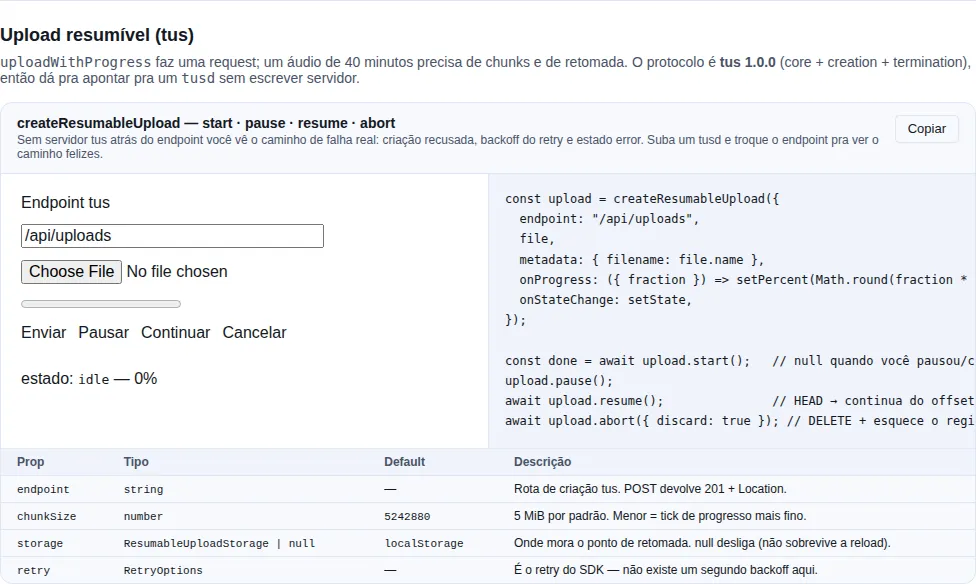
Section recipe-resumable-upload of the gallery — run it locally to interact.
The minimal example
import { createResumableUpload, type ResumableUpload } from "tempest-react-sdk";
import { useRef, useState } from "react";

export function SendRecording({ file }: { file: File }) {
  const upload = useRef<ResumableUpload | null>(null);
  const [percent, setPercent] = useState(0);
  const [state, setState] = useState("idle");

  async function start() {
    upload.current ??= createResumableUpload({
      endpoint: "/api/uploads",
      file,
      metadata: { filename: file.name },
      onProgress: ({ fraction }) => setPercent(Math.round(fraction * 100)),
      onStateChange: setState,
    });

    const done = await upload.current.start();
    if (done) await fetch(`/api/recordings?url=${encodeURIComponent(done.url)}`, { method: "POST" });
  }

  return (
    <>
      <progress value={percent} max={100} />
      <button type="button" onClick={() => void start()}>Send</button>
      <button type="button" onClick={() => upload.current?.pause()}>Pause</button>
      <button type="button" onClick={() => void upload.current?.resume()}>Resume</button>
      <button type="button" onClick={() => void upload.current?.abort({ discard: true })}>
        Cancel
      </button>
      <p>{state}</p>
    </>
  );
}
What happens: a POST creates the upload, a series of PATCHes pushes 5 MiB at a time, onProgress gets every byte tick, and at the end start() resolves with { url, size } — the tus URL, which you store next to the record.
start() resolves null when you paused or cancelled
Only a failure rejects. pause() and abort() are not failures, so the promise resolves null and you do not need a try/catch around a pause button.
States
upload.state (and onStateChange) walks through:
| State | Meaning |
|---|---|
idle |
Nothing started |
creating |
The creation POST is in flight |
uploading |
Chunks are going out |
paused |
pause() — the resume point is kept |
done |
Finished; the persisted record was deleted |
error |
The retries ran out; start() rejected |
aborted |
abort() — with discard: true, the record was deleted |
Resuming after a reload
That is the reason it exists. The client stores { url, offset, size, idempotencyKey } (plus owner, with getPrincipal) under a resume key and, on the next start(), re-attaches to the upload:
const upload = createResumableUpload({ endpoint: "/api/uploads", file });
// Page reloaded, the user picked the same file, called start() again:
// → HEAD on the old upload, the offset comes back as 312 MB, the PATCHes carry on from there.
The default key is a fingerprint of endpoint + name + size + type + lastModified — the same criterion the reference tus clients use. Cheap (it does not hash 400 MB) and it changes whenever the file does, which is the property that matters: resuming into the wrong file would corrupt both.
A nameless Blob has a weak fingerprint
Blob has no name and no lastModified, so two blobs of the same size and type collide. Pass an explicit key when what you upload is not a File.
Where the state lives
By default, localStorage, through createLocalUploadStorage(). Not IndexedDB, and that is a choice: the record is four fields and a URL, the requirement is only to survive a reload, and pulling Dexie in for that would put IndexedDB in the bundle of every app that uploads a file.
If your app already has a Dexie database open, plug yours in:
import {
  createOfflineStore,
  createResumableUpload,
  type ResumableUploadRecord,
} from "tempest-react-sdk";

const store = createOfflineStore<{ id: string; record: ResumableUploadRecord }, string>({
  databaseName: "Uploads",
  version: 1,
  tableName: "resume",
  indexes: "&id",
});

createResumableUpload({
  endpoint: "/api/uploads",
  file,
  storage: {
    get: async (key) => (await store.get(key))?.record ?? null,
    set: async (key, record) => {
      await store.put({ id: key, record });
    },
    delete: async (key) => {
      await store.delete(key);
    },
  },
});
storage: null turns persistence off: resuming then survives a network drop, but not a reload.
One record per user — getPrincipal and clear()
The record survives a reload — and, for that very reason, a logout. The default key carries no user at all: if A signs out leaving an upload half-done and B picks a file with the same fingerprint, B's client would send HEAD and PATCH to A's upload URL with B's token and, if the server refused, send the creation POST with A's Idempotency-Key (#479).
Two pieces close this:
import { createLocalUploadStorage, createResumableUpload } from "tempest-react-sdk";

declare const file: File;
declare const auth: { getToken: () => string | null };
declare const session: { userId: string | null };

const upload = createResumableUpload({
  endpoint: "/api/uploads",
  file,
  getToken: () => auth.getToken(),
  getPrincipal: () => session.userId,
});

await upload.start();

export function onSessionEnd(): void {
  createLocalUploadStorage().clear();
}
getPrincipal— the same getter the error reporter andprovideBackgroundSyncCredentialstake. The record gets a one-way fingerprint of the user (owner, never the raw id), and a record with another owner — another user, nobody, or no owner, written before 0.78.0 — is deleted instead of resumed: its URL gets no request, and itsIdempotency-Keyis never reused.clear()— removes every record undercreateLocalUploadStorage()'stempest-upload:prefix. Call it fromonSessionEnd(see Auth → Ending the session). A customstorageimplements the equivalent on its side.
And if the account switch happens while the upload runs? getPrincipal is read again before every chunk and every record write: once it names someone else, the run stops with ResumableUploadSupersededError (reason: "principal"), before the new account's token reaches the previous one's upload URL. A clear() mid-run does the same (reason: "cleared") instead of the record being written back. It is not a pause — the run cannot go on as the new account: the state moves to "error".
import { ResumableUploadSupersededError, createResumableUpload } from "tempest-react-sdk";

declare const file: File;
declare const session: { userId: string | null };

export async function send(): Promise<string | null> {
  const upload = createResumableUpload({
    endpoint: "/api/uploads",
    file,
    getPrincipal: () => session.userId,
  });
  try {
    return (await upload.start())?.url ?? null;
  } catch (error) {
    if (error instanceof ResumableUploadSupersededError) return null;
    throw error;
  }
}
clear() only removes values shaped like an upload record: a prefix with no delimiter ("app") does not take the app's own keys ("appSettings") with it.
Without getPrincipal, the behavior is the old one
Without getPrincipal, any record under the same key is still resumed, whoever wrote it, and a run in progress does not notice the account switch. That is fine for a one-account-per-browser app; with more than one, pass the getter and clear at session end — and, without the getter, call abort() on the uploads in progress from onSessionEnd.
The failure that actually happens
It is not the chunk that gets lost. It is the chunk the server stored and whose response never came back. The client cannot tell that from a lost chunk, and re-sending it blindly would duplicate bytes.
Two things prevent that:
1. Writes are addressed, not appended. Every PATCH states the offset it writes at (Upload-Offset). If the response was lost and the client repeats it, it is asking to write bytes the server already has — and gets 409. On any retry the client re-reads the truth with HEAD before writing and continues from where the server really is.
2. Creation carries an Idempotency-Key. tus has no idempotent creation; without this, a lost 201 would leave an orphan upload on the server and the client would create a second one. The key (from generateIdempotencyKey) is stored before the first attempt and reused on retry. A backend that honours the header returns the same Location; one that ignores it works just the same, it only keeps the orphan.
The backoff is the SDK's retry
There is no second backoff here: every chunk runs inside retry — exponential, honouring Retry-After. Tune it with retry: { retries, initialDelay, shouldRetry }.
What the chunk loop retries, and what it does not
Two of these decisions are specific to the resume protocol and do not follow the SDK's general policy:
| Answer | Retried? | Why |
|---|---|---|
network failure, 408, 425, 429, 5xx |
yes | the standard policy: it can change on its own |
409, 412 |
yes | the offset-divergence signal — the replay is the fix, and the resync HEAD performs it |
404, 410 |
no | the upload is gone from the server. Recreating one only happens at attach, never inside the loop |
400, 403, 413, 415, 422 |
no | a deliberate refusal; the 5th attempt gets the same answer |
409 is the interesting case: the SDK's general policy refuses 4xx, and it is
right to — but here it means "your offset is wrong", which is exactly what the
retry fixes.
404 is the inverse. A resource that vanished looks transient, but the
resync HEAD hits the same 404, so retrying meant probing a dead resource
five times before reporting "the upload expired" — with the backoff stacked on
top. Start a fresh upload for that one.
Your own shouldRetry replaces this policy entirely, in both directions.
What your backend must implement
Every request carries Tus-Resumable: 1.0.0.
| Step | Request | Expected response |
|---|---|---|
| Create | POST {endpoint} + Upload-Length, Upload-Metadata, Idempotency-Key |
201 + Location (the upload URL, absolute or relative) |
| Probe | HEAD {uploadUrl} |
200/204 + Upload-Offset |
| Write | PATCH {uploadUrl} + Upload-Offset, Content-Type: application/offset+octet-stream, body = chunk |
204 + the new Upload-Offset; 409 when the offset does not match |
| Discard | DELETE {uploadUrl} |
204 |
Details that tend to bite:
Locationmay be relative. The client resolves it against the page, so/api/uploads/abcis fine.Upload-Metadatais comma-separatedkey base64(value), with the value encoded as UTF-8 before base64 — that is hownote-ação.webmsurvives an HTTP header.HEADanswering404/410is read as "the server forgot this upload": the client recreates it from scratch instead of getting stuck.- A missing
Upload-Offseton a successfulPATCHis tolerated — the client assumes the end of the chunk — but sending it is better. - Keep a table of
Idempotency-Keys if you want to avoid orphans.
Off-the-shelf servers
tusd (Go), tus-node-server (Node) and tuspy/py-tus (Python) already implement the table. In a FastAPI app of your own it is four routes.
Progress and pausing, precisely
const upload = createResumableUpload({
  endpoint: "/api/uploads",
  file,
  chunkSize: 1024 * 1024, // 1 MiB: finer ticks, more round-trips
  // the default is DEFAULT_CHUNK_SIZE (5 MiB), exported so a settings UI can show it
  getToken: () => auth.getToken(),
  withCredentials: true,
  retry: { retries: 8, initialDelay: 500 },
  onProgress: ({ loaded, total, fraction, resumedFrom }) => {
    console.log(`${loaded}/${total} (${Math.round(fraction * 100)}%), resumed at ${resumedFrom}`);
  },
});
onProgressreports bytes of the whole file, not of the chunk.resumedFromsays how many were already on the server when this run started — useful so you do not announce "0%" for an upload that resumed at 80%.pause()drops the in-flight chunk; the persisted offset stays at the last confirmed chunk.resume()does aHEADfirst, so partial bytes the server accepted are not lost.abort({ discard: true })sendsDELETEand clears the record; withoutdiscard, the resume point stays.
The token does not follow Location off your origin
tus answers creation with a Location the server chooses, and the spec allows an absolute URL on another host — handing the upload to object storage is ordinary operation, not an attack. Up to 0.65.0 the bearer token followed that header wherever it pointed, along with the file bytes.
Since 0.66.0 the credential is bound to the endpoint's origin. When Location points elsewhere, the creation POST still carries the token — that one went to your backend — and the following HEAD/PATCH/DELETE go without it. The upload completes normally, which is what a presigned storage URL expects anyway.
When the storage host genuinely needs your API's token, declare it:
createResumableUpload({
  endpoint: "/api/uploads",
  file,
  getToken: () => auth.getToken(),
  trustedOrigins: ["https://storage.example.com"],
});
The same applies to the persisted record: a url in localStorage pointing off-origin does not get the token back on resume.
The csrf option follows the same rule: the CSRF token goes on the creation POST, every PATCH and the discarding DELETE — never on the offset HEAD — and only to the endpoint's origin and the trustedOrigins. See CSRF.
XMLHttpRequest, not fetch
As in uploadWithProgress: fetch still cannot report upload progress in any browser. There is a second reason here — tus returns the new offset in a response header, and uploadWithProgress only hands back a parsed body, so it could not be reused.
Recap
createResumableUpload({ endpoint, file })— 5 MiB chunks, resume across network drops and reloads, tus 1.0.0 on the wire.start()/pause()/resume()/abort({ discard });start()resolvesnullwhen you stopped on purpose.- The resume point lives in
localStorageby default; swap it withstorage, disable it withnull. getPrincipalbinds the record to the user;createLocalUploadStorage().clear()inonSessionEndremoves what is left.- A lost response is handled by addressed offsets + a
HEADbefore every retry, and creation by anIdempotency-Key. - The backoff is the SDK's
retry— there is no second one.