Virtualized Lists
Virtualized lists let you display collections of any size without rendering all
items at once. The app owns the visible window: it keeps a
window: tuple[int, int] that delimits the materialized indices, and the
reconciler diffs only those children. Use App.slide_window to advance the window
from the ScrollEvent emitted by on_scroll; the on_end_reached signal fires an
EndReachedEvent when scrolling past end_reached_threshold. For pull-to-refresh,
set refreshing=True while fetching and use on_refresh to react to the gesture —
on desktop the loading overlay is shown by the prop, not by a native gesture.
Both renderers — the Qt simulator and Compose on device — support these widgets.
LazyColumn
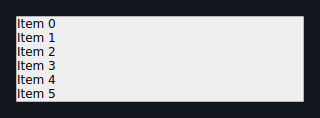
Vertically virtualized list — maps to Compose LazyColumn. Only the visible window
of items is rendered; item_builder is called with the absolute index to produce
each child widget.
from dataclasses import dataclass
from tempestroid import (
    App, Button, Column, EndReachedEvent, LazyColumn, RefreshEvent,
    Row, ScrollEvent, Style, Text,
)


@dataclass
class State:
    items: list[str]
    refreshing: bool
    window: tuple[int, int]


def make_state() -> State:
    return State(
        items=[f"Item {i}" for i in range(200)],
        refreshing=False,
        window=(0, 20),
    )


def view(app: App[State]) -> Column:
    s = app.state

    def build_item(index: int) -> Row:
        return Row(
            children=[
                Text(content=s.items[index], key="label"),
            ],
            key=str(index),
        )

    async def on_scroll(event: ScrollEvent) -> None:
        new_window = app.slide_window(s.window, event.offset, len(s.items))
        app.set_state(lambda st: setattr(st, "window", new_window))

    async def on_end_reached(event: EndReachedEvent) -> None:
        extra = [f"Item {len(s.items) + i}" for i in range(20)]
        app.set_state(lambda st: setattr(st, "items", st.items + extra))

    async def on_refresh(event: RefreshEvent) -> None:
        app.set_state(lambda st: setattr(st, "refreshing", True))
        import asyncio
        await asyncio.sleep(1.0)
        fresh = [f"New {i}" for i in range(200)]
        app.set_state(lambda st: (
            setattr(st, "items", fresh) or
            setattr(st, "refreshing", False)
        ))

    return Column(
        children=[
            LazyColumn(
                item_count=len(s.items),
                item_builder=build_item,
                window=s.window,
                window_size=20,
                end_reached_threshold=0.8,
                refreshing=s.refreshing,
                on_scroll=on_scroll,
                on_end_reached=on_end_reached,
                on_refresh=on_refresh,
                key="feed",
            ),
        ],
    )
| Prop | Type | Default | Description |
|---|---|---|---|
item_count |
int |
— required — | Total number of items in the collection. |
item_builder |
handler |
— required — | Function (int) -> Widget that builds an item by index. |
window_size |
int |
20 |
Default window size when window is None. |
window |
tuple[int, int] \| None |
None |
Visible window (start, end) — controlled by the app via App.slide_window. |
end_reached_threshold |
float |
0.8 |
Scroll fraction (0–1) at which on_end_reached fires. |
refreshing |
bool |
False |
When True, shows the loading indicator. |
on_scroll |
handler → ScrollEvent |
None |
Emits ScrollEvent(offset: float) on each scroll event. |
on_refresh |
handler → RefreshEvent |
None |
Emits RefreshEvent() when the user pulls to refresh (device only). |
on_end_reached |
handler → EndReachedEvent |
None |
Emits EndReachedEvent() when scroll passes end_reached_threshold. |
Qt ↔ Compose divergence
On Qt, the scroll area spans only the materialized window — the scrollbar
travels within already-built items. To scroll further, the app must widen
window via App.slide_window. On Compose, the native LazyColumn reports
layoutInfo against the full itemCount, enabling true virtual scrolling.
Pull-to-refresh has no native gesture on desktop — the refreshing=True overlay
is shown, but the pull-down gesture only works on the device.
LazyRow
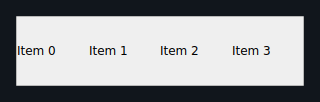
Horizontally virtualized list — maps to Compose LazyRow. Same mechanics as
LazyColumn, but items are laid out horizontally.
from dataclasses import dataclass
from tempestroid import (
    App, Column, EndReachedEvent, LazyRow, ScrollEvent, Style, Text,
)


@dataclass
class State:
    chips: list[str]
    window: tuple[int, int]


def make_state() -> State:
    return State(
        chips=[f"Tag {i}" for i in range(50)],
        window=(0, 20),
    )


def view(app: App[State]) -> Column:
    s = app.state

    def build_chip(index: int) -> Text:
        return Text(
            content=s.chips[index],
            style=Style(padding=8.0),
            key=str(index),
        )

    async def on_scroll(event: ScrollEvent) -> None:
        new_window = app.slide_window(s.window, event.offset, len(s.chips))
        app.set_state(lambda st: setattr(st, "window", new_window))

    async def on_end_reached(event: EndReachedEvent) -> None:
        extra = [f"Tag {len(s.chips) + i}" for i in range(10)]
        app.set_state(lambda st: setattr(st, "chips", st.chips + extra))

    return Column(
        children=[
            LazyRow(
                item_count=len(s.chips),
                item_builder=build_chip,
                window=s.window,
                window_size=20,
                end_reached_threshold=0.8,
                on_scroll=on_scroll,
                on_end_reached=on_end_reached,
                key="chips",
            ),
        ],
    )
| Prop | Type | Default | Description |
|---|---|---|---|
item_count |
int |
— required — | Total number of items. |
item_builder |
handler |
— required — | Function (int) -> Widget that builds an item by index. |
window_size |
int |
20 |
Default window size when window is None. |
window |
tuple[int, int] \| None |
None |
Visible window (start, end). |
end_reached_threshold |
float |
0.8 |
Scroll fraction at which on_end_reached fires. |
refreshing |
bool |
False |
Shows the loading indicator. |
on_scroll |
handler → ScrollEvent |
None |
Emits ScrollEvent(offset: float) on scroll. |
on_refresh |
handler → RefreshEvent |
None |
Emits RefreshEvent() on pull gesture (device only). |
on_end_reached |
handler → EndReachedEvent |
None |
Emits EndReachedEvent() at the threshold. |
Qt ↔ Compose divergence
The same window-materialization constraints as LazyColumn apply horizontally:
materialized window on Qt, native LazyRow on Compose. Pull-to-refresh has no
gesture on desktop.
LazyGrid
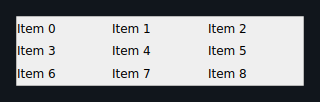
Virtualized grid — maps to Compose LazyVerticalGrid. Items are distributed across
columns columns; the reconciler relayouts the grid on every structural patch.
from dataclasses import dataclass
from tempestroid import (
    App, Column, Container, EndReachedEvent, LazyGrid,
    ScrollEvent, Style, Text,
)


@dataclass
class State:
    photos: list[str]
    window: tuple[int, int]


def make_state() -> State:
    return State(
        photos=[f"photo_{i}.jpg" for i in range(120)],
        window=(0, 20),
    )


def view(app: App[State]) -> Column:
    s = app.state

    def build_cell(index: int) -> Container:
        return Container(
            style=Style(
                background="#e0e0e0",
                height=100.0,
                padding=4.0,
            ),
            child=Text(content=s.photos[index], key="name"),
            key=str(index),
        )

    async def on_scroll(event: ScrollEvent) -> None:
        new_window = app.slide_window(s.window, event.offset, len(s.photos))
        app.set_state(lambda st: setattr(st, "window", new_window))

    async def on_end_reached(event: EndReachedEvent) -> None:
        extra = [f"photo_{len(s.photos) + i}.jpg" for i in range(20)]
        app.set_state(lambda st: setattr(st, "photos", st.photos + extra))

    return Column(
        children=[
            LazyGrid(
                item_count=len(s.photos),
                item_builder=build_cell,
                columns=3,
                window=s.window,
                window_size=20,
                end_reached_threshold=0.8,
                on_scroll=on_scroll,
                on_end_reached=on_end_reached,
                key="grid",
            ),
        ],
    )
| Prop | Type | Default | Description |
|---|---|---|---|
item_count |
int |
— required — | Total number of items in the grid. |
item_builder |
handler |
— required — | Function (int) -> Widget that builds a cell. |
columns |
int |
2 |
Number of columns. |
window_size |
int |
20 |
Default window size. |
window |
tuple[int, int] \| None |
None |
Visible window (start, end). |
end_reached_threshold |
float |
0.8 |
Scroll fraction for on_end_reached. |
on_scroll |
handler → ScrollEvent |
None |
Emits ScrollEvent(offset: float) on scroll. |
on_end_reached |
handler → EndReachedEvent |
None |
Emits EndReachedEvent() at the threshold. |
Qt ↔ Compose divergence
On Qt, LazyGrid renders into a QGridLayout of columns columns that is
relayouted on every structural patch — scroll spans the materialized window only.
On Compose, LazyVerticalGrid uses a native grid with a full virtual extent.
SectionList
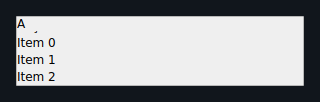
Sectioned virtualized list with sticky section headers. Each SectionHeader groups
items; the header of the topmost visible section stays pinned as items scroll.
from dataclasses import dataclass
from tempestroid import (
    App, Column, EndReachedEvent, ScrollEvent,
    SectionHeader, SectionList, Text,
)


@dataclass
class State:
    window: tuple[int, int]


def make_state() -> State:
    return State(window=(0, 20))


def view(app: App[State]) -> Column:
    s = app.state

    fruits = SectionHeader(
        title="Fruits",
        items=[
            Text(content="Apple", key="apple"),
            Text(content="Banana", key="banana"),
            Text(content="Orange", key="orange"),
        ],
    )
    veggies = SectionHeader(
        title="Vegetables",
        items=[
            Text(content="Carrot", key="carrot"),
            Text(content="Broccoli", key="broccoli"),
        ],
    )

    async def on_scroll(event: ScrollEvent) -> None:
        new_window = app.slide_window(s.window, event.offset, 5)
        app.set_state(lambda st: setattr(st, "window", new_window))

    async def on_end_reached(event: EndReachedEvent) -> None:
        pass  # load more sections here

    return Column(
        children=[
            SectionList(
                sections=[fruits, veggies],
                end_reached_threshold=0.8,
                on_scroll=on_scroll,
                on_end_reached=on_end_reached,
                key="categories",
            ),
        ],
    )
| Prop | Type | Default | Description |
|---|---|---|---|
sections |
list[SectionHeader] |
[] |
List sections; each has title: str and items: list[Widget]. |
end_reached_threshold |
float |
0.8 |
Scroll fraction for on_end_reached. |
on_scroll |
handler → ScrollEvent |
None |
Emits ScrollEvent(offset: float) on scroll. |
on_end_reached |
handler → EndReachedEvent |
None |
Emits EndReachedEvent() at the threshold. |
Qt ↔ Compose divergence
On Qt, sticky headers are floating QLabels overlaid at the top of the
viewport, tracking the topmost visible section. On Compose, headers use the
LazyColumn native stickyHeader API, which is managed directly by the layout
engine — no manual overlay needed.
RefreshControl
Standalone pull-to-refresh wrapper (maps to Compose PullToRefreshBox). Use when
you need pull-to-refresh on a widget that is not a LazyColumn or LazyRow — for
example, a custom ScrollView.
from dataclasses import dataclass
from tempestroid import App, Column, RefreshControl, RefreshEvent, Text


@dataclass
class State:
    message: str
    refreshing: bool


def make_state() -> State:
    return State(message="Pull to refresh", refreshing=False)


def view(app: App[State]) -> RefreshControl:
    s = app.state

    async def on_refresh(event: RefreshEvent) -> None:
        app.set_state(lambda st: setattr(st, "refreshing", True))
        import asyncio
        await asyncio.sleep(1.0)
        app.set_state(lambda st: (
            setattr(st, "message", "Refreshed!") or
            setattr(st, "refreshing", False)
        ))

    return RefreshControl(
        refreshing=s.refreshing,
        on_refresh=on_refresh,
        key="pull",
    )

| Prop | Type | Default | Description |
|---|---|---|---|
refreshing |
bool |
False |
When True, shows the loading indicator. |
on_refresh |
handler → RefreshEvent |
None |
Emits RefreshEvent() when the user pulls to refresh (device only). |
Qt ↔ Compose divergence
On desktop Qt, there is no pull gesture — RefreshControl shows the loading
overlay when refreshing=True, but the pull-down gesture is not captured by Qt.
On the device (Compose), PullToRefreshBox captures the native gesture and
emits RefreshEvent automatically.
Recap
- Virtualized lists render only the materialized window — the app controls
window: tuple[int, int]and advances it withApp.slide_window. on_scrollemitsScrollEvent(offset)on every scroll event; use it to slide the window.on_end_reachedemitsEndReachedEventwhen scroll passesend_reached_threshold— ideal for infinite scroll.- Pull-to-refresh uses
refreshing+on_refresh; the native gesture is only available on the device (Compose). SectionListgroups items into sections with sticky headers;RefreshControladds pull-to-refresh to any scrollable widget.- Both renderers (Qt and Compose) support these widgets; implementation divergences
are documented above and in the conformance suite (
tests/conformance/).
➡️ See Advanced Gestures for drag-drop and swipe-to-delete inside lists, or explore Overlays for pull-to-refresh combined with dialogs.